
• You've discovered RedGuides, an EverQuest multi-boxing and scripting community 🧙‍♀️⚙️. We want you to play several EQ characters at once, come join us and say hello! 👋

  • A TLP without truebox has thawed (Very Vanilla ready)
    Frostreaver
Resource icon

Release EZInventory 2026-04-25

Download
Joined
May 6, 2020
RedCents
2,564¢
I got tired of alt-tabbing across my characters to figure out who was carrying what in their inventories, or who was wearing what in what slot. There are plenty of tools out there that do the same thing, but...here's my take on the project. Cross character inventory viewer using the Actors mailboxes to sync. From your driver screen, you can now see who has what, request a trade, click the item and get the link for the equipped item (no need to have it in your inventory!)
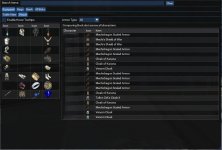

Screenshot 2025-05-08 100758.jpg

NOTE - this was written and developed on EMU servers - I have no idea how the bag/inventory/bank slots are numbered on Live as it's been many years since I was there.
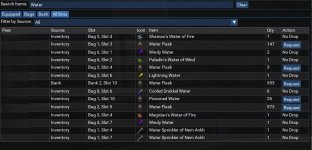
search.jpg

This does require the script to run on all characters - it should auto detect if you've got DanNet running and broadcast through DanNet. If it doesn't find DanNet, it'll try EQBC. If you're using something else, just broadcast the /Lua run ezinventory command from your driver, and it'll load the script in the background with the UI closed by default. To toggle the UI, /ezinventory_ui

***I have to give Credit where Credit is due - I borrowed code from Cold's Big Bag and Find Item Window in order to make this possible!

 
Last edited:
Way to go @psatty82 ! Love new work. Luas help us all, also congrats on the publish. I think it feels really nice to 'put something out there' for everyone.
 
If you would like, its easy and helps all members to make your work a resource, up above go to Resource and on the right there is a Add Resource button. This will allow you to push to your git and auto update here, but more importantly it goes to to the Launcher for proper user install.
 
psatty82 submitted a new resource:

Cross Character Visual Inventory - View All of the Things!

I got tired of alt-tabbing across my characters to figure out who was carrying what in their inventories, or who was wearing what in what slot. There are plenty of tools out there that do the same thing, but...here's my take on the project. Cross character inventory viewer using the Actors mailboxes to sync. From your driver screen, you can now see who has what, request a trade, click the item and get the link for the equipped item (no need to have it in your inventory!)...

Read more about this resource...
 
Lemme see if I can figure out how to make it a resource! Thanks for the support @Redfrog !
You got it! I saw your post before and it looked like it disappeared. So happy its back. If you need any help on the Resource thing, happy to assist.. actually feel like I know a tiny bit of stuff now. :toot:
 
Oh dang! Scary times! Nerve wracking putting something out there, and seeing what happens! Especially when I'm not anything remotely like a programmer or coder...
 
Oh dang! Scary times! Nerve wracking putting something out there, and seeing what happens! Especially when I'm not anything remotely like a programmer or coder...
LOL, it looks great, I know LESS than Jon Snow and I have some luas out... :)
jon snow love GIF
 
This looks very interesting but I don't see where it's available. What am I missing? I know it may not work on live but I'd like to try it! Is there a download I'm not seeing?
 
This looks very interesting but I don't see where it's available. What am I missing? I know it may not work on live but I'd like to try it! Is there a download I'm not seeing?
ALL Resources can be watched. Go up and click the Overview tab for this resource (not the Discussion watch) and you will see the 'Watch' button, click it, now this is 'watched' and you can go to your Launcher or RedFetch and it will download for you and install in your Lua folder. once installed, run it.
 
Ah! Thanks! I do have it on "watch" but was looking for a download button like most other resources. However, I just tried the launcher and see nothing about this resource in my Luas. Maybe I need Redfetch but I have never used that and don't see why it is needed, tbh.
 
Maybe I uploaded it wrong as a resource (which is entirely possible). Unzip this into your /lua folder and then /lua run ezinventory once in game.
It *should* now update automatically when you update your git repo
 
I see it as a download now. Thanks!

Edit: I have it downloaded and have it running. It seems fine on live EXCEPT that it only runs on one character and doesn't appear to pick up peers. That's a shame - it may be that it only works for EMU or it may be something I have done wrong. I use Dannet if it helps.

I'll keep watching in any case.
 
Last edited:
If you continue to improve this (maybe a little tightening of the GUI, dealing with whatever little bugs come up etc)... or perhaps if you don't, this is winning an award next year.

This is stellar.

I do recommend that the resource title and name should be the same, perhaps!
 
If you continue to improve this (maybe a little tightening of the GUI, dealing with whatever little bugs come up etc)... or perhaps if you don't, this is winning an award next year.

This is stellar.

I do recommend that the resource title and name should be the same, perhaps!

Thank you! Updated the Resource - you're right...makes more sense to have them be named the same!

I'm open to suggestions on the UI - it was very utilitarian, so if it needs polish or you have suggestions, I'm all ears!
 
For me, the UI seems fine. Mine (on Live) looks a little different to your pics. Mine has a line above where I can select a server and a peer.

I have had no luck getting other peers recognised yet. It runs on all of my toons but each only shows it's own items (which is still useful).

I also noticed that help shows "/ezinventory_cmd <peer> <command> [Args...]" but I have no idea about how/why this can be used (or what commands are available) and I'm also not sure if there is something else I need to run to have my peers report in or be selectable. Do I need to run a command to kick off the data collection? Maybe a setting I need.

I'd love to get it fully running and it's useful as-is but I think it could be fantastic if I can get it to recognise my other toons.
 
Is the script running on all toons while you're viewing on the main toon? It should pull in through the actor mailboxes, as long as the script is "alive" on everyone at the same time. (The UI doesn't need to be displayed, just running the Lua quietly in the background). If it didn't broadcast the start up, whatever network you use (DanNet, EQBC), broadcast out to all your connected toons /Lua run ezinventory. If you're doing this from your main screen (/bca //Lua run ezinventory), the background screens will load with the UI minimized.

This is what the "top" of the UI looks like, I was just being lazy and hadn't blocked out the Toon name in the list when I uploaded the resource.


Top bar.png


The /ezinventory_cmd function is for the background trading. It's designed to handle arguments that are built into the UI (/foreground, /itemnotify, etc.). Wasn't/isn't intended as a DanNet or EQBC style usage on the front side.
 
Is it possible to add a means in the GUI to quickly and easily close the window (something that mimics the `/ezinventory_ui` command)? Perhaps it is there and I simply missed it. Cheers!
 
There’s a “Close” button just to the right of the peer select.

I should probably move it to a more logical place (like over by the UI Lock icon), but it’s there!
 
Is the script running on all toons while you're viewing on the main toon? It should pull in through the actor mailboxes, as long as the script is "alive" on everyone at the same time. (The UI doesn't need to be displayed, just running the lua quietly in the background). If it didn't broadcast the start up, whatever network you use (DanNet, EQBC), broadcast out to all your connected toons /lua run ezinventory. If you're doing this from your main screen (/bca //lua run ezinventory), the background screens will load with the UI minimized.

This is what the "top" of the UI looks like, I was just being lazy and hadn't blocked out the Toon name in the list when I uploaded the resource.


View attachment 69619


The /ezinventory_cmd function is for the background trading. It's designed to handle arguments that are built into the UI (/foreground, /itemnotify, etc.). Wasn't/isn't intended as a DanNet or EQBC style usage on the front side.

Thanks for that psatty82. It looks as if everything is working fine except for the inability to see peers. Yes, EZInventory is running on all toons and it appears to broadcast the startup successfully. I can only assume there is something going on with the actor mailboxes or my local network.

I am currently on vacation and using the network in the villa I'm renting. I'll see what happens when I get home next week.
 
Thanks for that psatty82. It looks as if everything is working fine except for the inability to see peers. Yes, EZInventory is running on all toons and it appears to broadcast the startup successfully. I can only assume there is something going on with the actor mailboxes or my local network.

I am currently on vacation and using the network in the villa I'm renting. I'll see what happens when I get home next week.
Hrm. I'm stumped! You can bring up the UI on the background toons, right? (/ezinventory_ui)

I'll admit, my understanding of the mailboxes is limited. It shouldn't be affected by the network, since it's running locally on your computer between the windows. Does your server name populate in the drop down at the top? It *shouldn't* affect - I think I dealt with all the weird spaces/characters in server names, but...I could be wrong!
 
Hrm. I'm stumped! You can bring up the UI on the background toons, right? (/ezinventory_ui)

I'll admit, my understanding of the mailboxes is limited. It shouldn't be affected by the network, since it's running locally on your computer between the windows. Does your server name populate in the drop down at the top? It *shouldn't* affect - I think I dealt with all the weird spaces/characters in server names, but...I could be wrong!

Yes, the UI comes up on background toons. All seems fine there. I'll try again when I get home (and will log more toons in just in case it only affects the two I logged on).

In the meantime, are these mailboxes an MQ2 thing or are they the DBG in-game mail boxes? I'm just wondering about whether the use of them might be traceable/detectable on Live servers (not an issue on EMU, which is the target for this utility, I know).
 
No - not the in game mailboxes. It’s a system built into the MQ2Lua plugin that allows for lightweight *local* messaging. When you run the script, you create a “mailbox” that listens for other scripts to send it messages. It’s similar to DanNet/EQBC, but it’s built into the Lua system so you don’t need external networking dependencies once it’s up and running.

Let me know what happens when you get home. My best guess is the script is failing to register the “mailbox” due to a naming error/mismatch, or a character name with a special character/spacing in it.
 
Awesome looking!
I'll be trying this out in the next day or so when I have time to be online again...
Thank you for the submission @psatty82 !
 
No - not the in game mailboxes. It’s a system built into the MQ2Lua plugin that allows for lightweight *local* messaging. When you run the script, you create a “mailbox” that listens for other scripts to send it messages. It’s similar to DanNet/EQBC, but it’s built into the LUA system so you don’t need external networking dependencies once it’s up and running.

Let me know what happens when you get home. My best guess is the script is failing to register the “mailbox” due to a naming error/mismatch, or a character name with a special character/spacing in it.

I am home again now. All is working fine and it looks great. I'm not sure whether it was a network setup thing or something in one of your updates. Whatever the reason, all is working as intended and I see all of my toons. Thank you!
 
I am home again now. All is working fine and it looks great. I'm not sure whether it was a network setup thing or something in one of your updates. Whatever the reason, all is working as intended and I see all of my toons. Thank you!
Great news!! Glad that it works for you as intended. Hopefully it's a helpful tool!
 
This is a great tool. Its nice to be able to see all this information from my driver and even make characters hand things to others. The interface is nice and its easy to use. 10/10, would recommend.
 
Release EZInventory

Users who are viewing this thread

Back
Top
Cart
