• You've discovered RedGuides, an EverQuest multi-boxing and scripting community 🧙‍♀️⚙️. We want you to play several EQ characters at once, come join us and say hello! 👋

  • A TLP without truebox has thawed (Very Vanilla ready)
    Frostreaver

EQ Preview (Thumbnails for your EQ Clients)

Coldblooded

Zero Fuchs Given
Creator
Joined
Mar 23, 2019
RedCents
8,961¢
Pronouns
He/Him
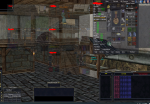
Forked from EVE-O Preview. This is an application that runs in the background and will create a thumbnail that you can move and resize for each of your EQ clients. Different combinations of mouse clicks allow you to maximize, minimize the EQ Client from the thumbnail.

Full instructions and download available here: https://gitlab.com/Coldblooded/eq-preview

Just something I threw together this afternoon and just put up the Gitlab site for it so people can download the binary (you're also free to compile yourself, it's pretty straightforward).

Cheers, and Enjoy!

 
IsBoxer does so much more.....everything that MQ2 doesnt do...IsBoxer does.

Before MQ2 I used to use this thumnail preview (IsBoxer calls it VideoFX). My SK UI had Multiple hotkeys for HT, or Mez, or Grp Heal.
Not the same as MQ2 - but could easily run 6 toons from one UI.
 
Forked from EVE-O Preview. This is an application that runs in the background and will create a thumbnail that you can move and resize for each of your EQ clients. Different combinations of mouse clicks allow you to maximize, minimize the EQ Client from the thumbnail.

Full instructions and download available here: https://gitlab.com/Coldblooded/eq-preview

Just something I threw together this afternoon and just put up the Gitlab site for it so people can download the binary (you're also free to compile yourself, it's pretty straightforward).

Cheers, and Enjoy!

My man. I went digging but I don't know enough to change the copy (which seems to be pulling from a websource) so all of my windows still reference EVE haha. But I knew enough to point it at EQGame.

In the Compatibility section there's still a reference to EVE-O Previewer.

I find it superior to IsBoxer for what I need it for... Keeping tabs and not fucking up all of my resolutions or settings.
 
My man. I went digging but I don't know enough to change the copy (which seems to be pulling from a websource) so all of my windows still reference EVE haha. But I knew enough to point it at EQGame.

In the Compatibility section there's still a reference to EVE-O Previewer.

I find it superior to IsBoxer for what I need it for... Keeping tabs and not fucking up all of my resolutions or settings.

Thanks, fixed.
 
You can do as many monitors as you want. It creates a virtualized display like picture-in-picture on a TV, shrunk down to scale.

It's been in EVE online for years and is a great free alternative to ISBoxer when you dont want any key broadcasting or virtualization
 
Ive been trying not use ISboxer, can this be configured to run MT1, MT2, MT3, MT4 on there monitors, and the remaining 21clients on a 5th monitor?

if so, is this going to negate EQwire's *dont draw until in the foreground* resource saving?
 
I still get MQ2EQWIRE savings with them up, the problem is running out of real estate. Here's a crude screenship:

1625940719719.png

You simply click an instance to make it active.

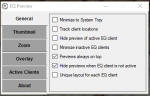
Here's what the UI looks like:

1625940819931.png

So if you want to run it the way you ask, you would put MT1, 2, 3, 4 on their respective monitors and then a 5th on the 5th monitor. From there, each tiny thumbnail can be placed wherever. This doesn't create discrete boundaries on a display for each area. So you can put them wherever. See below:

1625941496733.png
 
Last edited:
Windows Security detected two things and blocked this binary. Guessing it is just a false positive but the Readme.md on your github or the original eve-o site don't say anything about false positives so had me worried. Waiting on feedback til I allow windows security to let it run.

Trojan:Win32/Wacatac.B!ml

Both called same thing when I ran a scan on it.
 
Yeah it does the same thing for me. You're more than welcome to download the source and compile it locally - there are no crazy requirements or extra stuff, and it compiles in about 5 seconds.
 
Ran it on my 6 box crew. When you first start it puts all the overlays in the top right corner of the primary monitor. If you got to Overlay and select "Show frames" you can drag each of the windows to where you want them. If you no longer want to have the border around it that you can grab uncheck show frames.

Once put where you want them, if you zone they all seems to go to what appears to be a random spot. This is likely due to the name of the title for the window changing would be my guess. So I have to keep putting them back where I want them.

Zoom - It's a nice feature if you want to mouseover the windows being displayed to see what's going on for a different screen.
Switching - You can click on one of the previews to make that the active window.
Thumbnail - You can change the preview size and opacity. So you can set the preview size to 1/4 ratio for a secondary monitor and display 4 toons at 1/4 size on a different monitor which is pretty nifty. (w/4 h/4, so 1920 x 1080 is 480 x 270)

Overall it has it's quirk with the resetting location which I suspect is due to the win title change. But it's not bad.
 
Overall it has it's quirk with the resetting location which I suspect is due to the win title change. But it's not bad.

I'll take a look into that. I guess in EVE Online, you don't zone ... so that wasn't ever a problem, but yes I can see where that would get annoying.
 
If you can get the process PID and use that to keep track of the windows, I think that would be ideal. I haven't looked at the code, so that's based on assumption and might not even be related to the location change.
 
Chat, I've tracked down the method that handles the Thumbnail layout. And in testing, I set up my group, set up the thumbnail locations, zoned - noticed the window title change (It changes to "Everquest") and then back to <name>.server (Lvl: <level> <class name>) <Long Zone Name> - but my thumbnails don't lose location. So I need to do a bit more testing and see if I can reproduce the issue.

Note: Please do not install the application into the Program Files or Program files (x86) folders. These folders in general do not allow applications to write anything there while EQ Preview now stores its configuration file next to its executable, thus requiring the write access to the folder it is installed into.

Are you sure you have it in a folder that is writable? I know that the .json file (that holds the thumbnail locations) is updated on moving the preview windows. If it couldn't write the locations, this could be the issue.
 
Last edited:
The change for me happens only if I've never setup the window in the zone I'm in.

For instance. Setup the location in guild hall, then zone to pok. When I'm in POK it's using one location. If I zone back into guild hall it's going to the previous set location.
 
Confirmed that if the file (EQPreview.json) can not be written to - it does exactly how you describe (moves from set location to random-ish location back to set location when returning to the original zone).

I would double check that the EQPreview.json is in a directory where it can be written to - I can run a crew all over and the windows stay exactly where I put them.
 
Should be no issue writing to the downloads folder. JSON file is present and is being written to.
Agreed. Thanks for double-checking that. Do you run any kind of macro/hook in MQ to re-write the default window title? Sorry for all the questions, just want to be able to reproduce this.
 
Yeah title is set by the plugins. using /setwintitle
changes based on zone you are in.
Okay same as me then. I thought maybe you had something else going on. Humm, I'll keep looking. The problem is it works perfect for me - so I need to figure out what is different.
 
I've been bouncing between the same two zones since I initially loaded it and traveled here. I'll let you know any additional information if there is any to provide.
 
Okay same as me then. I thought maybe you had something else going on. Humm, I'll keep looking. The problem is it works perfect for me - so I need to figure out what is different.

Looks like for some reason the window's not being updated correctly and so the occasions where it wasn't going back was because the title stayed "Everquest"
 
EQ Preview (Thumbnails for your EQ Clients)

Users who are viewing this thread

Back
Top
Cart