• You've discovered RedGuides, an EverQuest multi-boxing and scripting community 🧙‍♀️⚙️. We want you to play several EQ characters at once, come join us and say hello! 👋

  • A TLP without truebox has thawed (Very Vanilla ready)
    Frostreaver

Problem - EQ not responding when MQ running

Joined
May 7, 2019
RedCents
198¢
As title states: EQ not responding when MQ running...

Try to load 1 char or group or multiple groups via MQAutologin and I get either a blackscreen or the EULA screen... and within a few seconds, Everquest is not responding. I cannot alt+tab or select from taskbar. Only options are to redX close, which prompts the eqgame.exe is not responding popup, or to end task via task manager, which does not show as not responding but rather has a seemingly high 20%ish for cpu and memory with 0 for disk and network. Multiple attempts, long waits, resets, switched ISPs, nothing changes... =samee nonresults

Also, if I try to log in manually via patcher with MQ running, I get the same issues.

Also, if I log in via Launchpad with MQ running, I can get to the server select screen, then the not responding happens.

Also, I can load any/all chars via launchpad and patcher with no problems IF MQ is not loaded... once I load MQ, everything goes not responding.

I have newest patch and RGLauncher is updated.

This is on a gettin oldish laptop, that has been working flawlessly until this:
i7 8750 @ 2.2GHz 6core, 32GB ram GTX1060

???


--edit--

I will add, this just started happening last night;

I was connected via my phone hotspot and had to leave, wasn't thinking and took phone with me /doink. When I returned 10ish min later, everything was timed out. I taskended, restarted pc & ran into these issues.

--another edit--

I read some older posts, suggesting I may have an issue with my character .ini files. I picked a character, deleted the .ini thinking EQ will jjust generattye a fresh one & tried all the same stuff I noted above to the same resulting not respondings
 
Last edited:
Live, test, TLP, EMU? Did your OS/laptop patch yesterday? Live EQ and MQ was patched 3 days ago, but not seeing a ton of people reporting issues, so odd..
Live. Patched 3 days ago. Been MQing for a few years. I am traveling, hense why I am using phone hotspot; but I've tried hotspot from my tablet and the hotel wifi. all same results.

If I have EQ running 1st, no matter what screen I am on, when I launch MQ from RG Launcher, EQ not responds: patcher eula page, login page, server select page, character select, in game. If MQ is already running, patcher freezes at eula & launchpad freezes at server select, mqautologin freezes at patcher eula. I have re-updated MQ in RGlauncher, no difference
 
As title states: EQ not responding when MQ running...

Try to load 1 char or group or multiple groups via MQAutologin and I get either a blackscreen or the EULA screen... and within a few seconds, Everquest is not responding. I cannot alt+tab or select from taskbar. Only options are to redX close, which prompts the eqgame.exe is not responding popup, or to end task via task manager, which does not show as not responding but rather has a seemingly high 20%ish for cpu and memory with 0 for disk and network. Multiple attempts, long waits, resets, switched ISPs, nothing changes... =samee nonresults

Also, if I try to log in manually via patcher with MQ running, I get the same issues.

Also, if I log in via Launchpad with MQ running, I can get to the server select screen, then the not responding happens.

Also, I can load any/all chars via launchpad and patcher with no problems IF MQ is not loaded... once I load MQ, everything goes not responding.

I have newest patch and RGLauncher is updated.

This is on a gettin oldish laptop, that has been working flawlessly until this:
i7 8750 @ 2.2GHz 6core, 32GB ram GTX1060

???


--edit--

I will add, this just started happening last night;

I was connected via my phone hotspot and had to leave, wasn't thinking and took phone with me /doink. When I returned 10ish min later, everything was timed out. I taskended, restarted pc & ran into these issues.

--another edit--

I read some older posts, suggesting I may have an issue with my character .ini files. I picked a character, deleted the .ini thinking EQ will jjust generattye a fresh one & tried all the same stuff I noted above to the same resulting not respondings
I would check you're not using the new engine, I would also ensure that you're not running any conflicting overlay,

Those potentially conflicting overlays may include: overwolf, nahmic, discord overlay, Xbox gamebar, afterburner, etc etc etc
 
I would check you're not using the new engine, I would also ensure that you're not running any conflicting overlay,

Those potentially conflicting overlays may include: overwolf, nahmic, discord overlay, Xbox gamebar, afterburner, etc etc etc

No Overlays/ No other programs or apps running except I guess operational stuffs. Not using new UI engine (box is unchecked).
 
No Overlays/ No other programs or apps running except I guess operational stuffs. Not using new UI engine (box is unchecked).
If you didn't actively check the overlay thing, you should.

Several people this week have had various issues that ended up being things like: discord turning overlay on without being told to, or windows changing settings on something.

If you already did that, I would also see if the issue corresponds with a windows update and maybe roll that back and see if it goes away.

If your windows and vid drivers aren't up to date, I'd check those too.

You'd also want to ensure you're not running into an issue with any AV
 
If you didn't actively check the overlay thing, you should.

Several people this week have had various issues that ended up being things like: discord turning overlay on without being told to, or windows changing settings on something.

If you already did that, I would also see if the issue corresponds with a windows update and maybe roll that back and see if it goes away.

If your windows and vid drivers aren't up to date, I'd check those too.

You'd also want to ensure you're not running into an issue with any AV
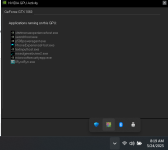
I did active check overlays, discord recently popped up & I disabled it (3days ago?) All other overlays Gamebar, xbox Nvidia etc are disabled.

1748099979331.png

Windows & Drivers are all up to date, even optional updates.

Also, I checked DX & DotNet, both are up to date /shrug

"You'd also want to ensure you're not running into an issue with any AV" not sure what this means ?


Also, Found this old thread & tried suggested fix to no avail. https://www.redguides.com/community...o-the-black-screen-bug-when-logging-in.66322/
 
I did active check overlays, discord recently popped up & I disabled it (3days ago?) All other overlays Gamebar, xbox Nvidia etc are disabled.

View attachment 69764

Windows & Drivers are all up to date, even optional updates.

Also, I checked DX & DotNet, both are up to date /shrug

"You'd also want to ensure you're not running into an issue with any AV" not sure what this means ?


Also, Found this old thread & tried suggested fix to no avail. https://www.redguides.com/community...o-the-black-screen-bug-when-logging-in.66322/
AV = AntiVirus
as if it is quarantine some files or something
 
well.. I "fixed" whatevs was wrong.... deleted entire VV folder. Did reinstall from RG Launcher...

The good: MQ is no longer forcing EQ into Not Responding and Autologin is working; everything is back to normal, functionally anyway.

The bad: All settings are reset and Autologin lost all it's data for my many chars. /sigh *My tower at home will still have everything, so I'll just wing it for now


Thank you all for all your help )
 
As title states: EQ not responding when MQ running...

Try to load 1 char or group or multiple groups via MQAutologin and I get either a blackscreen or the EULA screen... and within a few seconds, Everquest is not responding. I cannot alt+tab or select from taskbar. Only options are to redX close, which prompts the eqgame.exe is not responding popup, or to end task via task manager, which does not show as not responding but rather has a seemingly high 20%ish for cpu and memory with 0 for disk and network. Multiple attempts, long waits, resets, switched ISPs, nothing changes... =samee nonresults

Also, if I try to log in manually via patcher with MQ running, I get the same issues.

Also, if I log in via Launchpad with MQ running, I can get to the server select screen, then the not responding happens.

Also, I can load any/all chars via launchpad and patcher with no problems IF MQ is not loaded... once I load MQ, everything goes not responding.

I have newest patch and RGLauncher is updated.

This is on a gettin oldish laptop, that has been working flawlessly until this:
i7 8750 @ 2.2GHz 6core, 32GB ram GTX1060

???


--edit--

I will add, this just started happening last night;

I was connected via my phone hotspot and had to leave, wasn't thinking and took phone with me /doink. When I returned 10ish min later, everything was timed out. I taskended, restarted pc & ran into these issues.

--another edit--

I read some older posts, suggesting I may have an issue with my character .ini files. I picked a character, deleted the .ini thinking EQ will jjust generattye a fresh one & tried all the same stuff I noted above to the same resulting not respondings
had same autolog in issue also and MQ2autolog wasnt checked off
 
Problem - EQ not responding when MQ running

Users who are viewing this thread

Back
Top
Cart