• You've discovered RedGuides, an EverQuest multi-boxing and scripting community 🧙‍♀️⚙️. We want you to play several EQ characters at once, come join us and say hello! 👋

  • A TLP without truebox has thawed (Very Vanilla ready)
    Frostreaver

Question - Disable / revert new UI

Joined
Sep 16, 2020
RedCents
1,799¢
I recently re-installed Windows 11 and lost all my old EQ configuration. When I turned off the new UI before, I followed some instructions at the Daybreak forum but the link to that post is now dead. I can't seem to find a current post on how to do this. Can anyone point me in the right direction?
 
Solution
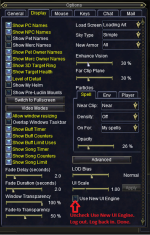
You can disable it in your alt-o window

Or UseNewUIEngine=0 in your eqclient.ini

Keep in mind, if you have issues where eq has a read issue to your file or can and will load with the "default" of being on - and if you're not locking your eqclient it can save that default value to your eqclient.ini

One of the reasons we (cwtn and I) added the new UI warning to our class plugins
You can disable it in your alt-o window

Or UseNewUIEngine=0 in your eqclient.ini

Keep in mind, if you have issues where eq has a read issue to your file or can and will load with the "default" of being on - and if you're not locking your eqclient it can save that default value to your eqclient.ini

One of the reasons we (cwtn and I) added the new UI warning to our class plugins
 
Solution
Question - Disable / revert new UI

Users who are viewing this thread

Back
Top
Cart