• You've discovered RedGuides, an EverQuest multi-boxing and scripting community 🧙‍♀️⚙️. We want you to play several EQ characters at once, come join us and say hello! 👋

  • A TLP without truebox has thawed (Very Vanilla ready)
    Frostreaver

Guide - CWTN UI Vid (2024)

Did you look here?


If the window isn't showing, you likely have a conflicting overlay that makes imgui overlay not function. Read that thread

which is in the stickied thread about the cwtn ui, as well as several other posts over the boards

here

and here

and here

here too

and here

tl;dr - if no eq overlay is showing then you likely have a conflicting overlay running - things like overwolf, nahimic, and others are often the culprit

Please make sure to click the links above that i put together for you.

You also posted your toon names in your screenshot, so i removed them for you. please dont do that, you're just asking to get banned :'(
 
So my last post got redirected to the new UI vid from back in Jan. Thanks for that. But it was no help.

The MQ window reports that mq2eskay IS loaded. But when I do a:

/shd show

Literally nothing happens. No overlay displays. No output to the MQ window. NADA.

Any help would, again, be greatly appreciated!

Kak
 
So my last post got redirected to the new UI vid from back in Jan. Thanks for that. But it was no help.

The MQ window reports that mq2eskay IS loaded. But when I do a:

/shd show

Literally nothing happens. No overlay displays. No output to the MQ window. NADA.

Any help would, again, be greatly appreciated!

Kak
My guy.

Please read
 
My apologies! I was being dumb! Thanks for the patience.

Kak

For the record....I had BOTH RivaTuner and Overwolf running. Totally uninstalled them both and we're 100% gtg. Thx again for the patience!

Kak
 
I cannot get my plugin UI to show on one of my characters. I can confirm that the window is "visible" somewhere by toggling the UI and reloading the plugin and seeing that the output does not go to the MQ window. I suspect that I have accidentally dragged the UI off of my screen somehow. Is there a way to reset the position so I can try to fix this?
 
I cannot get my plugin UI to show on one of my characters. I can confirm that the window is "visible" somewhere by toggling the UI and reloading the plugin and seeing that the output does not go to the MQ window. I suspect that I have accidentally dragged the UI off of my screen somehow. Is there a way to reset the position so I can try to fix this?
Did you try in full screen and not window mode?
 
I cannot get my plugin UI to show on one of my characters. I can confirm that the window is "visible" somewhere by toggling the UI and reloading the plugin and seeing that the output does not go to the MQ window. I suspect that I have accidentally dragged the UI off of my screen somehow. Is there a way to reset the position so I can try to fix this?
All imgui windows are stored in the macroquest_overlay.ini

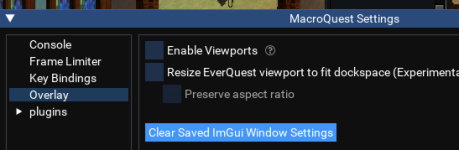
You can also reset all of imgui window positions in the mq settings window

this was posted because your thread title was "how to reset ui position" and if your suspicion about dragging it off the screen, and a "is there a way to reset the position".

this answer is correct.
 
Last edited:
Wrong forum
I accidentally move the bar into the top of my screen and now it's locked up there. I can't seem to pull it down....any clues on how to remove?

1718062044257.png
 
I had this happen too, I've also had it very commonly not let me interact with the windows and I've found that right clicking it will let you, so to fix my issue I right clicked and then it let me drag it down.

So 1 right click to get it functioning and then left click hold and drug it down, just to clarify.
 
Thanks. I can drag the whole width of it down, but i want it back to the original free floating. I've tried restarting, right click, left click, left click and hold...left click/rightclick at the same time....
 
On the outer rim of it, it gave me the option to move the whole window down. Maybe try uninstalling the plugin and reinstalling? Or loading a different UI?
 
I accidentally move the bar into the top of my screen and now it's locked up there. I can't seem to pull it down....any clues on how to remove?

View attachment 62335
When moving the window around holding shift will disable docking. and prevent that from happening.

I haven't found a setting yet to toggle that the other way but it would sure save some headaches. shift to dock instead of shift not to dock.
 
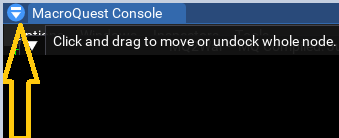
Top left, little down arrow (or cheveron), click that to *undock* and move how you want.

If that doesnt work, eq button mq, reset imgui overlay (that does all of them)
I hate asking dumb questions...but i can't find the eq settings. I have the MQ icon in my system tray that I can right click and start EQ from...change char settings, etc. But there is nothing like your photo showing EQ Settings.

There is no arrow/dropdown on the MQ2Enchanter plugin to select anything either.

I appreciate your help and I'm sure your suggestion is the solution.
 
I hate asking dumb questions...but i can't find the eq settings. I have the MQ icon in my system tray that I can right click and start EQ from...change char settings, etc. But there is nothing like your photo showing EQ Settings.

There is no arrow/dropdown on the MQ2Enchanter plugin to select anything either.

I appreciate your help and I'm sure your suggestion is the solution.
It is in EQ :rock: click the EQ button 1718138215700.png then MQ, and reset overlays in there.

HOWEVER

Did you just try moving it? :hfive:

PS crap pic, had to google, at work.
 
It is in EQ :rock: click the EQ button View attachment 62347 then MQ, andreset overlays in there.

HOWEVER

Did you just try moving it? :hfive:

PS crap pic, had to google, at work.
OMG I love you. I have tried every which way to move it and nothing was working.

Thank you for answering my dumb question on where the MQ settings were.

The reset imgui button worked perfectly and it's no longer locked and has returned to "normal"
 
on some of my toons, I somehow got the UI in a full screen dropdown that covers my entire screen there are no minimise tabs for me to correct this can anyone help?
 
on some of my toons, I somehow got the UI in a full screen dropdown that covers my entire screen there are no minimise tabs for me to correct this can anyone help?
what ui?

also, you probably docked the window

and if you did, click the icon on the top left so you can drag it off and not be docked

1721938872119.png
 
posting images with your toon names in them is a really bad idea.

Also, please make sure to post in the correct location (and say what it is) for future. i responded right when you posted, and been refreshing for an hour.
 
My Problem remains I do not have the icon indicated to un dock the console
it looks like you used something external to remove the header/titlebar from the imgui window? im not even sure how you did that (in which case you'll want to a: unload/reload the plugin, b: not use whatever you did to remove the header, c: let me know what it is so i can block it :))

alternatively, you can also go into MQ Settings -> Overlay -> Clear Saved ImGui Window Settings and all your imgui window positions will be reset

1721942064714.png
 
What I did was moved my normal UI window about to put the console drop down at the top of my page. In trying to get good alignment I accidentally pushed it up too far ie. beyond the window limits and lost the console in permanent docked mode.
 
Since the last patch, no matter how many times and combinations I try I cannot get the CWTN plugins to Save the size & position of the plugin windows. Is there a new way of doing this I don't know about?

My process has always been to move and resize the window to my desired location and then X out the window and load it back up by [CWTNShortClassName] show. Then to try and help seal the deal and verify, I have logged out of EQ and drop to server select then log back in to check it.

Generally I get about 85% of my toons keep the settings initially. But then a few days later only about 15% of them keep the settings. I have wasted a lot of time trying to get these damn settings to stick but it's getting annoying.

I'm looking for a better way to get it to just work and not lose the settings.

~TheFiddler~
 
Load up only that toon, no other instances from that same directory and do it again. You have the process correct, it seems to be weird stuff that the OS does when running multiple instances out of the same directory that causes that issue.
 
Since the last patch, no matter how many times and combinations I try I cannot get the CWTN plugins to Save the size & position of the plugin windows. Is there a new way of doing this I don't know about?

My process has always been to move and resize the window to my desired location and then X out the window and load it back up by [CWTNShortClassName] show. Then to try and help seal the deal and verify, I have logged out of EQ and drop to server select then log back in to check it.

Generally I get about 85% of my toons keep the settings initially. But then a few days later only about 15% of them keep the settings. I have wasted a lot of time trying to get these damn settings to stick but it's getting annoying.

I'm looking for a better way to get it to just work and not lose the settings.

~TheFiddler~
that approach was the old xml style.

the new style is handled by MQ and has nothing to do with that "move and x out and open back up".

these settings are saved in your macroquest_overlay.ini you can read a little more about it at the earlier posts in this thread

Load up only that toon, no other instances from that same directory and do it again. You have the process correct, it seems to be weird stuff that the OS does when running multiple instances out of the same directory that causes that issue.
yes, while we do use different entries for all class/name combinations in the macroquest_overlay.ini file - the file itself can get "locked" disallowing the location to be written.

this can also happen if you have file scanning or syncing on your mq files/folders or a slow hard drive - these things can exacerbate the issue

Unfortunately it isn't a simple issue for MQ to solve - you can see by a submitted merge request and brainaic's response on the matter > here <
 
I am sorry for my ignorance, and if this is not the place to post this, but the UI box has disappeared and I can't get it back. Any idea what I can do to get it back?
Thank you,
 
Well I thought it helped, but it is gone again
that sounds like you have a conflicting overlay running on your computer which is crashing imgui.

you should read other posts in the cwtn ui thread (or other threads on the boards) about that.

most common conflicts are: nahimic, overwolf, RivaTuner, etc

https://www.redguides.com/community/threads/cwtn-ui-vid-2024.89440/

If the window isn't showing, you likely have a conflicting overlay that makes imgui overlay not function. Read that thread

which is in the stickied thread about the cwtn ui, as well as several other posts over the boards

here

and here

and here

here too

and here

tl;dr - if no eq overlay is showing then you likely have a conflicting overlay running - things like overwolf, nahimic, and others are often the culprit

Check out the links.

otherwise it is just "show" so for mq2monk it is /mnk show
 
I'm having issues with the CWTN Plugin GUI windows not saving their size/location. It is an intermittent problem though. Some toons are saving just fine. Others revert immediately upon logging out. Sometimes those same toons save their sizing/location of the GUI window for days before randomly reverting back to default.

I've made sure the file/folder(s) are not write protected. I've tried switching from windowed to fullscreen and moving other windows to see if that would help save the UI settings. Not sure what else to try.
 
I'm having issues with the CWTN Plugin GUI windows not saving their size/location. It is an intermittent problem though. Some toons are saving just fine. Others revert immediately upon logging out. Sometimes those same toons save their sizing/location of the GUI window for days before randomly reverting back to default.

I've made sure the file/folder(s) are not write protected. I've tried switching from windowed to fullscreen and moving other windows to see if that would help save the UI settings. Not sure what else to try.
we don't save the position. mq does
that approach was the old xml style.

the new style is handled by MQ and has nothing to do with that "move and x out and open back up".

these settings are saved in your macroquest_overlay.ini you can read a little more about it at the earlier posts in this thread


yes, while we do use different entries for all class/name combinations in the macroquest_overlay.ini file - the file itself can get "locked" disallowing the location to be written.

this can also happen if you have file scanning or syncing on your mq files/folders or a slow hard drive - these things can exacerbate the issue

Unfortunately it isn't a simple issue for MQ to solve - you can see by a submitted merge request and brainaic's response on the matter > here <
 
To long - don't want to read: Is there a / command to open the CWTN UI directly to the settings page? Tried /<ClassShortName> UI settings and a couple other arguments thinking there might be some super secret sauce to hop straight there instead of the plugin output page but couldn't find anything.

Why would i like to do such a thing? I have an odd problem that pops up every so often with a variety of the CWTN plugins on live where occasionally a toon will fail to chase until I launch the UI and navigate to the settings page. I don't have to actually change anything, just opening the settings tab makes the magic happen and they'll be off following my MA. It's more of a slight inconvenience than anything but i've recently expanded my setup to include another PC with multiple toons on it so having to swap PCs, figure out which tab is who, and get the UI opened is slightly more cumbersome. It'd be great to just be able to do a /cwtnr ui settings or something, have everyone open that page and correct the chase issue from my driver instead of manually doing it. Or...if it's a known thing and people have other workarounds I'd be all ears. Seems to happen in both raidmode and normal chase (most frequently with bard and SK it seems, but has happened to all of 'em at one point or another).
 
that is not an issue with the plugins i am 99.999% certain, i would more suspect its your fps settings or your framelimiter settings.

because those can interfere with how the client in the background does things like follow and move
 
To long - don't want to read: Is there a / command to open the CWTN UI directly to the settings page? Tried /<ClassShortName> UI settings and a couple other arguments thinking there might be some super secret sauce to hop straight there instead of the plugin output page but couldn't find anything.

Why would i like to do such a thing? I have an odd problem that pops up every so often with a variety of the CWTN plugins on live where occasionally a toon will fail to chase until I launch the UI and navigate to the settings page. I don't have to actually change anything, just opening the settings tab makes the magic happen and they'll be off following my MA. It's more of a slight inconvenience than anything but i've recently expanded my setup to include another PC with multiple toons on it so having to swap PCs, figure out which tab is who, and get the UI opened is slightly more cumbersome. It'd be great to just be able to do a /cwtnr ui settings or something, have everyone open that page and correct the chase issue from my driver instead of manually doing it. Or...if it's a known thing and people have other workarounds I'd be all ears. Seems to happen in both raidmode and normal chase (most frequently with bard and SK it seems, but has happened to all of 'em at one point or another).
that is not an issue with the plugins i am 99.999% certain, i would more suspect its your fps settings or your framelimiter settings.

because those can interfere with how the client in the background does things like follow and move
Kaen is correct.

The plugins there is nothing that says "don't chase/move unless I'm on the settings tab" in the plugins themselves. - you don't even have to use the UI window.

I suspect your performance/framelimiter settings is what needs to be looked at.

Then I would try not showing the window at all - in case for your PC you have some unusual interaction with imgui windows - like another conflicting overlay (nahamic, overwolf, etc, etc, etc, etc)

It might be worth disabling viewportE

Q button, MQ button, settings, overlay "disable viewports
 
Thanks folks - I'll take a look at the framerate limiter (99% it's set to disabled on all). The UIs are already hidden on login with my cfg files but i'll look at disabling the viewports as well.

Appreciate all the feedback.
 
Last edited:
Thanks folks - I'll take a look at the framerate limiter (99% it's set to disabled on all - the UIs are already hidden on login with my cfg files but i'll look at disabling the viewports as well.

Appreciate all the feedback.
Also, if you're using the new eq UI engine you should disable that in your eqclient. Framelimiter can't limit the new UI engine elements.
 
Guide - CWTN UI Vid (2024)

Users who are viewing this thread

Back
Top
Cart