I hope this is the right place for this. I saw help/yell and coding help sections in forum, but they didn't seem to fit so apologies if I'm in the wrong spot. I'm trying to set a macro to broadcast to all toons in a group and set their AssistAt % to different values. I tried /brd assistat 90 and that works from the bard's MQ and cwtn assistat 90 will set all to the same value, but can't figure out how to set a specific value for each toon individually (/brd assistat 90, /rog assistat 85, etc) from my tank. Maybe its a simple solution but I can't figure it out. Any help you can provide is greatly appreciated.

Install the app
How to install the app on iOS
Follow along with the video below to see how to install our site as a web app on your home screen.
Note: This feature may not be available in some browsers.
-
 You've discovered RedGuides, an EverQuest multi-boxing and scripting community 🧙♀️⚙️. We want you to play several EQ characters at once, come join us and say hello! 👋
You are using an out of date browser. It may not display this or other websites correctly.
You should upgrade or use an alternative browser.
You should upgrade or use an alternative browser.
Question - CWTN AssistAt Settings
- Thread starter Celestia
- Start date

This is really a "I need a hotkey" help and not really cwtn specifically.I hope this is the right place for this. I saw help/yell and coding help sections in forum, but they didn't seem to fit so apologies if I'm in the wrong spot. I'm trying to set a macro to broadcast to all toons in a group and set their AssistAt % to different values. I tried /brd assistat 90 and that works from the bard's MQ and cwtn assistat 90 will set all to the same value, but can't figure out how to set a specific value for each toon individually (/brd assistat 90, /rog assistat 85, etc) from my tank. Maybe its a simple solution but I can't figure it out. Any help you can provide is greatly appreciated.
you're not really going to be able to just "/domybidding 80 90 100" that adjusts rog, brd, rng to "80, 90, 100" without making yourself a script
there are a bunch of ways to do this - but each of them have pros and cons
you could:
do a single multiline hotkey:
/dgga /multiline ; /brd assistat 90; /rog assistat 85; /mag assistat 80 This would tell everyone to try and issue "/brd" and "/rog" which would fail on classes that dont match, but it doesn't hurt anything.you could do a multiple line hotkey:
this would have the specific toons by name adjust their values to the preset values you have
INI:
/dex <bardname> /brd assistat 90
/dex <roguename> /rog assistat 85
/dex <clericname> /clr assistat 80you could create a small Lua script to adjust your settings that has a table with class, setting, and value and it would just adjust to that.
this you would do something liker:
/dgga /lua run assistat
Lua:
local mq = require('mq')

local shortname = mq.TLO.Me.Class.ShortName()

if shortname == 'CLR' then
   mq.cmd('/clr assistat 80')
elseif shortname == 'ROG' then
     mq.cmd('/rog assistat 90')
elseif shortname == 'BRD' then
     mq.cmd('/brd assistat 85')
end
you could also utilize the built-in dannet groups with something like this:
this would broadcast to the respective "group" of classes to adjust their assistat
INI:
/dgex brd /brd assistat 90
/dgex rog /rog assistat 95
/dgex clr /clr assistat 95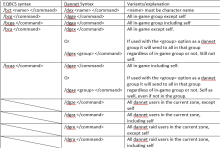
Thank you very much for taking the time to provide such a detailed analysis. It really helped me to understand the commands.This is really a "I need a hotkey" help and not really cwtn specifically.
you're not really going to be able to just "/domybidding 80 90 100" that adjusts rog, brd, rng to "80, 90, 100" without making yourself a script
there are a bunch of ways to do this - but each of them have pros and cons
you could:
do a single multiline hotkey:/dgga /multiline ; /brd assistat 90; /rog assistat 85; /mag assistat 80This would tell everyone to try and issue "/brd" and "/rog" which would fail on classes that dont match, but it doesn't hurt anything.
you could do a multiple line hotkey:
this would have the specific toons by name adjust their values to the preset values you have
etcINI:/dex <bardname> /brd assistat 90 /dex <roguename> /rog assistat 85 /dex <clericname> /clr assistat 80
you could create a small lua script to adjust your settings that has a table with class, setting, and value and it would just adjust to that.
this you would do something liker:/dgga /lua run assistat
Lua:local mq = require('mq') local shortname = mq.TLO.Me.Class.ShortName() if shortname == 'CLR' then mq.cmd('/clr assistat 80') elseif shortname == 'ROG' then mq.cmd('/rog assistat 90') elseif shortname == 'BRD' then mq.cmd('/brd assistat 85') end
you could also utilize the built-in dannet groups with something like this:
this would broadcast to the respective "group" of classes to adjust their assistat
INI:/dgex brd /brd assistat 90 /dgex rog /rog assistat 95 /dgex clr /clr assistat 95
View attachment 77453
pretty sure my most viewed posts are hit hotkey and other guides lol.Click the first link in Sic's signature (Getting started with CWTN plugins!).
Scroll down to movement and hotkeys (#3).
The link Sic's Hotkey Resource is full of information to learn from to do what you need.
Users who are viewing this thread
Total: 1 (members: 0, guests: 1)
Share: