
-
 Hail, we're RedGuides. We want you to play six (yes, 6!) EverQuest characters at once. We have scripts and a friendly community to help, please join our playstyle and say hello! 👋
You are using an out of date browser. It may not display this or other websites correctly.
You should upgrade or use an alternative browser.
You should upgrade or use an alternative browser.
Question - creating a social
- Thread starter Grumm
- Start date


- Commits
- 2
open up a social and put what you want to use.
/bca //cast 9 (tell all your toons to cast slot 9)
/bct toonname //cast 9 (tell a specific toon to cast 9)
/bcaa //cast 9 (tells all toons and yourself to cast 9)
/bca //camp
/bca //assist tankname
/bca //attack
/bca //cast 9 (tell all your toons to cast slot 9)
/bct toonname //cast 9 (tell a specific toon to cast 9)
/bcaa //cast 9 (tells all toons and yourself to cast 9)
/bca //camp
/bca //assist tankname
/bca //attack
If you want them to activate a key you can also do:
/bcaa //keypress 3
The "mimic me" button on group window can also do some duplication like hails and such.
/bcaa //keypress 3
The "mimic me" button on group window can also do some duplication like hails and such.


Grimlock
Well-known member
couple things ..can only make 5 commands per social box unless they changed it ..but you can also /bcaa //alt activate xxxx to get everyone to do something : example …/bcaa //alt activate 511 will command everyone to use throne of hero's if they are in the bc you can also /bct charatername //xxxxx will allow you to tell a single toon what to do
can then add in multi commands to your social to do what ever you are trying to string together
Grimlock
can then add in multi commands to your social to do what ever you are trying to string together
Grimlock

I don't think you can create a social by using EQBCS. To make a social you have to first right click on the hotbar key. Then you have to input the name of the social and then in the next 5 lines what you want to do. So the first obstacle would be to send a command to all members on the client to click the same hotbar key (which means which hotbar you are using and which key on the hotbar to use). Once you get that working you then need to be able to have the text input into the social. (I have not seen anything so far that lets you send text to a social) You can have your team speak things but to actually try to input text into a social I can't see how to do this. Of course I am still learning this stuff.
So as it stands so far (IMO and WIK) It can't be done the way you want to do it... Sorry
So as it stands so far (IMO and WIK) It can't be done the way you want to do it... Sorry

I'm not a good enough programmer to do this but ultimately doesn't it just put lines of text in an INI file?
I wrote a program earlier this year with VS that is a basic interface gui that lets you read and edit a character's ini file, specifically socials, I lost interest in it before I finished. If there is any interest I can share, just be advised that it will write to the ini of your choice but the hotkey socials blank out and you have to right click and re-apply in game when using this program to edit the file. As I said, I never bothered trying to narrow down the issue. Attached are screen snips.
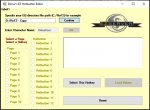 This is what it looks like when you start the program, it saves the last values entered into it for directory and character name but you can replace the default and enter whatever you need to in these fields.
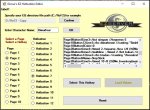 Once you specify a directory and a character ini file, it reads all entries in that character's ini file under the [Socials] header and displays them. I was going to initially have it sort by button name but never got around to it.
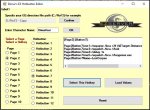 You then click the corresponding button page and hotbutton on the page and it will list the specific information it finds for that hotbutton, if no information exists it will just display a blank entry.
 You can edit the values on any of the hotbuttons by selecting Load Values...it should pop up a shitty rendition of the in game hotbutton fields for you to view and edit as needed.
This is what it looks like when you start the program, it saves the last values entered into it for directory and character name but you can replace the default and enter whatever you need to in these fields.Once you specify a directory and a character ini file, it reads all entries in that character's ini file under the [Socials] header and displays them. I was going to initially have it sort by button name but never got around to it.You then click the corresponding button page and hotbutton on the page and it will list the specific information it finds for that hotbutton, if no information exists it will just display a blank entry.You can edit the values on any of the hotbuttons by selecting Load Values...it should pop up a shitty rendition of the in game hotbutton fields for you to view and edit as needed.
Last edited:
giogibyeie
Member
This is Great!!! Could you share to me? Thanks a lot.I wrote a program earlier this year with VS that is a basic interface gui that lets you read and edit a character's ini file, specifically socials, I lost interest in it before I finished. If there is any interest I can share, just be advised that it will write to the ini of your choice but the hotkey socials blank out and you have to right click and re-apply in game when using this program to edit the file. As I said, I never bothered trying to narrow down the issue. Attached are screen snips.
View attachment 21315This is what it looks like when you start the program, it saves the last values entered into it for directory and character name but you can replace the default and enter whatever you need to in these fields.
View attachment 21316Once you specify a directory and a character ini file, it reads all entries in that character's ini file under the [Socials] header and displays them. I was going to initially have it sort by button name but never got around to it.
View attachment 21317You then click the corresponding button page and hotbutton on the page and it will list the specific information it finds for that hotbutton, if no information exists it will just display a blank entry.
View attachment 21318You can edit the values on any of the hotbuttons by selecting Load Values...it should pop up a shitty rendition of the in game hotbutton fields for you to view and edit as needed.
Users who are viewing this thread
Total: 1 (members: 0, guests: 1)
Share: