• You've discovered RedGuides, an EverQuest multi-boxing and scripting community 🧙‍♀️⚙️. We want you to play several EQ characters at once, come join us and say hello! 👋

  • A TLP without truebox has thawed (Very Vanilla ready)
    Frostreaver

Problem - Crashing with 1-17-24 Update

Joined
Dec 13, 2022
RedCents
1,306¢
Just updated with the RGLauncher and keep crashing a minute or so after log in. Login in with a mage and cleric using the plugins, after about 5 crashes in a row I stopped so haven't checked other toons using other plugins.

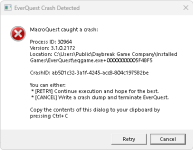
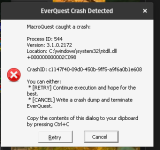
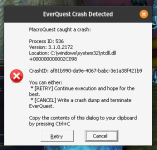
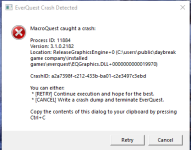
Received the following attached crash messages-

---------------------------
EverQuest Crash Detected
---------------------------
MacroQuest caught a crash:

Process ID: 2508
Version: 3.1.0.2172
Location: RemoveDetour+0 (C:\RedGuides\MQ2Main.dll+00000000002218C0)

CrashID: d3fb07eb-df40-4072-8832-b98ce71d75f8

You can either:
* [RETRY] Continue execution and hope for the best.
* [CANCEL] Write a crash dump and terminate EverQuest.

Copy the contents of this dialog to your clipboard by pressing Ctrl+C

---------------------------
Retry Cancel
---------------------------

---------------------------
EverQuest Crash Detected
---------------------------
MacroQuest caught a crash:

Process ID: 6448
Version: 3.1.0.2172
Location: RemoveDetour+0 (C:\RedGuides\MQ2Main.dll+00000000002218C0)

CrashID: 15ba1c98-f07a-4b71-ac42-688908c8e728

You can either:
* [RETRY] Continue execution and hope for the best.
* [CANCEL] Write a crash dump and terminate EverQuest.

Copy the contents of this dialog to your clipboard by pressing Ctrl+C

---------------------------
Retry Cancel
---------------------------


Thanks in advance folks-

BB~
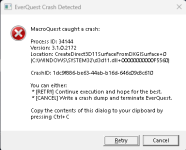
 
I'm crashing as well. If I load one character and then background the session, it'll crash fairly quickly. When I load multiples, they all start to crash once they background.
 
I'm crashing as well. If I load one character and then background the session, it'll crash fairly quickly. When I load multiples, they all start to crash once they background.
Uncheck the use new UI option. That was causing my main client to crash and fixed it for me. Hopefully it fix your problem as well.
 
Manually download your CWTN plugins and replace the old plugin. i found that the launcher didnt do that which i manually did it and its working perfect.
 
Uncheck the use new UI option. That was causing my main client to crash and fixed it for me. Hopefully it fix your problem as well.
This was the issue for me. With New UI - CTD on background clients - challenge is to get in and click it off before crash.
 
Unchecking new UI works for me as well. I was also able to get it to work after clicking off Enable frame limiting when in the background under Macroquest/settings. Should also mention I'm using Isboxer. As I would rather leave the frame limiter enabled, I'll run with the new UI disabled. Unfortunately, I'll have to disable the new UI on all 54.
 
1705567412332.png
Unchecking new UI works for me as well. I was also able to get it to work after clicking off Enable frame limiting when in the background under Macroquest/settings. Should also mention I'm using Isboxer. As I would rather leave the frame limiter enabled, I'll run with the new UI disabled. Unfortunately, I'll have to disable the new UI on all 54.
Just set that in your eqclient.ini before launching. Goes in [Defaults] section. No need to do it 54 times. That's what was changed when I clicked it off in game.
 
Had to ask in Discord because I'm terribad at searching, but you can edit your eqclient.ini to add this line:
  1. [Defaults]
    UseNewUIEngine=0

  2. Have to add it for each virtualized .ini though for ISBoxer.
 
Last edited:
Had to ask in Discord because I'm terribad at searching, but you can edit your eqclient.ini to add this line:
  1. [Defaults]
    UseNewUIEngine=0

  2. have to add it for each virtualized .ini though for ISBoxer, no?
Not sure. I don't use boxer. Not sure how it copies them and what parts it uses.
 
If they're all in one directory and you got git for windows or Windows Subsystem for Linux, open a bash shell and use sed -i 's\UseNewUIEngine=1\UseNewUIEngine=0\g' *.ini to change it in all files at once.

Can probably find sed for windows too.
 
Last edited:
I've got 54 ini's. I just turned off the frame limiter, launched them all and then turned off the UI. Clicked the limited back on. Also had to up the Isboxer frame limiter to get back to normal performance.
 
So far nothing mentioned has worked. I keep crashing as soon as I log in.

But thanks for assisting folks~
Will keep looking.

BB~
 
Manually download your CWTN plugins and replace the old plugin. i found that the launcher didnt do that which i manually did it and its working perfect.
old plugins of any flavor would not be able to load with mq2main because it wouldn't match. there are 0 crashes where somehow a plugin from december is loading in the january build.

Always use the launcher, don't manually download anything. just check the plugin tab.
 
old plugins of any flavor would not be able to load with mq2main because it wouldn't match. there are 0 crashes where somehow a plugin from december is loading in the january build.

Always use the launcher, don't manually download anything. just check the plugin tab.
I do use the Launcher all the time. Will delete the "plugin" folder and see if that fixes it. Thanks Sic

BB~
 
Still crashing. Deleted the plugins folder and reinstalled. I have no clue whats gong on. I did have to switch to full screen to fix a cursor issue; maybe that has something to do with it?

Attaching a .DMP file.

Any ideas are appreciated.


Thanks- BB~
 
Still crashing. Deleted the plugins folder and reinstalled. I have no clue whats gong on. I did have to switch to full screen to fix a cursor issue; maybe that has something to do with it?

Attaching a .DMP file.

Any ideas are appreciated.


Thanks- BB~
I dont read DMP files, but full screen and EQ have been fighting for years. try going back to windowed for a bit..
 
I dont read DMP files, but full screen and EQ have been fighting for years. try going back to windowed for a bit..
Have been in Windowed mode. Only time I switched since patch day was to correct a cursor issue. (Cursor was bottom right of where I'd click / aim) Alt-Enter x 2 corrected that in EQ without MQ,.


Thanks tho D.


BB~
 
Please don't post DMP files. They can contain sensitive and/or personal information.

Post a crash id instead and we can look it up on the crash report server
 
haveing similar issues as bluebug have tried all the fixes on here and on isboxer i can get in on 1 toon just fine loading screen just has middle picture flickering bad enough to bother my eyes and then i can zone in on another toon and it crashes but w/o boxer eq is all good
 
I was able to run one toon, but using multiple toons I was getting crashes, however I was not using isboxer. What resolved my crashes was updating to the latest nvidia drivers for by card. I have not crashed since.
 
drivers update was my first try can run 6 toons w/o boxer but cant run 2 with it i no alt tab but boxer just makes it easy to swap keybindings etc
 
Constant crashing since last patch. Tried a complete new install on a new machine build to eliminate any potential conflicts on my system.

Consistent as soon as a CWTN plugin is loaded and settings is selected. If I stay in CLI mode it works for awhile until I try to log another character on that account, this is 100% crash, or zone eventually getting the crash. Once this happen nothing can get back in without a full system restart.

Kicked off KA to try another plugin running to see if I get the same results. Had it run for 20 min on a character with no issue so far. Will run this way for a while and can send an update from there.

Any assistance is appreciated.

Adding 2 crash ID's here
1705707705819.png
1705707407103.png
 
Generated a new crash.

e27876dc-3260-4462-b1b8-96fa3c3d37bb

It is linux using wine emulating win7 x64 with DX11 in play, been working well for about a year now through multiple installs. There is some extra overhead of the macroquest.ini file management etc.., but beyond that it has worked really well. I can replicate the issue on a Windows machine as well and can get a code from there when in front of one later tonight.

If this is out of bounds on the research I can appreciate that and will accept that this path of play may be dead for now. :)
 
Unfortunately it doesn't look like any of your crash reports are coming through. If you have any dmp files under your mq dir/logs then you might send me one but the likelihood of being able to address this directly may be pretty slim.

We have some known problems with the directx overlay that I'll try to work through as time permits, so you might get lucky as stability improves it might work more.
 
Any chance at all it has something to do with MQmage, something with mage? Its just speculative but Ive run a crew of 4 for hours with zero issues. When I load the mage up everything crashes soon thereafter. Again just suggesting ideas
 
Any chance at all it has something to do with MQmage, something with mage? Its just speculative but Ive run a crew of 4 for hours with zero issues. When I load the mage up everything crashes soon thereafter. Again just suggesting ideas
no, other than the fact it is using an imgui window, no, not *because* of mq2mage
 
I know you might think I am Crazy, but I was getting these un-explainable crashes all the time. At one point I was timing it and I would crash every 4 hours or so as well. I did everything humanly possible, I even cleaned the inside of my computer with a vacuum ( Yes, to that degree). !!!

Now here is where it gets even more interesting, after this last patch. I am having trouble even tabbing to another character (using the windows key, before not even a problem ). To throw on top of that, when I am able to tab over I crash as well.

Now I say to myself, I go in chat room and try explaining this, people think I am either crazy or dumb. So, I have another computer and just for the hell of it I switched monitors ( reason being , One is a 43 inch smart TV using as a monitor and another is a 23 HP conventional monitor)

BAM!!!!!!!!!

Problem is solved, I don't get one crash until now. Even if I am Logged in for 24 hours. This is using the conventional computer monitor.

Tell me how do you explain the un-explainable ??? Anyways I hope this information helps someone and does not have to go through the pain I went through until I figured it out
 
I have an issue that just started this morning. I've previously been able to log into EQ. Now, when it attempts to run it puts the game in the upper left corner of the screen (minimized almost) and it crashes. This happens with both EQ attempting to run and MQ attempting to run EQ. I've tried reinstalling EQ. I've tried reinstalling Plugins and MQ2.

Thanks in advance!


1705767210845.png


EDIT: Was able to fix by uninstalling EQ, deleting all EQ files in the directory, and did a fresh install. Loaded right up. PLEASE NOTE: I MOVED ALL My UI FILES PRIOR TO AND REIMPORTED THEM!
 
Last edited:
Have been in Windowed mode. Only time I switched since patch day was to correct a cursor issue. (Cursor was bottom right of where I'd click / aim) Alt-Enter x 2 corrected that in EQ without MQ,.


Thanks tho D.


BB~
You ever have any luck ? I've tried every suggestion myself, same issue. Maybe this is the push I need finally Lol
 
I've been gone for a week hoping I would be able to play when I came back. It was fine as long as none of my characters moved very far, even managed to kill a few mobs, but as soon as I ran off to pull it crashed again. I did a fresh install for everything before going of out town, but it looks like I will be looking for solutions again.
 
You ever have any luck ? I've tried every suggestion myself, same issue. Maybe this is the push I need finally Lol
vetra, you mean you're still crashing?

Brainiac was able to check out my crash dumps (I think that's what they're called) an saw that I had a third party overlay running. Like he said in his post it was my FPS counter RivaTuner. I still use MSI Afterburner so I had to uninstall RivaTuner so any non EQ / MQ overlay was running on my PC. That fixed the crash problems! (YAY Brainiac!)

Or are you having the cursor / pointer off center issue? That's a whole 'nother Rabbit Hole of shit to dig through.


BB~
 
I've been gone for a week hoping I would be able to play when I came back. It was fine as long as none of my characters moved very far, even managed to kill a few mobs, but as soon as I ran off to pull it crashed again. I did a fresh install for everything before going of out town, but it looks like I will be looking for solutions again.
Post a crash ID, otherwise we're just guessing. (My money is on you have an overlay).
 
Problem - Crashing with 1-17-24 Update

Users who are viewing this thread

Back
Top
Cart