grimmier submitted a new resource:
ConfigEdit - All the Things Configuration Editor....
Read more about this resource...
ConfigEdit - All the Things Configuration Editor....
see readme
Read more about this resource...


see readme
Grim, you got some awesome sauce with these, so many good tools. Love it, thank you for this and so many goodies.grimmier submitted a new resource:
ConfigEdit - All the Things Configuration Editor....
Read more about this resource...
happpy to help =)Grim, you got some awesome sauce with these, so many good tools. Love it, thank you for this and so many goodies.
oops i forgot the require packageman let me fix thatThanks for the great stuff you produce!
Tried loading this one getting an error
Module lfs not found
[1.13] - 2024-06-09
Bug Fixes
- Last one didn't work it broke other things
(61e8b3d) ~grimmier378This time we are just moving those into the main gui and hiding them until needed.
- Keep open and save dialogs topmost
...Don't let them get lost behind the main gui. that is annoying
[1.14] - 2024-06-10
Bug Fixes
- Fixed an issue with numbered keys saving as strings
...Also added button based file tree for your selected path, to make navigating back to a folder easier.
Save dialog will select the current selected path from Open dialog when opened. so you don't have to navigate the folder tree to save back to the original location.
[1.15] - 2024-06-13
Bug Fixes
- Replaced missing ini function
(5a73d26) ~grimmier378Accidently removed an ini function in the last update. sorry about that
[1.16] - 2024-06-16
Bug Fixes
- This should fix missing nested tables
(e7c2c07) ~grimmier378This should fix losing nested tables when saving a lua table back.
also correctly saves numbers
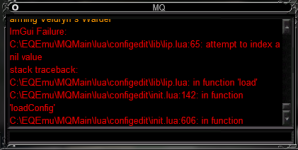
I will look into this when i get out of work later. this is for an E3 ini?Tried to use it to open one of my toons ini's on lazarus and got this error View attachment 62649
Yeah, e3 ini.. was gonna see if I could use it as a quick way to toggle on and off taunt/aggro spells in game w/o having to load up the INI in a text editor for when doing raids etcI will look into this when i get out of work later. this is for an E3 ini?
loads in document mode but not ini viewahh you could try loading it in document mode.
there may be some thing in the ini that breaks the normal ini view.
just got home and looking into it now
you would need to have the automation/script/macro/ MQ reload to refresh the configs in game.I recently had to build all my cfg and ini files from scratch after I wiped my computer. This utility would have been handy. Does it have a way of refreshing or reloading the files after editing so they can be used on the characters already in-game?
So i found the issue. E3 ini's first off allow duplicate keys likeloads in document mode but not ini view
Bot Buff=Lingering Sloth/Rekken/Gem|8
Bot Buff=Lingering Sloth/Self/Gem|8
Bot Buff=Unfailing Reverence/Rekken/Gem|7
Bot Buff=Group Pact of the Wolf/Rekken/AfterSpell|Group Shrink/CheckFor|Robo Robustness
Bot Buff=Group Shrink/Rekken/Ifs|TankNotShrunk
Bot Buff=Group Shrink/Hordester/Ifs|MeNotShrunk
Bot Buff=Talisman of Perseverance/Rekken/gem|7
Combat Buff=Enlightened Focus of Arcanum/CheckFor|Acute Focus of Arcanum
Combat Buff=Acute Focus of Arcanum/CheckFor|Enlightened Focus of ArcanumGroup Heal=Already had them saved as UTF-8 -BOM will resave as just UTF-8 but will grab the recent update once I see. And, Thank you.you would need to have the automation/script/macro/ MQ reload to refresh the configs in game.
So i found the issue. E3 ini's first off allow duplicate keys like
Code:Bot Buff=Lingering Sloth/Rekken/Gem|8 Bot Buff=Lingering Sloth/Self/Gem|8 Bot Buff=Unfailing Reverence/Rekken/Gem|7 Bot Buff=Group Pact of the Wolf/Rekken/AfterSpell|Group Shrink/CheckFor|Robo Robustness Bot Buff=Group Shrink/Rekken/Ifs|TankNotShrunk Bot Buff=Group Shrink/Hordester/Ifs|MeNotShrunk Bot Buff=Talisman of Perseverance/Rekken/gem|7 Combat Buff=Enlightened Focus of Arcanum/CheckFor|Acute Focus of Arcanum Combat Buff=Acute Focus of Arcanum/CheckFor|Enlightened Focus of Arcanum
they also allow empty or nil Values instead of a NULL or something
Group Heal=
and to top it off use UTF-8 -BOM encoding
but i was able to work around most of the issues. youmayjust need to resave your ini's as UTF-8 encoding. Notepad ++ works well for this.
edit: you will Definitely need to resave the files with the proper encoding.
otherwise the fixes should appear here in the next 20 or so min. or they are already on github.
yeah thats the bad one we want them as UTF-8Already had them saved as UTF-8 -BOM but will grab the recent update once I see. And, Thank you.
[1.18] - 2024-06-22
Bug Fixes
- Forgot to remove debug print
(9975c65) ~grimmier378
[1.17] - 2024-06-22
Commits
- Display duplicated keys and empty values
Some ini files (e3) use duplicate keys for settings and accept nil values to boot.
This should fix these issues. any duplicate keys will...
E3N auto saves it as UTF-8 -BOM soon as I save it as UTF-8 so can't change it. So, even with the latest file it still crashes Lua w/ the same error as before.yeah thats the bad one we want them as UTF-8
which is what all MQ scripts look for. e3 might be different not sure i don't actually use it.
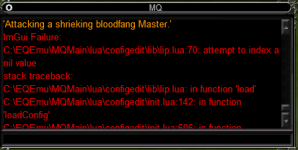
Next update should allow you to edit them even if they are UTF-8-BOM,E3N auto saves it as UTF-8 -BOM soon as I save it as UTF-8 so can't change it. So, even with the latest file it still crashes lua w/ the same error as before.View attachment 62659
[1.19] - 2024-06-22
Bug Fixes
- Added checks for UTF-8-BOM
(a38824f) ~grimmier378Should now handle UTF-8-BOM files correctly.
Works.. thanks a ton!.. Question about it putting an _#### next to stuff tho, will that mess up the saving of the INI?Next update should allow you to edit them even if they are UTF-8-BOM,
since e3 will auto add back in the BOM stuff we just remove it to edit and save and let E3 re-add it to the config.
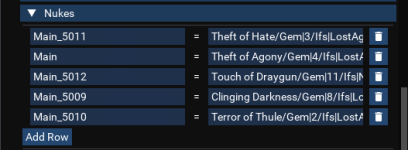
when it writes back it strips that back offWorks.. thanks a ton!.. Question about it putting an _#### next to stuff tho, will that mess up the saving of the INI?View attachment 62685
Cool good to know ty again!when it writes back it strips that back off
[1.20] - 2024-07-06
Documentation
- Readme update
(9fbbb2f) ~grimmier378
Features
- Added ability to change the name of a file when saving.
...This should help with duplicating a file for different characters.