Commands aren't really something that is uniform from one MQ user to the next.
To elaborate, every plugin, macro bind, or alias can be a new command. So depending on which plugins you have loaded on which commands are available. Depending on what aliases have been setup by you or for you, then you could have additional commands.
Aliases can be easy. They'll be listed in your Macroquest.ini, and those will even tell you what the alias does if you understand the text that follows.
Binds would require you are currently running the macro and that macro has binds created, and the commands are only available while the macro is currently running. So bit harder to determine without checking the resource overview and seeing if the commands are listed by the author.
The logic related to both aliases and commands via plugins or core is located in MQ2CommandAPI.cpp of the source. Looking through it, I don't see a function to list all the commands available. With that said, I don't think it would be as useful as you might think it would be. Best bet would be to check out the individual resources that you have loaded. As an example, if you use MQ2DPSAdv, then you would have access to "/dpsadv" command. However, there are various things that get added to that which make that command do different things. Without a reference to those you would really have any way to know what all options were available with the command, unless the person who made the command also programmed in a list of options, and what those options do.
To access the individual plugins command list and options you would want to look at the resource, or the wiki page where it should be listed if it has any.
https://www.redguides.com/docs/projects/mq2dpsadv/ as an example here is the wiki for the DPSAdv plugin.
https://www.redguides.com/community/resources/mq2dpsadv.118/field?field=commands and here is the "commands" tab of the resource for DPSAdv.
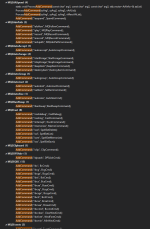
As an addendum, you could download the source for MQ and search the entire solution for the text "AddCommand" but again, probably not very useful ultimately. Here is just what I could fit on my screen.