
• You've discovered RedGuides, an EverQuest multi-boxing and scripting community 🧙‍♀️⚙️. We want you to play several EQ characters at once, come join us and say hello! 👋

  • A TLP without truebox has thawed (Very Vanilla ready)
    Frostreaver

Question - Changing Targets

Joined
May 31, 2022
RedCents
4,162¢
RGMercs Build?
1547
What level is the character?
65
Hi, I wish to change targets on the fly and struggling a bit.

Currently trying to takedown Kargsmash on laz emu.
During the fight a pair of add spawn (speed of body, and strength of body).

My war refuses to change targets. I have tried set up buttons for /rgl forcetarget strength of body and /rgl forcetarget speed of body with limited success.
As a result my enchanter, cleric, and mage get splatted, often in that order.

I see there are settings here:

1750197513681.png

My question is what change of settings and commands will get the result I'm after: on the fly changing target and having group assist that change?
 
Hi, I wish to change targets on the fly and struggling a bit.

Currently trying to takedown Kargsmash on laz emu.
During the fight a pair of add spawn (speed of body, and strength of body).

My war refuses to change targets. I have tried set up buttons for /rgl forcetarget strength of body and /rgl forcetarget speed of body with limited success.
As a result my enchanter, cleric, and mage get splatted, often in that order.

I see there are settings here:
View attachment 70228

My question is what change of settings and commands will get the result I'm after: on the fly changing target and having group assist that change?
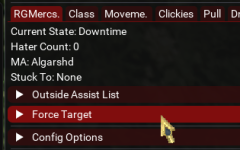
Either turn off autoengage on your assist (or pause, or do whatever you want), or use the force target tab menu. I keep mine popped out into its own tab. /forcetarget does not currently accept arguments (it forces your current target), and if it did, it would be likely to be an ID, tbh.

Edit: turning off autoengage is an advanced setting. I recommend you flip that switch to show them.

1750198127928.png
 
Either turn off autoengage on your assist (or pause, or do whatever you want), or use the force target tab menu. I keep mine popped out into its own tab. /forcetarget does not currently accept arguments (it forces your current target), and if it did, it would be likely to be an ID, tbh.

Edit: turning off autoengage is an advanced setting. I recommend you flip that switch to show them.

View attachment 70229
Cheers, will give that a go.
 
Either turn off autoengage on your assist (or pause, or do whatever you want), or use the force target tab menu. I keep mine popped out into its own tab. /forcetarget does not currently accept arguments (it forces your current target), and if it did, it would be likely to be an ID, tbh.

Edit: turning off autoengage is an advanced setting. I recommend you flip that switch to show them.

View attachment 70229

Got him this morning.
Using the force target tab popped out without any other adjustments gave me exactly the behaviour I was after.

Cheers
 
Got him this morning.
Using the force target tab popped out without any other adjustments gave me exactly the behaviour I was after.

Cheers
That is great to hear!
I will keep this situation in mind for possible future (command-line) improvements to forcetarget.
Thanks for checking back in, my dude.
 
Question - Changing Targets

Users who are viewing this thread

Back
Top
Cart