- Joined
- Dec 29, 2017
- RedCents
- 24,680¢
So this topic doesn't have it's own Forum catagory that I saw. So I'm creating a thread in Macro Mania because it's to do with coding logic that follows along the same guidelines as the MQ2HUD.ini in a way.
I'm talking about the [Captions] section of Macroquest.ini that most people don't even know exists. The [Captions] section uses a little known TLO that's not echoable in MQ2 that inherits the "Spawn" datatype to display information on NPC's and players. It's the code that shows you the details of player/NPC/pet spawns in MQ2.
Why do you care? Well recently I created a HUD that got a lot of positive attention. the logic used to create the HUD is a lot like the logic that will be used to explain the captions section of Macroquest.ini
What can you do with [Captions] section of the Macroquest2.ini, well. See for yourself what I've done in a few minutes of coding using the ${NamingSpawn} TLO.
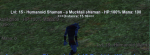
This is an altered form of the [Captions] section of the macroquest.ini
I've changed NPC= section to display the information I want to see.
The ${NamingSpawn} inherits the spawn data type. https://redguides.com/docs/projects/macroquest/reference/data-types/datatype-spawn/
While the wiki is certainly dated, just with that link alone you can find a lot of information. Basically anything you see in that list should be allowed to attach to the end of ${NamingSpawn}. You can test them with ${Target.datamember} IE: ${NamingSpawn.Body} will display "Humaniod", "Animal", "Plant", "Undead", etc so you can just look at the targets name and see if you can use your body specific spells/banestrike. I've added distance using ${NamingSpawn.Distance} and there is a lot more that you can add that I just haven't done yet.
Limitations - You're only allowed two lines. So while you can \n to go to a next line, you can only do this once as two lines is the maximum.
Player1, Player2, Player3, etc......what does it mean? The players are directly attached to /shownames 1, 2, 3, 4 etc in game. This only applies to player information.
So if you want /shownames 1 to not show anything at all, you can do something like. Player1=${If[${NamingSpawn.ID},,]}
Someone recently mentioned mobs Feigning Death in EQ. Well perhaps you want to add ${NamingSpawn.Feigning} to the display of NPC's? ${If[${NamingSpawn.Feigning},FD,]} will display FD if the NPC is FD.
Want to know what spell a player is casting? Add ${If[${NamingSpawn.Casting.ID}, Casting: ${NamingSpawn.Casting},]} to the Player# you want to show that information. Great for PVP when you want to stop a player from casting a heal by stunning them but don't want to waste your bash/stun on a trivial spell that won't save their life. /evil grin.
So as you can see this is a very powerful feature that most players either don't know exists or don't know how to edit.
Got your captions setup already? type /captions anon on, then take a screenshot and post it along with the associated code!
~Chatwiththisname
--Update--
I completely overlooked this question. The answer is YES~!
So if you make changes and want to test them you have to type
Then right click on the tray icon for MQ2 and hit "Refresh injections"
That will effectively reload the MacroQuest.ini and update your [Captions]
I don't know of any other way other than this.
The following is how an ${If[,,,]} statement works.
The following is how a ${Select[,]} statement works.
if CompareThis is equal toThis, OR andThis, OR andThis then it evaluates TRUE.
Example of a Select statement.
The above code evaluates true if the Spawn's ID is the first, second, or third group member in your group window.
You would do
You leave the Else portion blank.
NamingSpawn appears to inherit all members of ${Spawn[]} TLO. Therefore the following list should be available to ${NamingSpawn}. Some things may only apply to the current character you are playing.
Mez Detection for NPC's.
Group Role Detection for Main Tank, Main Assist, and Puller to go on Player#
I'm talking about the [Captions] section of Macroquest.ini that most people don't even know exists. The [Captions] section uses a little known TLO that's not echoable in MQ2 that inherits the "Spawn" datatype to display information on NPC's and players. It's the code that shows you the details of player/NPC/pet spawns in MQ2.
Why do you care? Well recently I created a HUD that got a lot of positive attention. the logic used to create the HUD is a lot like the logic that will be used to explain the captions section of Macroquest.ini
What can you do with [Captions] section of the Macroquest2.ini, well. See for yourself what I've done in a few minutes of coding using the ${NamingSpawn} TLO.
This is an altered form of the [Captions] section of the macroquest.ini
I've changed NPC= section to display the information I want to see.
The ${NamingSpawn} inherits the spawn data type. https://redguides.com/docs/projects/macroquest/reference/data-types/datatype-spawn/
While the wiki is certainly dated, just with that link alone you can find a lot of information. Basically anything you see in that list should be allowed to attach to the end of ${NamingSpawn}. You can test them with ${Target.datamember} IE: ${NamingSpawn.Body} will display "Humaniod", "Animal", "Plant", "Undead", etc so you can just look at the targets name and see if you can use your body specific spells/banestrike. I've added distance using ${NamingSpawn.Distance} and there is a lot more that you can add that I just haven't done yet.
Limitations - You're only allowed two lines. So while you can \n to go to a next line, you can only do this once as two lines is the maximum.
Player1, Player2, Player3, etc......what does it mean? The players are directly attached to /shownames 1, 2, 3, 4 etc in game. This only applies to player information.
So if you want /shownames 1 to not show anything at all, you can do something like. Player1=${If[${NamingSpawn.ID},,]}
Someone recently mentioned mobs Feigning Death in EQ. Well perhaps you want to add ${NamingSpawn.Feigning} to the display of NPC's? ${If[${NamingSpawn.Feigning},FD,]} will display FD if the NPC is FD.
Want to know what spell a player is casting? Add ${If[${NamingSpawn.Casting.ID}, Casting: ${NamingSpawn.Casting},]} to the Player# you want to show that information. Great for PVP when you want to stop a player from casting a heal by stunning them but don't want to waste your bash/stun on a trivial spell that won't save their life. /evil grin.
So as you can see this is a very powerful feature that most players either don't know exists or don't know how to edit.
Got your captions setup already? type /captions anon on, then take a screenshot and post it along with the associated code!
~Chatwiththisname
--Update--
And is there anyway to reload the settings other than a totally relog?? is there any slash command like /reload or something? Ty
I completely overlooked this question. The answer is YES~!
So if you make changes and want to test them you have to type
Rich (BB code):
/unloadThen right click on the tray icon for MQ2 and hit "Refresh injections"
That will effectively reload the MacroQuest.ini and update your [Captions]
I don't know of any other way other than this.
How does an ${If[,,,]} statement work?
The following is how an ${If[,,,]} statement works.
Rich (BB code):
${If[ThisIsTrue,DoThis,ElseDoThis]}How does a ${Select[,]} statement work?
The following is how a ${Select[,]} statement works.
Rich (BB code):
${Select[CompareThis,toThis,andThis,andThis]}Example of a Select statement.
Rich (BB code):
${Select[${NamingSpawn.ID},${Group.Member[1].ID},${Group.Member[2].ID},${Group.Member[3].ID}]}How do I nest an ${Select[,]} inside an ${If[,,,]}
You would do
Rich (BB code):
${If[${Select[CompareThis,toThis,andThis,andThis]},IfTrueDoThis,IfFalseDoThis]}What if I don't want it to do anything if it's false?
You leave the Else portion blank.
Rich (BB code):
${If[ThisIsTrue,DoThis,]}What can I do with ${NamingSpawn}
NamingSpawn appears to inherit all members of ${Spawn[]} TLO. Therefore the following list should be available to ${NamingSpawn}. Some things may only apply to the current character you are playing.
Rich (BB code):
[spawn]
Member1=ID
Member2=Name
Member3=Level
Member4=X
Member5=Y
Member6=Z
Member7=DistanceX
Member8=DistanceY
Member9=DistanceZ
Member10=Distance
Member11=Distance3D
Member12=DistancePredict
Member13=Next
Member14=Prev
Member15=Heading
Member16=Speed
Member17=Levitating
Member18=Sneaking
Member19=HeadingTo
Member20=Light
Member21=Body
Member22=State
Member23=CurrentHPs
Member24=MaxHPs
Member25=PctHPs
Member26=Deity
Member28=Type
Member29=CleanName
Member30=Surname
Member31=Guild
Member32=GuildStatus
Member33=Master
Member34=Pet
Member35=Race
Member36=Class
Member38=Gender
Member39=GM
Member40=Height
Member41=MaxRange
Member42=AARank
Member43=Casting
Member44=Mount
Member45=FeetWet
Member46=Underwater
Member48=Animation
Member49=Holding
Member50=Look
Member51=N
Member52=W
Member53=U
Member54=S
Member55=E
Member56=D
Member57=DistanceN
Member58=DistanceW
Member59=DistanceU
Member60=Invis
Member61=Linkdead
Member62=LFG
Member63=Trader
Member64=AFK
Member65=ConColor
Member67=Standing
Member68=Sitting
Member69=Ducking
Member70=Feigning
Member71=Binding
Member72=Invited
Member73=NearestSpawn
Member74=MaxRangeTo
Member75=DisplayName
Member76=AATitle
Member77=GroupLeader
Member78=Mark
Member79=Assist
Member80=Anonymous
Member81=Roleplaying
Member82=LineOfSight
Member83=HeadingToLoc
Member84=Title
Member85=Suffix
Member86=Fleeing
Member87=Named
Member88=Buyer
Member89=Moving
Member90=StandState
Member91=Dead
Member92=Stunned
Member93=Hovering
Member94=CurrentMana
Member95=MaxMana
Member96=CurrentEndurance
Member97=PctEndurance
Member98=MaxEndurance
Member99=Loc
Member100=LocYX
Member101=LocYXZ
Member102=Owner
Member103=Following
Member104=Address
Member105=Inviter
Member106=MercID
Member107=ContractorID
Member108=PctMana
Member109=Primary
Member110=Secondary
Member111=Equipment
Member112=Targetable
Member113=PlayerState
Member114=Stuck
Member115=Aggressive
Member116=CanSplashLand
Member117=IsBerserk
Member118=pTouchingSwitch
Member119=bShowHelm
Member120=CorpseDragCount
Member121=bBetaBuffed
Member122=CombatSkillTicks
Member123=FD
Member124=InPvPArea
Member125=bAlwaysShowAura
Member126=GMRank
Member127=WarCry
Member128=IsPassenger
Member129=LastCastTime
Member130=DragNames
Member131=DraggingPlayer
Member132=bStationary
Member133=BearingToTarget
Member134=bTempPet
Member135=HoldingAnimation
Member136=Blind
Member137=LastCastNum
Member138=CollisionCounter
Member139=CeilingHeightAtCurrLocation
Member140=AssistName
Member141=SeeInvis
Member142=SpawnStatus
Member143=bWaitingForPort
Member144=EQLoc
Member145=MQLoc
Member146=TimeBeenDead
Member147=FloorZ
Member148=IsSummoned
Member149=TargetOfTarget
Mez Detection for NPC's.
Rich (BB code):
${If[${Select[${NamingSpawn.Animation},110,26,32,71,72,111]} && ${Select[${NamingSpawn.ID},${Me.XTarget[1].ID},${Me.XTarget[2].ID},${Me.XTarget[3].ID},${Me.XTarget[4].ID},${Me.XTarget[5].ID},${Me.XTarget[5].ID},${Me.XTarget[6].ID},${Me.XTarget[7].ID},${Me.XTarget[8].ID},${Me.XTarget[9].ID},${Me.XTarget[10].ID},${Me.XTarget[11].ID},${Me.XTarget[12].ID},${Me.XTarget[13].ID},${Me.XTarget[14].ID},${Me.XTarget[15].ID}]},>>>Mezzed<<<,]}Group Role Detection for Main Tank, Main Assist, and Puller to go on Player#
Rich (BB code):
${If[${NamingSpawn.ID}==${Group.MainAssist.ID}, MA,]}
${If[${NamingSpawn.ID}==${Group.MainTank.ID}, MT,]}
${If[${NamingSpawn.ID}==${Group.Puller.ID}, Puller,]}
Last edited: