
AntivirusI love it when you use 2 letter abbreviations. Like what does that mean and how? Even my Autoaccept group is jacked guess I will have to redo that one Aswell. Only reason I ask my keyboard is jacked its not allowing me to use the numbers up top. Num pad is fine. But still can't enter in my account info to restart Autologin till I get another keyboard.

-
 Hail, we're RedGuides. We want you to play six (yes, 6!) EverQuest characters at once. We have scripts and a friendly community to help, please join our playstyle and say hello! 👋
You are using an out of date browser. It may not display this or other websites correctly.
You should upgrade or use an alternative browser.
You should upgrade or use an alternative browser.

Release AutoLogin (core plugin) (5 Viewers)
- Thread starter Redbot
- Start date

h2ofrontsc
Member
I’m having a weird issue when I use autologin. It slides the game window to the left and then re-adjusts and fills the screen but it hangs in a partial server select screen that I can’t move or use in any way. If I login without autologin and use the launcher it works fine but I know that’s not the ideal way to do things. Anyone else having this problem?
that sounds pretty unusual.I’m having a weird issue when I use autologin. It slides the game window to the left and then re-adjusts and fills the screen but it hangs in a partial server select screen that I can’t move or use in any way. If I login without autologin and use the launcher it works fine but I know that’s not the ideal way to do things. Anyone else having this problem?
your entire eq moves left?
or just the autologin overlay?
if so you can
/mqoverlay reload to reset the locations of *all* of your imgui overlay windows.I'd also check you don't have any conflicting overlays like: nahimic, afterburner, overwolf, nvidia overlay, xbox overlay, discord overlay etc
h2ofrontsc
Member
Thank you Sic, I’ll try that tonight. Yes the whole window is sliding left. Just started after the latest patch. I did have a discord overlay I’ll disable that too.
the whole eq window and not just imgui? not sure how that might be a conflicting overlayThank you Sic, I’ll try that tonight. Yes the whole window is sliding left. Just started after the latest patch. I did have a discord overlay I’ll disable that too.
are you using isboxer?
eq live now offers fullscreen windowed borderless (yes, that is stupid naming). is it possible you have your settings in someway that is resizing your window upon launch?
h2ofrontsc
Member
Yes sir the whole eq window moves. I’ll have to check the settings tonight. Not using anything but MQ and the plugins I watch. The video settings are a good idea I did some things trying to make the interface text larger. I’m getting old and can’t see as well as I used too. I will check that thoroughly tonight. Thanks again!
Hey guys i am just starting some boxes back up on Teek and set up my MQ. Autologin Continues to say inactive even though it is active in the ini file.
There was no mq2autologin config file in that folder so i created one manually to see if that would help.
I have logged into all the accounts manually, camped out. they all have files but still when i go to profiles there is no characters to add.
I tried to add the characters manually and nothing seems to save.

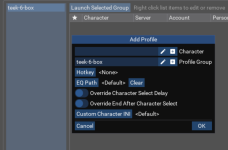
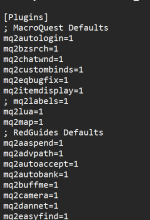
There was no mq2autologin config file in that folder so i created one manually to see if that would help.
I have logged into all the accounts manually, camped out. they all have files but still when i go to profiles there is no characters to add.
I tried to add the characters manually and nothing seems to save.

autologin does not use any ini files so probably why you have issues.
1. you run macroquest
2. you go to the settings by clicking the macroquest icon in your tray
3. you set up your eq install location
4. you add accounts
5 you add charactere profiles
and you are good to go
watch the video on the resource
1. you run macroquest
2. you go to the settings by clicking the macroquest icon in your tray
3. you set up your eq install location
4. you add accounts
5 you add charactere profiles
and you are good to go
watch the video on the resource

I did it manually and it does not save any information. after i add the character nothing happens and i still cannot select itautologin does not use any ini files so probably why you have issues.
1. you run macroquest
2. you go to the settings by clicking the macroquest icon in your tray
3. you set up your eq install location
4. you add accounts
5 you add charactere profiles
and you are good to go
watch the video on the resource

Check to make sure nothing is locking/stopping access to your login.db or the other two temp DB files in the MQ config folder.Have done this process numerous times before not sure why its just not working now
It's where AutoLogin data is stored.
Kind of odd though, cuz usually when it's corrupt, AutoLogin won't even load properly.... But maybe it can't write the char info?
That's what it seems like. it says its already loaded but it never made the initial file for the Configuration folder... I made one manually but did not seem to change. I will keep checking things, not really sure at this point.Check to make sure nothing is locking/stopping access to your login.db or the other two temp DB files in the MQ config folder.
It's where AutoLogin data is stored.
Kind of odd though, cuz usually when it's corrupt, AutoLogin won't even load properly.... But maybe it can't write the char info?
The login.db is what holds the infoThat's what it seems like. it says its already loaded but it never made the initial file for the Configuration folder... I made one manually but did not seem to change. I will keep checking things, not really sure at this point.

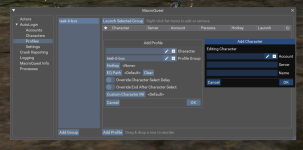
Hello,
Thanks for all of this
I have another issue that may already have been mentioned somewhere, but I couldn’t find anything about it.
I have 4 accounts, each with its own EQ folder. When I use auto-login, the accounts and folders get completely mixed up. I can’t seem to get the right account with the right installation directory. It feels like the whole process gets tangled up.
So for now I’ve stopped using this feature, but if anyone has an idea, I’m interested !
Thanks for all of this
I have another issue that may already have been mentioned somewhere, but I couldn’t find anything about it.
I have 4 accounts, each with its own EQ folder. When I use auto-login, the accounts and folders get completely mixed up. I can’t seem to get the right account with the right installation directory. It feels like the whole process gets tangled up.
So for now I’ve stopped using this feature, but if anyone has an idea, I’m interested !
Set the install in the account menu, for the server they play on, rather than trying to set it from the characterHello,
Thanks for all of this
I have another issue that may already have been mentioned somewhere, but I couldn’t find anything about it.
I have 4 accounts, each with its own EQ folder. When I use auto-login, the accounts and folders get completely mixed up. I can’t seem to get the right account with the right installation directory. It feels like the whole process gets tangled up.
So for now I’ve stopped using this feature, but if anyone has an idea, I’m interested !
If that is not enough info or a poor explanation I can send a pic later, when I'm at a pc

Hi Guys! So it seems that you have a problem with Redfetch and trying to get your group to autologin, am I right? Have you made sure that everything is pointing to the right directory? I just added a new group (the girls) and then filled out the boxes to have the group formed and then launched the group. All went well and the group entered the game. Now I have to set up the autogroup and bingo. I am ready to run the group.
If you need someone to go over step by step the process I will be glade to help. One thing.... Have you checked the master password box to see if a new password was entered?
Zeb
If you need someone to go over step by step the process I will be glade to help. One thing.... Have you checked the master password box to see if a new password was entered?
Zeb

why do you use a different folder for every account?Hello,
Thanks for all of this
I have another issue that may already have been mentioned somewhere, but I couldn’t find anything about it.
I have 4 accounts, each with its own EQ folder. When I use auto-login, the accounts and folders get completely mixed up. I can’t seem to get the right account with the right installation directory. It feels like the whole process gets tangled up.
So for now I’ve stopped using this feature, but if anyone has an idea, I’m interested !
yepI've read, it is better for ... I don't remember. Do you think I could do everything with only one folder and launch the .exe for every account ? No interference between any .ini ?
use !framelimiter and you'll be golden
Hi Guys! So it seems that you have a problem with Redfetch and trying to get your group to autologin, am I right? Have you made sure that everything is pointing to the right directory? I just added a new group (the girls) and then filled out the boxes to have the group formed and then launched the group. All went well and the group entered the game. Now I have to set up the autogroup and bingo. I am ready to run the group.
If you need someone to go over step by step the process I will be glade to help. One thing.... Have you checked the master password box to see if a new password was entered?
Zeb
I feel like i have done all this and none of the settings seem to save or anything.Hi Guys! So it seems that you have a problem with Redfetch and trying to get your group to autologin, am I right? Have you made sure that everything is pointing to the right directory? I just added a new group (the girls) and then filled out the boxes to have the group formed and then launched the group. All went well and the group entered the game. Now I have to set up the autogroup and bingo. I am ready to run the group.
If you need someone to go over step by step the process I will be glade to help. One thing.... Have you checked the master password box to see if a new password was entered?
Zeb
Spent an entire day on it i dunno, never had it be an issue
Hey Ryka I was looking a the message that has your screen shot. Their was one window that you did not show. Have you tried to use this and make sure the password for the account is correct?
Also under settings this is a section for setting up a master password. Have you checked that and see if one has been added or changed.
Check the input path and make sure that it is pointing to ?:\Daybreak Game Company. That should be where eqgame.exe is located.
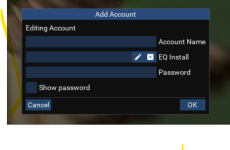
Also under settings this is a section for setting up a master password. Have you checked that and see if one has been added or changed.
Check the input path and make sure that it is pointing to ?:\Daybreak Game Company. That should be where eqgame.exe is located.
if i was in your boat this is what i would:I feel like i have done all this and none of the settings seem to save or anything.
Spent an entire day on it i dunno, never had it be an issue
- exit game entirely
- exit mq
- would check no antivirus (including windows defender) holding any files hostage (quarantine)
- then check that you're not trying to file sync (like one drive) your mq stuff
- go into your config folder
- delete the login.db-wal and login.db-shm files (not the regular login.db file)
- launch mq
- create your stuff
- see if it saves?
if for some reason it doesn't - this is what i've done in the past (before i knew that wal/shm files were causing me grief).
- exit mq
- download dbbrowser
- edit stuff in the login.db with db browser
-
I have run 54 from one...you will be fineI've read, it is better for ... I don't remember. Do you think I could do everything with only one folder and launch the .exe for every account ? No interference between any .ini ?

I run 7 different accounts from one folder with no issues.
I've read, it is better for ... I don't remember. Do you think I could do everything with only one folder and launch the .exe for every account ? No interference between any .ini ?
Complete newbie question and I didn't see the information in prior posts, but totally could have missed it. I did not update the EQ Launcher since the update last night, but Redfetch gives the patch day notification and won't allow launch via the normal update button. Am I good to use the MQ launch link within redfetch to launch MQ, do my normal autologin, and play? Or is there another process to run MQ and login without patching? Thanks in advance for your help!


> What to expect on patchdays? <Complete newbie question and I didn't see the information in prior posts, but totally could have missed it. I did not update the EQ Launcher since the update last night, but Redfetch gives the patch day notification and won't allow launch via the normal update button. Am I good to use the MQ launch link within redfetch to launch MQ, do my normal autologin, and play? Or is there another process to run MQ and login without patching? Thanks in advance for your help!
View attachment 77226
View attachment 77227
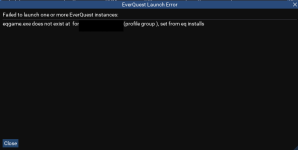
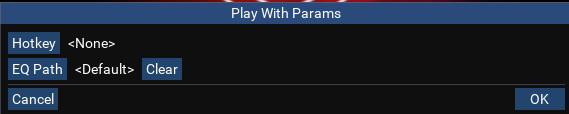
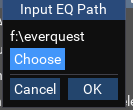
Stop doing it from play with parameters that's a single use windowThank you, sir for responding. I do that and click 'OK' and it will log me in and I can play. But when I log off and each time that I want to play, I have to re-do the path. this is the same for each account that I log in to use.
Edit: Solved via Claude - thought I had done this but apparently I did not do it correctly. Pasting here for any future search - feel free to delete:
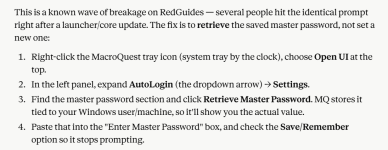
Original question below:
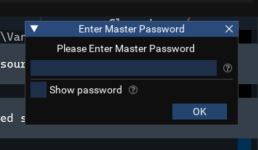
Been running everything for a couple of weeks with no issues (just started back in EQ).
Today when booting up after work this popped up for the first time. I am the only one with access to my computer so this isn't something someone accidentally created. I tried a couple of the only passwords I have associated with this and all said "invalid password". I tried to go into the Config and set a master password but when I press OK the box goes slightly faded and does nothing else. I can continue to click OK or X out.|
The real problem is this has started happening when launching my autologin 6-box: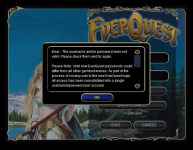
I could not find anything when searching and am pretty clueless on where to turn. I looked in config folders to see if there were any files I could edit associated with autologin but had no luck.
I have no idea what would have caused this Master Password to pop up. The only thing I have altered is my cleric/shamans
The only thing I have done myself is alter the class config files for my casters (via claude) to get it casting some of the low level spells etc.
I am able to manually type out the password and login
Any help greatly appreciated - apologies also if this is in the incorrect thread
Original question below:
Been running everything for a couple of weeks with no issues (just started back in EQ).
Today when booting up after work this popped up for the first time. I am the only one with access to my computer so this isn't something someone accidentally created. I tried a couple of the only passwords I have associated with this and all said "invalid password". I tried to go into the Config and set a master password but when I press OK the box goes slightly faded and does nothing else. I can continue to click OK or X out.|
The real problem is this has started happening when launching my autologin 6-box:
I could not find anything when searching and am pretty clueless on where to turn. I looked in config folders to see if there were any files I could edit associated with autologin but had no luck.
I have no idea what would have caused this Master Password to pop up. The only thing I have altered is my cleric/shamans
The only thing I have done myself is alter the class config files for my casters (via claude) to get it casting some of the low level spells etc.
I am able to manually type out the password and login
Any help greatly appreciated - apologies also if this is in the incorrect thread
You're talking about autologin, not redfetch.Edit: Solved via Claude - thought I had done this but apparently I did not do it correctly. Pasting here for any future search - feel free to delete:
View attachment 77502
Original question below:
View attachment 77500
Been running everything for a couple of weeks with no issues (just started back in EQ).
Today when booting up after work this popped up for the first time. I am the only one with access to my computer so this isn't something someone accidentally created. I tried a couple of the only passwords I have associated with this and all said "invalid password". I tried to go into the Config and set a master password but when I press OK the box goes slightly faded and does nothing else. I can continue to click OK or X out.|
The real problem is this has started happening when launching my autologin 6-box: View attachment 77501
I could not find anything when searching and am pretty clueless on where to turn. I looked in config folders to see if there were any files I could edit associated with autologin but had no luck.
I have no idea what would have caused this Master Password to pop up. The only thing I have altered is my cleric/shamans
The only thing I have done myself is alter the class config files for my casters (via claude) to get it casting some of the low level spells etc.
I am able to manually type out the password and login
Any help greatly appreciated - apologies also if this is in the incorrect thread
The .wal/.shm files can get boried up (sying or antivirus) and you can have something like this happen
Been putting this off as it's not a game breaker, just annoying.
But now I want to get it fixed.
Couple months ago my VV Autologin stopped working.
It gets to password screen on EQ and fails to enter the password, so i get incorrect PW error from EQ and have to enter it manually.
It also will NOT let me add new accounts or characters, I enter the info, and nothing happens, it acts like it accepted it, but nothing shows up.
How do I fix or reinstall this feature?
I tried searching in the RG folder for autologin and nothing is found so I'm puzzled where this even lives?
I'm on the current build on tlp and it's been this way the last 2 builds at least.
I've also reinstalled RG VV over the old one, no change.
Thanks for any advice.
But now I want to get it fixed.
Couple months ago my VV Autologin stopped working.
It gets to password screen on EQ and fails to enter the password, so i get incorrect PW error from EQ and have to enter it manually.
It also will NOT let me add new accounts or characters, I enter the info, and nothing happens, it acts like it accepted it, but nothing shows up.
How do I fix or reinstall this feature?
I tried searching in the RG folder for autologin and nothing is found so I'm puzzled where this even lives?
I'm on the current build on tlp and it's been this way the last 2 builds at least.
I've also reinstalled RG VV over the old one, no change.
Thanks for any advice.
Users who are viewing this thread
Total: 6 (members: 0, guests: 6)
Share: