Defaults are fine. If you click the Choose button, it should bring up a directory navigation window - click the appropriate drive letter at the top, and it's directories will show below, double click through those to get your actual EQ folder. Click OK to save the whole thing. The box that says TYPE to start is to identify the install - Live, Test, EMU, etc.

-
 Hail, we're RedGuides. We want you to play six (yes, 6!) EverQuest characters at once. We have scripts and a friendly community to help, please join our playstyle and say hello! 👋
You are using an out of date browser. It may not display this or other websites correctly.
You should upgrade or use an alternative browser.
You should upgrade or use an alternative browser.

Release AutoLogin (core plugin)
- Thread starter Redbot
- Start date

Free_Sid
Well-known member
Thanks! I got it to work...I just need to set the profile now so the whole group starts....but this was a helpDefaults are fine. If you click the Choose button, it should bring up a directory navigation window - click the appropriate drive letter at the top, and it's directories will show below, double click through those to get your actual EQ folder. Click OK to save the whole thing. The box that says TYPE to start is to identify the install - Live, Test, EMU, etc.

I ran into the same problem when I first started using Redfetch. First off you need to make sure that the path goes to the folder where eqgame.exe is. What I finaly did was find out where Daybreak Games company folder was and set the path to it. That was it just set the path to it and if you scroll down the folder you will see eqgame.exe. Once set up everything started working. Now if you want a breakdown on how to go about making a group to autologin. (step by step, just ask).
Zeb
Zeb

redfetch is only an updater for mq just like the rg launcher, it has nothing to do with mq's autologinI ran into the same problem when I first started using Redfetch. First off you need to make sure that the path goes to the folder where eqgame.exe is. What I finaly did was find out where Daybreak Games company folder was and set the path to it. That was it just set the path to it and if you scroll down the folder you will see eqgame.exe. Once set up everything started working. Now if you want a breakdown on how to go about making a group to autologin. (step by step, just ask).
Zeb


JarohTheSly
New member
I spent a long time getting auto login set up over the past 3 days. I read quite a bit, did troubleshooting on my own, and then as I scrolled through this forum I found the debugging log. Genius! Through that I was able to identify the problem (which was that I was running RedGuides as admin) and get things fixed straight away.
Just wanted to say thanks to the community and all those with vastly more knowledge than I about these things. Couldn't have done it without you.
Just wanted to say thanks to the community and all those with vastly more knowledge than I about these things. Couldn't have done it without you.

treadstone
Active member
I've been using MQ for a few days and enjoying it a lot. While exploring the options, I found that I can assign hotkeys to my characters in the Autologin > Characters menu that lets me swap between their windows with a keypress. I've assigned F1 to F6 for my team...multiple times, because the hotkey assignment isn't saving for me between sessions. So I have to go in and assign them all every time I start.
Is there a way to save these hotkey assignments?
I was also wondering about the Autologin > Profiles menu - you can assign hotkeys to characters there too, but they don't seem to do anything when I press them.
Maybe there's another menu to set permanent window switching hotkeys that I haven't found? Thanks!
Is there a way to save these hotkey assignments?
I was also wondering about the Autologin > Profiles menu - you can assign hotkeys to characters there too, but they don't seem to do anything when I press them.
Maybe there's another menu to set permanent window switching hotkeys that I haven't found? Thanks!
i use hotkeys in autologin with much joy - it was one of the things that was hard not having from ISBoxerI've been using MQ for a few days and enjoying it a lot. While exploring the options, I found that I can assign hotkeys to my characters in the Autologin > Characters menu that lets me swap between their windows with a keypress. I've assigned F1 to F6 for my team...multiple times, because the hotkey assignment isn't saving for me between sessions. So I have to go in and assign them all every time I start.
Is there a way to save these hotkey assignments?
I was also wondering about the Autologin > Profiles menu - you can assign hotkeys to characters there too, but they don't seem to do anything when I press them.
Maybe there's another menu to set permanent window switching hotkeys that I haven't found? Thanks!
here's an example from one of my profile groups
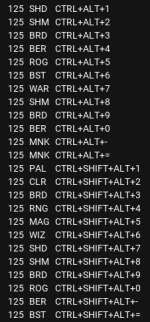
in whatever profile, you edit the profile and "Hotkey" and then do the thing
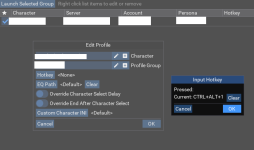
then for that profile it now shows that hotkey


Wrong forum
I'm having an issue, where when I use MQ to load up my team, it gives a wrong password error at the login screen. I can manually input the password and it logs in, but I can't just spin up my team anymore. The password is set up correctly in the configuration. I apologize if this is a new issue that's already been addressed.

wrong error password at the login screen..
is this eq's login screen?
the master password for autologin?
It's the old login that the MQ2 login tool uses, not the standard patch/login that you would normally use. I don't use a master password. I've never had an issue with this before. It started after blueguides.
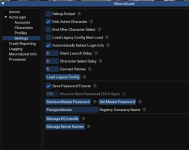
Are you using Redfetch? I had the same problem. What I found out was that in MQ where you set up your group look in the settings tab. When opend look down the list and you will see where you can enter a master password. Their is also a retrieve master password tab. Check and see if there is a password. Log in using that password when it askes for it.
Zeb
Zeb
Are you using Redfetch? I had the same problem. What I found out was that in MQ where you set up your group look in the settings tab. When opend look down the list and you will see where you can enter a master password. Their is also a retrieve master password tab. Check and see if there is a password. Log in using that password when it askes for it.
Zeb
I don't believe I'm using anything called Redfetch. I right click MQ from my tray, open the group config, choose my group, and launch group. When I set up the autologin i set up each account with the password. I went in and checked that the password was correct for each account and they are. I haven't changed them in 20 years lol. When I get home I'll follow your directions and see if that's what I need to do. Thank you for the feedback.
I have been using Redfetch or is it now bluefecth... Any way it seems that there was a master password generated when I tried to login my group. The same thing happened to me. Got to the EQ login window and it stoped. I then entered the password for that account and it went through no problem. I think that some how a master password was generated for the group as a whole, or one for all of MQ in general. This then made or removed the passwords for the accounts (I think it just blanked it) so when it tried to login an account there was no password to use and that is where everything stopped at the EQ screen. When I found the generated password for MQ and used that everything started working. I also never made a master password.
Zeb
Zeb
I have been using Redfetch or is it now bluefecth... Any way it seems that there was a master password generated when I tried to login my group. The same thing happened to me. Got to the EQ login window and it stoped. I then entered the password for that account and it went through no problem. I think that some how a master password was generated for the group as a whole, or one for all of MQ in general. This then made or removed the passwords for the accounts (I think it just blanked it) so when it tried to login an account there was no password to use and that is where everything stopped at the EQ screen. When I found the generated password for MQ and used that everything started working. I also never made a master password.
Zeb
You were right. I created a master password and now it works again /shrug. Thanks
this all but certainly means you need to go to the settings tab of redfetch and point it to where you want it to update to instead of the defaultI ran into an issue I don't know how to solve. I downloaded RedFetch and now my AutoLogin is blank. So I rebooted and tried the regular launcher and all my auto login is also empty. Is there an easy was to return it?
Thanks,
BB~
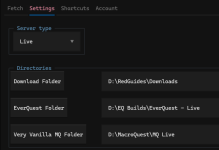
then after you update the Very Vanilla MQ Folder
hit this button
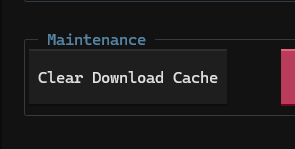
and then update

BlueBug
Seasoned veteran member
Awesome, thanks Sic!this all but certainly means you need to go to the settings tab of redfetch and point it to where you want it to update to instead of the default
View attachment 75296
then after you update the Very Vanilla MQ Folder
hit this button
View attachment 75297
and then update
BB~
recently returning to RG and attempting to use the autologin feature. my title says it all, as I feel totally dummy trying to set this up. I've followed a couple explanation vids on the subject but I just don't get it. hopefully the screenshots attached will show my problem area.
eqinstalls image: whats important in this window, (Manage EQ installs?) my assumption this targets my eq folder, yea?
Accounts image: My assumption was this area would be auto populated once i had settings correct and launched eq one time, silly me.
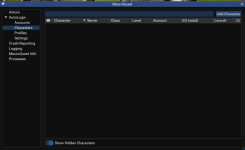
Characters image: make a team, add the toons, and set up for a one click autolaunch of those characters.
thanks in advance for any helpful instruction.
eqinstalls image: whats important in this window, (Manage EQ installs?) my assumption this targets my eq folder, yea?
Accounts image: My assumption was this area would be auto populated once i had settings correct and launched eq one time, silly me.
Characters image: make a team, add the toons, and set up for a one click autolaunch of those characters.
thanks in advance for any helpful instruction.
Attachments
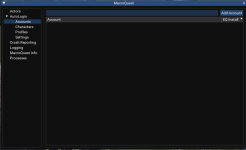
Hi, I cannot see to find the import/export in Autologin anymore? Did this go away. I want to copy my setup to a new laptop and i don't see the export selection from the Autologin menu option. Sorry if this has already been answered. I wish it would decrypt my passwords too as I have one for each toon, It gets confusing at time.
You just need the login.db from your config golderHi, I cannot see to find the import/export in Autologin anymore? Did this go away. I want to copy my setup to a new laptop and i don't see the export selection from the Autologin menu option. Sorry if this has already been answered. I wish it would decrypt my passwords too as I have one for each toon, It gets confusing at time.
Hey everyone, I am new and I was able to get the auto login to work, but I am essentially looking to set up a bot group but apparently I need get level 2 for rgmercslua. Is there another way of doing this without paying or should I just post alot and hope to get enough redcents to continue month after month?
My buddy and I are working towards figuring this out if anyone has advice for us..Hey everyone, I am new and I was able to get the auto login to work, but I am essentially looking to set up a bot group but apparently I need get level 2 for rgmercslua. Is there another way of doing this without paying or should I just post alot and hope to get enough redcents to continue month after month?
You seem to already be aware of level 2 being available for redcents since you've mentioned it elsewhere.Hey everyone, I am new and I was able to get the auto login to work, but I am essentially looking to set up a bot group but apparently I need get level 2 for rgmercslua. Is there another way of doing this without paying or should I just post alot and hope to get enough redcents to continue month after month?
My buddy and I are working towards figuring this out if anyone has advice for us..
Please make sure to read and understand those rules.
I don't want to be speaking to you in a week about a using redcents or account sharing.


Just on the path of moving my setup from using ISB to Autologin. The hotkeys to switch to sessions are a great addition, thank you!
I have one issue where I cant set a hotkey to CTRL+SHFT+0 - anyone have any ideas why or how I can diagnose? When I try and set it just doesnt recognise the 0. It seems to work for all the other combinations CTRL+SHFT+1 to =.
I have one issue where I cant set a hotkey to CTRL+SHFT+0 - anyone have any ideas why or how I can diagnose? When I try and set it just doesnt recognise the 0. It seems to work for all the other combinations CTRL+SHFT+1 to =.
Weird.Just on the path of moving my setup from using ISB to Autologin. The hotkeys to switch to sessions are a great addition, thank you!
I have one issue where I cant set a hotkey to CTRL+SHFT+0 - anyone have any ideas why or how I can diagnose? When I try and set it just doesnt recognise the 0. It seems to work for all the other combinations CTRL+SHFT+1 to =.
Are you running any other programs that hijack?
I use ctrl+alt 1 through = ctrl+shift 1 through = and control alt shift 1 through =
Have checked everything and cant find a clash, the keys dont do anything when I press them (used to work when assigned in ISB). Will keep looking....Weird.
Are you running any other programs that hijack?
I use ctrl+alt 1 through = ctrl+shift 1 through = and control alt shift 1 through =
For those interested its a known Win11 bug that can affect random CTRL+SHFT keys. Need to turn off shortcuts to switch between Windows Languages...Have checked everything and cant find a clash, the keys dont do anything when I press them (used to work when assigned in ISB). Will keep looking....
Check this thread. You shouldn't be running anything as admin.Code:[error] [AutoLogin.cpp:361] Failed to create new eqgame process: The requested operation requires elevation.
- Running with admin rights still same error.
- Installed fresh folder using Redfetch, Runs fine!.
Anyone had this?
As the title says this is the first time i have used MQ or played on emu server that has allowed it. My issue is my game wasn’t saving AAs or macros on my hot bar after completely closing client. After some searching I seen someone said it was because because of permissions so I put eq launcher and MQ as run in administrator and it would save. Now the issue is that MQ won’t auto launch my accounts (unless I load to login) but works when I take admin back off.
- Jkline410
- Replies: 8
- Forum: /yell for /help
SOLVED!!! and CENTED!!!Check this thread. You shouldn't be running anything as admin.
As the title says this is the first time i have used MQ or played on emu server that has allowed it. My issue is my game wasn’t saving AAs or macros on my hot bar after completely closing client. After some searching I seen someone said it was because because of permissions so I put eq launcher and MQ as run in administrator and it would save. Now the issue is that MQ won’t auto launch my accounts (unless I load to login) but works when I take admin back off.
- Jkline410
- Replies: 8
- Forum: /yell for /help

recently returning to both eq and MQ2. Noticed the autologin has changed slightly, anyways was wondering if anyone could coach me thru setting up auto login. I have tried few times but cant get it to work. All the videos ive searched on the topic are years old and out dated. Any guidance would be appreciated. thanks.
recently returning to both eq and MQ2. Noticed the autologin has changed slightly, anyways was wondering if anyone could coach me thru setting up auto login. I have tried few times but cant get it to work. All the videos ive searched on the topic are years old and out dated. Any guidance would be appreciated. thanks.

check the autologin overview - there's a vid
Great to see you are still at it Sic. thanks for the faster than light response. Sic has Hair?
"Updater" being redfetch? Redfetch doesn't download a new autologin database for you.Ran the updater today when I got home from work . My characters not showing up. Any suggestions? Lord knows I don't want to manually redo my 40 ish toons. Even tried the clear cache method you mentioned up a few threads.
It *sounds* like you updated redfetch, but don't have redfetch pointing to your previous mq installation location and you're basically starting over
That or you got pw printed and got it wrong
was working fine last night didn't do anything besides hit the update button till I came and read some post on here? So basically you telling me I will have to do the whole set up over? Whats pw printed?"Updater" being redfetch? Redfetch doesn't download a new autologin database for you.
It *sounds* like you updated redfetch, but don't have redfetch pointing to your previous mq installation location and you're basically starting over
That or you got pw printed and got it wrong
No. I didn't say that.was working fine last night didn't do anything besides hit the update button till I came and read some post on here? So basically you telling me I will have to do the whole set up over? Whats pw printed?
I would check:
- av, that you don't somehow have your login.db locked
- that should don't have more than 1 instal location like I said
I love it when you use 2 letter abbreviations. Like what does that mean and how? Even my Autoaccept group is jacked guess I will have to redo that one Aswell. Only reason I ask my keyboard is jacked its not allowing me to use the numbers up top. Num pad is fine. But still can't enter in my account info to restart Autologin till I get another keyboard.No. I didn't say that.
I would check:
- av, that you don't somehow have your login.db locked
- that should don't have more than 1 instal location like I said
Users who are viewing this thread
Total: 1 (members: 0, guests: 1)
Share: