• You've discovered RedGuides, an EverQuest multi-boxing and scripting community 🧙‍♀️⚙️. We want you to play several EQ characters at once, come join us and say hello! 👋

  • A TLP without truebox has thawed (Very Vanilla ready)
    Frostreaver
AutoLogin (core plugin)

Release AutoLogin (core plugin)

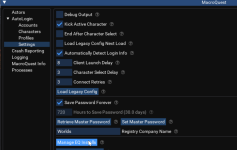
there is no .ini

launch a profile with autologin then check the command line arguments in task manager. use those command line arguments to launch through isboxer. should look like /login:<something>

Hrm. This confuses me. I am not the most savvy. I was just trying to follow the wiki and it seemed pretty straightforward if the INI file existed. I am guessing there has been an update/change to how the process works since wiki was created?

EDIT: I figured out how to work autologin with ISBoxer. I just launched the team in ISBoxer and autologin overlay showed up and I just selected the account that I had tied to that login. I was overthinking things.
 
Last edited:
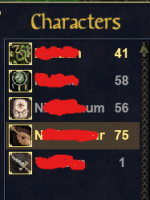
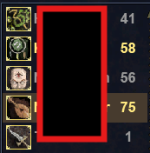
On the MQ2 character select menu i chose a "greyed out" toon a on 5/2 free player account(it was paid many years ago at some point). Auto login appeared to bypass the greyed out and set it as a "active" character. The screen shot below showing the 41 is active now, i was actively leveling the 58 shammy over the past few days and just had a missclick selecting the toon. Does this send out some red flags or is this common? Bard/Shammy were the 2 active toons on this login.

Screenshot 2025-09-20 120725.png
 
On the MQ2 character select menu i chose a "greyed out" toon a on 5/2 free player account(it was paid many years ago at some point). Auto login appeared to bypass the greyed out and set it as a "active" character. The screen shot below showing the 41 is active now, i was actively leveling the 58 shammy over the past few days and just had a missclick selecting the toon. Does this send out some red flags or is this common? Bard/Shammy were the 2 active toons on this login.

View attachment 71936
lol that's funny.

this is probably one of those "if your air bar says you're out of air, then you're out of air" - meaning that eq believes with the ui is telling them, but can be manipulated around it
 
Last edited:
lol that's funny.

this is probably one of those "if your air bar says you're out of air, then you're out of air" - meaning that eq believes with the ui is telling them, but can be manipulated around it
Yeah was quiet a surprise, i have another toon with a closely similar name to the accidental druid which is another bard. Alt tabbed back to the shd im leveling gave it time to get logged in tabbed back over and was like this is most definately not a bard... or the right account lol
 
Don’t know the impact of this, didn’t even realize it was a thing. Will fix autologin so it doesn’t to select things it shouldn’t be selecting.
 
I was able to cycle through the log ins to get it back to the appropriate active 2 toons, i guess that kinda confirms it wasnt a 1 time hiccup.
Screenshot 2025-09-20 155929.png
 
I can't get this to work every time I try to add an account or a character it does not show up in the menu. Maybe I'm just slow but at this point it's making me want to throw my pc out the window. I have watched the video, 3x and have concluded how do you make a video as a tutorial with everything already set up. but something seems to be missing. Can someone pls help.
 
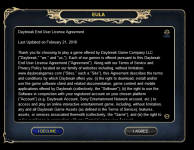
This suddenly stopped working for me today. I've been using it for years, and suddenly today it just keeps stopping at the EULA screen and does nothing. It worked earlier in the day, and then stopped working. I've tried rebooting with no success. Anyone have any suggestions?
 
This suddenly stopped working for me today. I've been using it for years, and suddenly today it just keeps stopping at the EULA screen and does nothing. It worked earlier in the day, and then stopped working. I've tried rebooting with no success. Anyone have any suggestions?
Check antivirus quarantine (then consider whitelisting eq, mq, and RG folders).
Check you're not trying to runq or eq elevated.

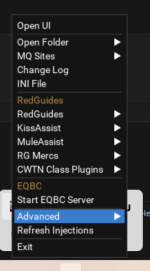
You can right click on mq on the sys tray and turn on debugging and it might tell you something useful
 
Check antivirus quarantine (then consider whitelisting eq, mq, and RG folders).
Check you're not trying to runq or eq elevated.

You can right click on mq on the sys tray and turn on debugging and it might tell you something useful
Nothing is quarantined. Exe's are whitelisted as always in BitDefender.

I was actively playing on other accounts with no problem. At the same time I was suddenly unable to log in to any other accounts with autologin. Now that I've logged out of those other accounts, I can't log into any account through autologin.

I rebooted with no change. I reinstalled Very Vanilla with no change. I disconnected and shut down my VPN with no change.

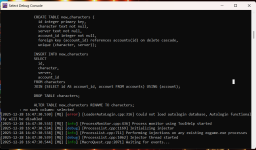
I enabled debug output on the autologin plugin, but I don't know where that logs to. The MQ debug console is clean with or without the debug enabled.

debug console.png

I'm not sure how to check if autologin is trying to run with elevated privileges ... I haven't changed anything there ... well ... ever

Basically, I'm stuck at this point
 
I was having the same issue. I switched to redfetch and it works now.
other than if your rg launcher is set to run as admin, the rg launcher and redfetch don't inherently make mq work/not-work, but if your location has permission issues (like %APPDATA% or some other higher protected directory location) then redfetch and putting it somewhere without permission restrictions would correct it (i always recommend putting mq somewhere easily accessible - c:/MQ etc)

Nothing is quarantined. Exe's are whitelisted as always in BitDefender.

I was actively playing on other accounts with no problem. At the same time I was suddenly unable to log in to any other accounts with autologin. Now that I've logged out of those other accounts, I can't log into any account through autologin.

I rebooted with no change. I reinstalled Very Vanilla with no change. I disconnected and shut down my VPN with no change.

I enabled debug output on the autologin plugin, but I don't know where that logs to. The MQ debug console is clean with or without the debug enabled.

View attachment 72913

I'm not sure how to check if autologin is trying to run with elevated privileges ... I haven't changed anything there ... well ... ever

Basically, I'm stuck at this point
yeah looks like it is injecting fine there, which is good.

re: whitelist - are just the .exe or are the folder/sub-folders? cause they need to be, if your autologin.db is somehow restricted, or some other file that isn't just the .exe you may have problems.

are you using any file syncing on those files like onedrive or similar? file locking might happen
 
I was having the same issue. I switched to redfetch and it works now.
Thanks for the suggestion, but sadly redfetch didn't help. It's the same issue. Logging in stops at the EULA screen. It doesn't appear to click the 'I Agree' button. I have confirmed I can manually log in from that point on if I click I Agree and then put in my own login info. This is very strange since I didn't do anything, or update anything, and I was actively playing on other accounts at the same time.
 
Thanks for the suggestion, but sadly redfetch didn't help. It's the same issue. Logging in stops at the EULA screen. It doesn't appear to click the 'I Agree' button. I have confirmed I can manually log in from that point on if I click I Agree and then put in my own login info. This is very strange since I didn't do anything, or update anything, and I was actively playing on other accounts at the same time.
are you using a set time on your autologin password, and are now past that time?

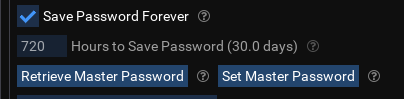
Autologin on mq sys tray -> open config -> this info

1764467700537.png
 
are you using a set time on your autologin password, and are now past that time?

Autologin on mq sys tray -> open config -> this info

View attachment 72914
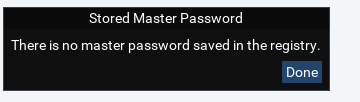
Save Password Forever was not on. I've now turned it on. However, it looks like I never bothered to set a master password in the first place since 'Retrieve Master Password' returns this:

Master Password.png
I'm not sure how this would affect the login process.

I've also whitelisted the entire release folder and it's still not working.
 
Save Password Forever was not on. I've now turned it on. However, it looks like I never bothered to set a master password in the first place since 'Retrieve Master Password' returns this:

View attachment 72915
I'm not sure how this would affect the login process.

I've also whitelisted the entire release folder and it's still not working.

More info ...

'Launch Without Login' under autologin has the same behavior (does not go past the EULA screen). I also created a brand new account and character, and the behavior is the same - this pretty much eliminates some sort of password / expiration / hashing / encryption issue.
 
More info ...

'Launch Without Login' under autologin has the same behavior (does not go past the EULA screen). I also created a brand new account and character, and the behavior is the same - this pretty much eliminates some sort of password / expiration / hashing / encryption issue.
launch without login is literally "just take me to the screen that i have to put a username and password in". You can do this with no autologin profiles/characters/etc

When i click "launch without login" it takes me to the login info window and I see this on the top left of my screen

1764471649384.png


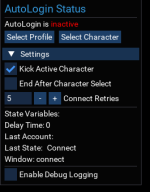
can you try turning on enable debug logging, and then "select profile" or "select character"
 
If the client does not go past the eula screen it means the autologin plugin is not loaded. It always clicks past the eula screen regardless of if it is performing a login or not.
 
If the client does not go past the eula screen it means the autologin plugin is not loaded. It always clicks past the eula screen regardless of if it is performing a login or not.
This.

I have no idea how it got unloaded, but I when I logged in and loaded the plug-in (it said loaded so obviously was not there), it works again.

Thanks!
 
My autologin stops at the EULA screen and even when I manually click "Accept" it doesn't log in.

View attachment 72942
Each resource on RG has an Overview / Discussion Thread and either a link to their wiki or tabs with FAQ, Commands, Etc.
Please make sure to post in the respective discussion thread, and check the FAQ/Commands/Wiki for information before posting.

- you should post autologin question in the autologin thread.
- your image doesn't need to be billboard size

- you probably accidentally have mq2autologin unloaded; /plugin autologin
 
This was actually my initial problem from the original comment I had left.. I originally didn't have the plugin loaded. Once I ran thru all the steps and loaded the plugin everything showed up and loaded just fine.

Logically, it is kind of backwards that you need to login and activate autologin plugin before you can login automatically. Reminds me of TBL progression.
 
This was actually my initial problem from the original comment I had left.. I originally didn't have the plugin loaded. Once I ran thru all the steps and loaded the plugin everything showed up and loaded just fine.

Logically, it is kind of backwards that you need to login and activate autologin plugin before you can login automatically. Reminds me of TBL progression.
autologin is a defaulted "loaded" plugin just as an fyi
 
My autologin stops at the EULA screen and even when I manually click "Accept" it doesn't log in.

View attachment 72942
If the client does not go past the eula screen it means the autologin plugin is not loaded. It always clicks past the eula screen regardless of if it is performing a login or not.
This.

I have no idea how it got unloaded, but I when I logged in and loaded the plug-in (it said loaded so obviously was not there), it works again.

Thanks!
 
Is there a way to move my AutoLogin profiles to another computer? I am setting up another computer but what to keep my same profiles without manually re-adding each one. Is this possible?
 
Is there a way to move my AutoLogin profiles to another computer? I am setting up another computer but what to keep my same profiles without manually re-adding each one. Is this possible?
The information is stored in login.db.
That file is located in your MQ config folder.
If you've adjusted your auto login very recently, there is a potential that you might need the other .DB files, but, you should be able to just copy the first one. :)
 
The information is stored in login.db.
That file is located in your MQ config folder.
If you've adjusted your auto login very recently, there is a potential that you might need the other .DB files, but, you should be able to just copy the first one. :)

Thank you, I will try it. 🙏
 
1766959205331.png Something is wrong with my Autologin. This is all that shows up now and it didnt do this before. Here is what I get when I run the debug. 1766959282447.png

It shows the error but no explanation. I have checked to ensure that the .ini is correct, it is. I am not running in administrator mode, nor using any other programs in conjunction. It just started doing this and I'm kinda lost as to why. I also tried reinstalling everything and it doesn't fix the issue. This started a few days ago, never had a problem before. thoughts?
 
Reinstall wouldn't fix an issue with the db files, @Derple had that happen once (he shared it on Discord but not sure if it was your issue we were most recently discussing).
Try moving login.db-shm and login.db-wal out of your config folder temporarily. If that doesn't solve it, try moving login.db as well (and if that solves it, you'll likely just want to start over on autologin setup).
View attachment 73851 Something is wrong with my Autologin. This is all that shows up now and it didnt do this before. Here is what I get when I run the debug. View attachment 73852

It shows the error but no explanation. I have checked to ensure that the .ini is correct, it is. I am not running in administrator mode, nor using any other programs in conjunction. It just started doing this and I'm kinda lost as to why. I also tried reinstalling everything and it doesn't fix the issue. This started a few days ago, never had a problem before. thoughts?
 
It just started doing this
Famous last words! I would know lol

Have you added any new characters just before it started acting up? Like algar says, it sounds like a db issue and working backwards on changes you made might help isolate the issue. On the other hand if you’re fine with it, a complete restart would do the same without the headache of experimentation
 
Okay after many many attempts at setting up my group, I can now autologin the whole group at once. (Cheers) As I see it that is all autologin does is just login the group. Looks like I need to now use autogroup to gather up all my wayward toons. Well back to the videos and looking at more guides. Although one would think that someone would try to merge the two together to log them in and then group them up. Well back to messing things up....L8R
 
Okay after many many attempts at setting up my group, I can now autologin the whole group at once. (Cheers) As I see it that is all autologin does is just login the group. Looks like I need to now use autogroup to gather up all my wayward toons. Well back to the videos and looking at more guides. Although one would think that someone would try to merge the two together to log them in and then group them up. Well back to messing things up....L8R
Sounds great my dude!
But what would happen when you don't want them grouped?

Give this info a shot:

I use makecrew atm for most things. Make sure you set up MQ2AutoAccept by using the nifty little copy/paste codeblock so your dudes will auto accept the things!
 
WoW Algar!!! Gona have to look into the Lau stuff. Now I said to myself, self if I went through all the trouble to set up six toons and make it so I can log them in all at once why would I not want them grouped together? Self replied and said Raid. You might want to switch out group members with other toons for better dps on a raid. OR you might want just say 5 members and want to power level another toon. OKay self you thought this through so lets look at this autogroup or make crew as well as autoaccept. Thanks for pointing me in some direction Algar.
 
Wrong forum
I've been gone for 7ish years?

Lots has changed! Lots stayed the same. I searched and listened to about an hours worth of video's but it did not answer my question.

I have 4 installs of Everquest. As I'm setting up characters in autologin it's asking me for accounts, PATHS, passwords, etc. It's doesn't appear to actually keep the game directory path info and updates it to whatever the last one I entered was. Does it not support multiple game installs?

Again, it's been awhile since I've played. I remember making multiple installs due to chat issues - wanting to see melee hits on one, not wanting to see it on another. I don't exactly remember to be honest - maybe it's not an issue any more? Still though - my question is, does auto login support multiple EQ installs.

Thanks in advance!
 
I run 6 box on one laptop and dont have any chat issues.
I would start on just one install and see how it goes.
The filter options on the chat windows are pretty good - lots of options now.
 
Again, it's been awhile since I've played. I remember making multiple installs due to chat issues - wanting to see melee hits on one, not wanting to see it on another. I don't exactly remember to be honest - maybe it's not an issue any more? Still though - my question is, does auto login support multiple EQ installs.
Yes, it does.
1768747671201.png
 
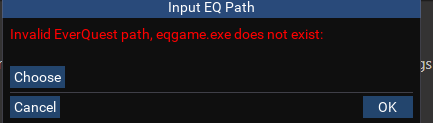
I wanted to load EQ and MQ on another computer. I downloaded the launcher. Logged a guy in and its all working but I cant seep to figure out how to configure the new auto log in. the video was for the old set up. I go to settings > then EQ installs > Add Install...i get the following error...

1768870550534.png


when i try to add account I get the same error.....I then choose path and click ok but nothing happens. It doesnt fill the box. I am at a loss and have spent the past week going through the forums. I am hoping someone has some good instructions I missed.

Is there a better place to save EQ and or Macroquest? I just chose the default for both.
 
Release AutoLogin (core plugin)

Users who are viewing this thread

Back
Top
Cart