Yes, I was able to start EQ and log in a character using a shortcut to the eqgame exe with "patchme" added to the command.So you said launch pad gets through (and yeah that was very relevant)... Does bypassing the launchpad without MQ get through?
I ask in case your AV or firewall or whatever may have launcher and client under two separate entries. That doesn't make sense to me, but I've seen stranger.
@Lidori

-
 Hail, we're RedGuides. We want you to play six (yes, 6!) EverQuest characters at once. We have scripts and a friendly community to help, please join our playstyle and say hello! 👋
You are using an out of date browser. It may not display this or other websites correctly.
You should upgrade or use an alternative browser.
You should upgrade or use an alternative browser.

Release AutoLogin (core plugin) (2 Viewers)
- Thread starter Redbot
- Start date
Hi guys im a returning playa. I have 2 computers 2 seperate locations. The first location works well and everything was easy to install and works better than ever before. the second location is not working, i loaded macroquest and attempt to load a profile and it would not allow me to. I click on characters and do not see any.... it appears im missing something... Am i allowed to use redguides and the associated software with two computer or is this not allowed and causing this issue?
what i've done so far is to load up EQ and load my 6 accounts to this computer.
updated everthing i could on redguies etc...
thanks again
xxx
what i've done so far is to load up EQ and load my 6 accounts to this computer.
updated everthing i could on redguies etc...
thanks again
xxx

you can use multiple computers just fine.Hi guys im a returning playa. I have 2 computers 2 seperate locations. The first location works well and everything was easy to install and works better than ever before. the second location is not working, i loaded macroquest and attempt to load a profile and it would not allow me to. I click on characters and do not see any.... it appears im missing something... Am i allowed to use redguides and the associated software with two computer or is this not allowed and causing this issue?
what i've done so far is to load up EQ and load my 6 accounts to this computer.
updated everthing i could on redguies etc...
thanks again
xxx
you can't have multiple rg accounts
you'll have to give more information on the second location "not working"
"click on characters and don't see any" - where is this? after server select screen? did you put in the wrong server for your autologin?
well, you'd have to copy over your .db if you wanted to have all your accounts - they're not stored in the cloud somewhere, so if it is a fresh install, they'd be missing.I launch MQ, then i right click the MQ (macroquest) button. then I look for profiles and charters and this is a new computer so i do not see anything. i attempt to click on profiles to add one. It would not let me.
thanks sic
what does "it would not let me" mean.
if you have AV/file-syncing running, check that you're not kicking yourself by file locking / holding stuff hostage
AV is antivirus - sometimes they'll flag rg/mq/eq folders and disallow from things being edited or accessedAV/file sycing running, what does that exactly mean and how do i fix tha? im will to update the keys and binds i have written down for this computer.
file syncing are things like one-drive
if you haven't moved over your login.db from your computer 1's config folder to your computer 2 config folder i'd do that
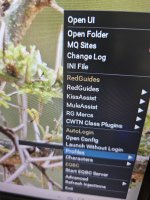
yes, showing you have no profilesscreen shot
you add them in the "open config" you see in your screenshot
or you can move over the file i mentioned
just follow the prompts to input your informationUnfortunately I do not have that file with the toons into. I did shut down the antivirus. Are there instructions on line that might help with reloading all of my toons?
thanks once again, SIC

jh86
Well-known member
If you manually log in your accounts you want to use on that computer it should save them for future auto logins.sorry sir is there any way to write out instructions so my NON computer brain can grasp how u load this. i see nothing on line.
tks again SIC

Type it in…like so…or copy the file from computer A to Bsorry sir is there any way to write out instructions so my NON computer brain can grasp how u load this. i see nothing on line.
tks again SIC


Ok, quick fit.. you have a kitchen/garage/dresser drawer.. you move to new house, now that place is gone. You come to RG, hey how do i get X back.. we say go grab it.. your like cant do that.. so at this point we are saying remake the kitchen/garage/dresser drawer.. if you cant touch and copy old one, will need to remake... mq2autologin has a vid, and alot of discussions on setting it up. You should do that.
So I am starting to get more comfortable with everything, I am having one issue with auto log in. It keeps going to the EULA and does not seem to be opening with the launcher to skip it. Is there anyway to fix this or am I just stuck manually logging in each account?
you need to add your toons to autologinSo I am starting to get more comfortable with everything, I am having one issue with auto log in. It keeps going to the EULA and does not seem to be opening with the launcher to skip it. Is there anyway to fix this or am I just stuck manually logging in each account?
The current MQ2Autologin RedGuide's video is based on the old autologin system, a new RG video is in the works, so things look different than that.
The new MQ2AutoLogin is really easy to setup once you have a feeling for what you're doing. If you check out these steps you'll be autologging in, in no time!
if you right click on your mq icon you can go to "Open Config" for autologin
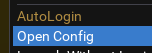
then you want to go to profiles (you can start with accounts and work down, but this is the route i went to show you)
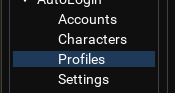
then you want to create a new group (or select a group you already made that you want to add accounts/characters to)
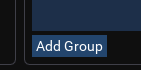
I'm creating "Hardknox" profile group
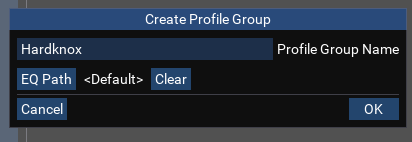
now I have the group, I want to add a profile to it
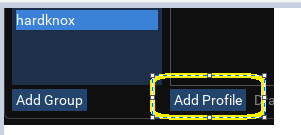
the profile input box i would be able to just click and then select from a dropdown, but since i don't have the character I want to add, i'm gonna hit the "+"
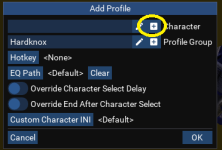
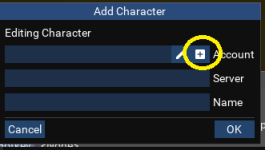
the account input box i would be able to just click and then select from a dropdown, but since i don't have the account I want to add, i'm gonna hit the "+"
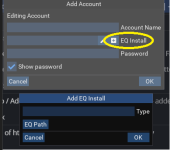
you may also need to hit the "+" here to create an EQ install
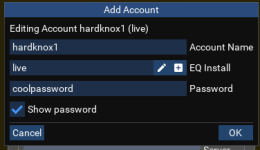
If you need to create an EQ Install
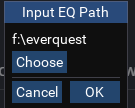
you can click the "EQ Path" above and then "choose" and then navigate to where you have everquest installed.
mine is easy to find, it is on my F:/ drive in a folder called "everquest"
now i have that added as "live" i can click in the input bar and select the "live" from the dropdown

now i have created the account, i can add that account to a character (dropdown)
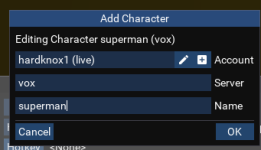
now i have a character, i can add that back to the profile we started at
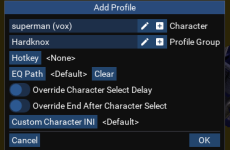
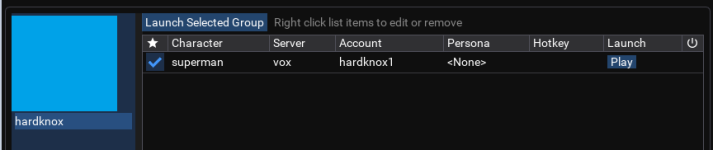
Here's a video @grimmier made (until i get around to making one, and until RG has RG official one from @Redbot
I also noticed the same time I started having log in issues my key mapping stopped working to switch from one account to another. All setting seem to be set the same though.
I have the toons added and all set up in a profile. using the same log in path and path is set correctly as far as I can tell
Just went through each profile to make sure path was set correctly and it still is loading with EULA not the launcher
I have the toons added and all set up in a profile. using the same log in path and path is set correctly as far as I can tell
Just went through each profile to make sure path was set correctly and it still is loading with EULA not the launcher
please re-look at the post above, i added some pictures and wordsI also noticed the same time I started having log in issues my key mapping stopped working to switch from one account to another. All setting seem to be set the same though.
I have the toons added and all set up in a profile. using the same log in path and path is set correctly as far as I can tell
Just went through each profile to make sure path was set correctly and it still is loading with EULA not the launcher
please re-look at the post above, i added some pictures and words
Thank you for taking the time to do that, however those are the steps I took to set up my profile in the launcher.please re-look at the post above, i added some pictures and words
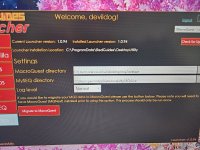
i deleted your pics as they had your server and toon names in them (please don't post your server and toon names.)Hi sic, thank so much, i loaded the group up and now i get this error msg when i try to load the group up.?
tks again
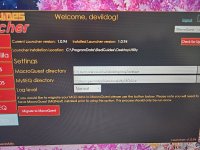
when you do this part, you have to select your eqinstall
if you don't have one you can click the "+" like i mentioned
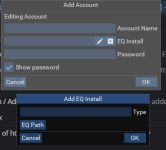
you can click the "EQ Path" above and then "choose" and then navigate to where you have everquest installed.
mine is easy to find, it is on my F:/ drive in a folder called "everquest"
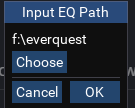
now i have that added as "live" i can click in the input bar and select the "live" from the dropdown

if you don't have one you can click the "+" like i mentioned
you can click the "EQ Path" above and then "choose" and then navigate to where you have everquest installed.
mine is easy to find, it is on my F:/ drive in a folder called "everquest"
now i have that added as "live" i can click in the input bar and select the "live" from the dropdown
you change the path in the place i saidwhere would i change the path and to what exactly? or is each path/computer different?
hit the "choose" and then navigate to the location on your computer where you have everquest installed
hell yeah dudeAMAZING, OMG, FANTASTIC. you can teach monkey's new tricks..
thanks so much for all you diligent help.
MQ2 alll loaded just a few more tweeks and i'll be up and playing!!!
tks again
keep us in the loop - if you need help just ask (and be specific)
there is a post on how to move your autologin that i tagged on to explain how to move your ini file , it is not the same name anymore , this is what i think im reading.I launch MQ, then i right click the MQ (macroquest) button. then I look for profiles and charters and this is a new computer so i do not see anything. i attempt to click on profiles to add one. It would not let me.
thanks sic
Last edited:
MegaphoneCrooner
Member
Trying to get started after the download and install update. Having lots of issues understanding the videos. Lots of half explained things where your experience with this is taking others knowledge for granted. I can't select a profile where there is no profile.
Post in thread 'MQ2AutoLogin' https://www.redguides.com/community/threads/mq2autologin.43323/post-633533Trying to get started after the download and install update. Having lots of issues understanding the videos. Lots of half explained things where your experience with this is taking others knowledge for granted. I can't select a profile where there is no profile.
Good afternoon.
I'm sure this has been asked before, however, I can't find anything while searching for it.
I want to transfer my entire autologin setup from one PC to another. (IE Travel Laptop to Home PC, and vice vers)
But I can't seem to figure out what file to xfer.
MQ2AUTOLOGIN.INI had a ton of OLD profiles that I have deleted and or moved, and didn't do anything wen I moved it.
Any info would be great! Thank you
Sincerely,
Jarlentor
I'm sure this has been asked before, however, I can't find anything while searching for it.
I want to transfer my entire autologin setup from one PC to another. (IE Travel Laptop to Home PC, and vice vers)
But I can't seem to figure out what file to xfer.
MQ2AUTOLOGIN.INI had a ton of OLD profiles that I have deleted and or moved, and didn't do anything wen I moved it.
Any info would be great! Thank you
Sincerely,
Jarlentor

Plugin - - MQ2AutoLogin
Hello all. I have a very minor issue that I"m assuming ( I know I know) is AutoLogin- Using the latest way I click Open Config under AutoLogin. The MacroQuest box pops up, under the AutoLogin tab there is where I launch my toons. On raids as I getting a lot of video lag and I noticed for each...
 www.redguides.com
it means your autologin isn't pointed to your eq folder.I'im sorry if this has been discussed else where but im have this error message pop buy when im trying to use auto login anyone help me?
Release - AutoLogin (core plugin)
So you said launch pad gets through (and yeah that was very relevant)... Does bypassing the launchpad without MQ get through? I ask in case your AV or firewall or whatever may have launcher and client under two separate entries. That doesn't make sense to me, but I've seen stranger. @Lidori...
www.redguides.com
MegaphoneCrooner
Member
I wasn't expecting this prompt. Everything is working ok but I think after changing it a few times I am completely confused as to which password in my list is correct. I did generate 10 sets of numbers for two step authentication but not sure where to use them or when it will be necessary. Will I need a password reset later? I guess we can cross that bridge when we get to it.

GKD1231
Well-known member
I dont know what I am doing wrong, but I am sure it is user error. When I click on the tray icon, and right click the MQ icon, the go to profiles, I do not get the drop down menu to create a profile. So I never get the profile box. I had set this up on a previous computer a few years back, so I know how to do it. It is just not letting me.
I have left clicked the MQ icon and brought of a window where you should be able to add accounts, characters, profiles, etc. I have entered them sever times but it never saves them.
I checked, and MQ2autologin is loaded.
Any ideas???
I have left clicked the MQ icon and brought of a window where you should be able to add accounts, characters, profiles, etc. I have entered them sever times but it never saves them.
I checked, and MQ2autologin is loaded.
Any ideas???
Users who are viewing this thread
Total: 3 (members: 0, guests: 3)
Share: