I at some point accidently clicked on the program manager v1908 and clicked off mq2autologin with out knowing lol... so whenever I tried to do auto login it would just bring me to the screen and i wasn't sure why. but then i thought maybe while alt tabbing around etc. i might have clicked it off. sure enough! feel dumb asking though.

-
 Hail, we're RedGuides. We want you to play six (yes, 6!) EverQuest characters at once. We have scripts and a friendly community to help, please join our playstyle and say hello! 👋
You are using an out of date browser. It may not display this or other websites correctly.
You should upgrade or use an alternative browser.
You should upgrade or use an alternative browser.

Release AutoLogin (core plugin)
- Thread starter Redbot
- Start date


mine does the same thing. I deleted everything and tried to start new and now it wont save the characters when I add them.My Autologin just stopped putting in the correct password. And when I try to change it back on the account edit feature afterwards I check and it's gibberish again
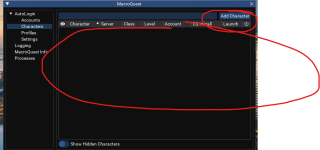
There needs to be a new creation video on how to set this up, since things have changed.

By"deleted everything" did you also delete all the stuff in the "Accounts" tab?mine does the same thing. I deleted everything and tried to start new and now it wont save the characters when I add them.
View attachment 63646
There needs to be a new creation video on how to set this up, since things have changed.
If so, I believe you will have to renter the account login info before you can use the add characters button
Yes, I tried to start completely fresh. It will not save my account information in order to create the characters. Is there a setting somewhere I have to check before entering information, in order to get it to save?By"deleted everything" did you also delete all the stuff in the "Accounts" tab?
If so, I believe you will have to renter the account login info before you can use the add characters button
I hope I am not repeating previously answered questions.
Unfortunatly on 1 of 2 computers autologin from the MQ icon has disappeared. Any suggestions on how to repair this?
Unfortunatly on 1 of 2 computers autologin from the MQ icon has disappeared. Any suggestions on how to repair this?

Each resource on RG has an Overview / Discussion Thread and either a link to their wiki or tabs with FAQ, Commands, Etc.I hope I am not repeating previously answered questions.
Unfortunatly on 1 of 2 computers autologin from the MQ icon has disappeared. Any suggestions on how to repair this?
Please make sure to post in the respective discussion thread, and check the FAQ/Commands/Wiki for information before posting.
you likely have some conflicting overlay like nahimic or overwolf
Thank you very much for the info, and moving me to the right area.Each resource on RG has an Overview / Discussion Thread and either a link to their wiki or tabs with FAQ, Commands, Etc.
Please make sure to post in the respective discussion thread, and check the FAQ/Commands/Wiki for information before posting.
you likely have some conflicting overlay like nahimic or overwolf
Unfortunatly, I have nothing like that. So would a fresh install potentially be needed?
"fresh install" mq isn't really "installed" like you're probably thinking of.Unfortunatly, I have nothing like that. So would a fresh install potentially be needed?
is MQ otherwise working? like if you right click on it do you see windows?
if so, go to Open Folder -> Config
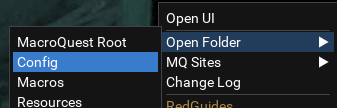
then MacroQuest.ini

you should see "mq2autologin=1" and not blank or "mq2autologin=0" under the
[Plugins] section
INI:
[Plugins]
mq2autologin=1
if you don't change that to =1

juice999
the Degenerate
Is there any way to add a bit of delay between loading each client when you select "Launch All Starred"? I've been manually staggering my launches for a while now, but it would be really nice if it just did it by default.
The issue with all the clients opening so quickly when you use the Launch All function is it will sometimes bug out a client and load with full default settings, or reset Lua window locations. By staggering the launches by about 5 seconds between each launch prevents this from ever happening.
The issue with all the clients opening so quickly when you use the Launch All function is it will sometimes bug out a client and load with full default settings, or reset Lua window locations. By staggering the launches by about 5 seconds between each launch prevents this from ever happening.
Is there any way to add a bit of delay between loading each client when you select "Launch All Starred"? I've been manually staggering my launches for a while now, but it would be really nice if it just did it by default.
The issue with all the clients opening so quickly when you use the Launch All function is it will sometimes bug out a client and load with full default settings, or reset LUA window locations. By staggering the launches by about 5 seconds between each launch prevents this from ever happening.
Client Launch Delay?
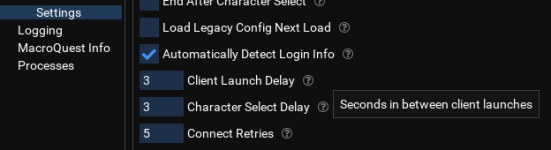
juice999
the Degenerate
Oh my god, I don't know how I missed this. Thank you, sic.
As always it's just my stupid ass having completely unawareness to a feature.
Hey gang, odd here, been using autologin and profiles for a year and when I logged in today... the profiles section is not being displayed on my mq options. Checked profile, autologin=1 and when I manually login, my autogroup and everything else in mq is working perfectly..... I did a repair, no change... thoughts?
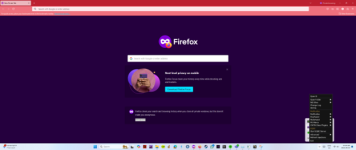
have you double checked your antivirus to ensure you dont have any quarantined files?Hey gang, odd here, been using autologin and profiles for a year and when I logged in today... the profiles section is not being displayed on my mq options. Checked profile, autologin=1 and when I manually login, my autogroup and everything else in mq is working perfectly..... I did a repair, no change... thoughts?
View attachment 64006
Hey thanks for the response Sic, yeah checked everything all seems fine and it is odd that MQ2 is fully functional except the profile section. All my plugins are working but as you can see from the screen shot, only the profile section is missing from MQ2, goodness what could cause that? I checked it and mq2autologin is loaded, autogroup is working also, and it is odd that only that one section on MQ2 is not active? any ideas?have you double checked your antivirus to ensure you dont have any quarantined files?
ok, I have disabled anti-virus, no change, the profile section does not show up on my mq2.... all the other areas are there... no profiles....Hey thanks for the response Sic, yeah checked everything all seems fine and it is odd that MQ2 is fully functional except the profile section. All my plugins are working but as you can see from the screen shot, only the profile section is missing from MQ2, goodness what could cause that? I checked it and mq2autologin is loaded, autogroup is working also, and it is odd that only that one section on MQ2 is not active? any ideas?
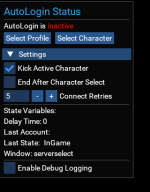
Also, when I manually log in with mq2 active, the following is in the top left corner, it indicates autologin is inactive, I have checked the mq2.ini and autologin is set =1.....
Any thoughts?
Wrong forum
I'm getting this error tonight. I put in my password say "abc" and it corrupts to random junk like: 'Z l<A6r3
I'm unable to log in, I've restarted my computer. The rest of my system seems fine right now - I don't suspect bad memory or anything at this time.
I'm also unable to add new accounts either.
Has anyone else ran into this issue and fixed/solved it?
I ended up reinstalling very vanilla MQ, it prompted me for the master password, and everything is working again with nothing corrupted. So there might be something going on where the master password expires and doesn't prompt the user to re-enter it and thus you get junk for your passwords.
I'm unable to log in, I've restarted my computer. The rest of my system seems fine right now - I don't suspect bad memory or anything at this time.
I'm also unable to add new accounts either.
Has anyone else ran into this issue and fixed/solved it?
I ended up reinstalling very vanilla MQ, it prompted me for the master password, and everything is working again with nothing corrupted. So there might be something going on where the master password expires and doesn't prompt the user to re-enter it and thus you get junk for your passwords.
ok big brained folks, I am having a problem with macroquest. I posted this before but did not get any real traction on it so going to try again with what I have done and eliminated and maybe you folks can recommend my next course of action.
Ok here is the issue, autologin profiles section is missing from my mq2:
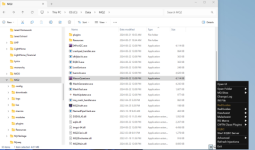
I have used the autologin for ages and suddenly it disappeared. My group was perfectly running and now I do not get the profile section to appear. This started happening on both my laptop and my desktop.
OK what I have done to investigate:
I turned off bit defender virus and firewall tool - no effect
I checked and all my exception rules were still there in bit defender (on or off) the virus protection is not affecting my operation of Mq2 when I load my toons and group them up.
When I manually activate my eqbc server and login to everquest manually, all is good. MQ2 is fully active and all my plugins are working, my group (once manually loaded) operates exactly as before.
This is the corner display when I get the server select screen:
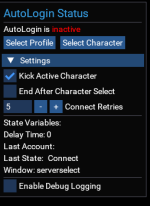
This is the mq2 display at character select:
when on my character, I confirm I have 46 plugins loaded, everything runs perfectly... but I do not get the option for profiles at macroquest start up.......
ANYONE HELP??????
Ok here is the issue, autologin profiles section is missing from my mq2:
I have used the autologin for ages and suddenly it disappeared. My group was perfectly running and now I do not get the profile section to appear. This started happening on both my laptop and my desktop.
OK what I have done to investigate:
I turned off bit defender virus and firewall tool - no effect
I checked and all my exception rules were still there in bit defender (on or off) the virus protection is not affecting my operation of Mq2 when I load my toons and group them up.
When I manually activate my eqbc server and login to everquest manually, all is good. MQ2 is fully active and all my plugins are working, my group (once manually loaded) operates exactly as before.
This is the corner display when I get the server select screen:
This is the mq2 display at character select:
when on my character, I confirm I have 46 plugins loaded, everything runs perfectly... but I do not get the option for profiles at macroquest start up.......
ANYONE HELP??????
did you need to re-enter your password?ok big brained folks, I am having a problem with macroquest. I posted this before but did not get any real traction on it so going to try again with what I have done and eliminated and maybe you folks can recommend my next course of action.
Ok here is the issue, autologin profiles section is missing from my mq2:
View attachment 64366
I have used the autologin for ages and suddenly it disappeared. My group was perfectly running and now I do not get the profile section to appear. This started happening on both my laptop and my desktop.
OK what I have done to investigate:
I turned off bit defender virus and firewall tool - no effect
I checked and all my exception rules were still there in bit defender (on or off) the virus protection is not affecting my operation of Mq2 when I load my toons and group them up.
When I manually activate my eqbc server and login to everquest manually, all is good. MQ2 is fully active and all my plugins are working, my group (once manually loaded) operates exactly as before.
This is the corner display when I get the server select screen:
View attachment 64367
This is the mq2 display at character select:
View attachment 64368
when on my character, I confirm I have 46 plugins loaded, everything runs perfectly... but I do not get the option for profiles at macroquest start up.......
ANYONE HELP??????
I made mine "save password forever" so i don't run into that
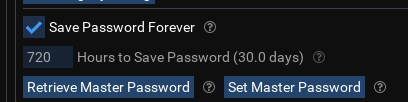
Hey boss, where is this option I am not seeing it in may of my windowsdid you need to re-enter your password?
I made mine "save password forever" so i don't run into that
View attachment 64369
right click on MQ in systray -> "Open Config" under autologin -> "Settings" under "AutoLogin"Hey boss, where is this option I am not seeing it in may of my windows
yeah this is the core of the problem I think, this is my right click on mq in systray:right click on MQ in systray -> "Open Config" under autologin -> "Settings" under "AutoLogin"
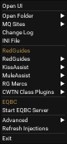
Only config I have is under open folder there is no autologin.... unless I am missing something...
Select open UI should take you to the same window. then folow Sic's Advice to get to where he's talking about.yeah this is the core of the problem I think, this is my right click on mq in systray:
View attachment 64372
Only config I have is under open folder there is no autologin.... unless I am missing something...
double check your antivirus and make sure nothing is quarantined. it sounds like the db is missingyeah this is the core of the problem I think, this is my right click on mq in systray:
View attachment 64372
Only config I have is under open folder there is no autologin.... unless I am missing something...
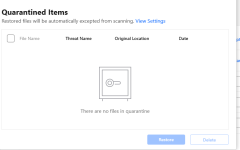
that's pretty strangeSic really appreciate the time you are spending on this... Nope nothing in quarantine....
View attachment 64373
if you go into your config folder do you see a login.db?
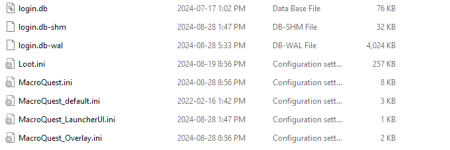
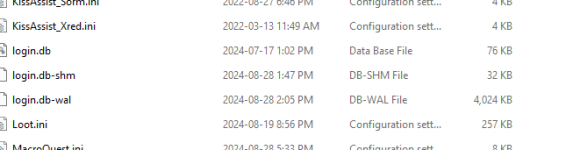

The older date would be the last time you made any changes to it. The -shm and wal files I think are temporary files, meaning the database is being accessed by MQ currently. I would definitely check the saved password, as that has bitten me in the butt before.
ok folks I could not figure out how to repair it, I finally fully removed mq2 and installed from fresh and I have it fully functional again.... odd for sure.....The older date would be the last time you made any changes to it. The -shm and wal files I think are temporary files, meaning the database is being accessed by MQ currently. I would definitely check the saved password, as that has bitten me in the butt before.
Wrong forum
Hi all, hoping I can get some suggestions for this problem. Note that the problem appeared this morning and I have never experienced it before now. <Edit> it only happens when trying to log in with MQ / AutoLogin. I can run from the EQ launchpad with no problems.
I start the RG Launcher
After all the plugins, etc are loaded, I bring up the AutoLogin UI
I choose a profile set, character, and click Play
The login process gets as far as "Logging in to the server. Please wait....", but is stuck there <pic below>
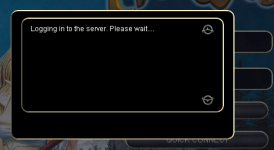
The same thing happens, but for all 6 accounts, if I click "Launch Selected Group"
Here's what I've done so far, restarting PC after each if there was a change:
1. Checked for a Windows update - none.
2. Installed a Dell update
3. Updated my EQ folders to allow Read/Write/Execute/List permissions for Everyone.
4. Removed nvidia GE Force Experience
5. Checked Windows Services for Nahimic. It is there, but not running. "Startup Type" is Manual.
6. Fed up with Bitdefender, uninstalled it and made sure Windows Defender is on the job
7. "Terminated" MS Game Bar. Really - that's what the button is labelled lol
Please help! Thanks in advance.
I start the RG Launcher
After all the plugins, etc are loaded, I bring up the AutoLogin UI
I choose a profile set, character, and click Play
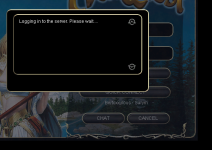
The login process gets as far as "Logging in to the server. Please wait....", but is stuck there <pic below>
The same thing happens, but for all 6 accounts, if I click "Launch Selected Group"
Here's what I've done so far, restarting PC after each if there was a change:
1. Checked for a Windows update - none.
2. Installed a Dell update
3. Updated my EQ folders to allow Read/Write/Execute/List permissions for Everyone.
4. Removed nvidia GE Force Experience
5. Checked Windows Services for Nahimic. It is there, but not running. "Startup Type" is Manual.
6. Fed up with Bitdefender, uninstalled it and made sure Windows Defender is on the job
7. "Terminated" MS Game Bar. Really - that's what the button is labelled lol
Please help! Thanks in advance.
Attachments
Last edited:

Unplugging the modem didn't help, but this time I did see the "A connection to the server could not be found" flash by, twice in about a minute. I'm 99% sure this didn't happen before, but of course it could have. I do see the two events in the debug console.
I haven't seen that again in the last 10 minutes.
I haven't seen that again in the last 10 minutes.

Its a connection problem with the login server. It has nothing to do with autologin. Login server could also just be having a bad day.
I know it isn't an autologin problem - because you said that nothing has changed, and because the issue is sitting at the EQ screen.I should have said that I can log in the non-MQ way, using the EQ launch pad.
And your comment about autologin is EXACTLY why I didn't originally put my problem post in this forum. I also do not think it's an autologin problem.
I merged it here because your post title (autologin stuck...) was about mq2autologin, and it seemed like you thought it is an autologin issue (which means potentially other folks in the future looking for the same thing) might look here and see.
There's none need for snarky pms about it.

No :p and I'm sure what I took as snark wasn't intended either.Snark not intended. Did I PM someone?
Users who are viewing this thread
Total: 1 (members: 0, guests: 1)
Share: