• You've discovered RedGuides, an EverQuest multi-boxing and scripting community 🧙‍♀️⚙️. We want you to play several EQ characters at once, come join us and say hello! 👋

  • A TLP without truebox has thawed (Very Vanilla ready)
    Frostreaver

Guide - AddClicky Information (1 Viewer)

I apologize if this has been asked/answered. I searched but didn't come up with anything. I'm trying to figure out how to best leverage a Geomantra clicky. The obvious answer would be downtime, except that doesn't really help in the context of a raid event where I want to refresh it as soon as the item is ready, regardless of combat state.

Am I correct in assuming this isolated use case is outside the scope of the add-clicky functionality, and is better handled with a LEM condition or React, or am I missing something obvious? Thanks!
well - sound it out - when do you want to use it?

some people put it in defensive clickies, i personally think this is a waste of mana/endurance/etc and a waste of the item ability

some people just have a hotkey for toons to toss it at a particular time

there is not a "i am currently taking spell damage" clicky group, so it really depends on how you want the usage to happen
 
HI, I just got staff of forbidden rites!!! YES!!!
Im trying to add it to you NEW add clicky menu!
Im guessing it goes into the special slot? but i do not see an option to do that.
My BP is in there and sayes activate or deactivate!!

thanks again....
 
HI, I just got staff of forbidden rites!!! YES!!!
Im trying to add it to you NEW add clicky menu!
Im guessing it goes into the special slot? but i do not see an option to do that.
My BP is in there and sayes activate or deactivate!!

thanks again....
We automatically use it in the classes that can use it. There is nothing to add it to.
 
Im sure Im doing something wrong, but I'm having trouble adding my clickies on, and if I try to use them manually MQ2 removes them. What am I doing wrong? Thank you.
 
Im sure Im doing something wrong, but I'm having trouble adding my clickies on, and if I try to use them manually MQ2 removes them. What am I doing wrong? Thank you.
this sounds like you're asking about the cwtn plugins - but you didn't say so, nor post in the correct location.

can you please confirm so i can move it and then attempt to answer you
 
I apologize, I don't fully know or understand all the names of the modules involved but below is the screen Im referencing. It wont let me add the items here and If I manually add the item by clicking it the effect is removed immediately. Im certain I have something set incorrectly.
 
Last edited by a moderator:
I apologize, I don't fully know or understand all the names of the modules involved but below is the screen Im referencing. It wont let me add the items here and If I manually add the item by clicking it the effect is removed immediately. Im certain I have something set incorrectly.

View attachment 71383
so yes - this is for cwtn class plugins

you didn't say so, nor post in the cwtn section - let alone in the addclicky discussion.
what is it you're trying to add?


Please see >>> Getting Started with CWTN plugins! (Movement, UI Window, Clickies, Pulling, ETC) Check Here First! <<< :)
 
did you read the output when you try and ad it?

because it isn't a "real clicky item" - which the output tells you

yes, so this isn't actually a clicky, and we disallow you from adding to addclicky, since it isn't a clicky that actually gives you any kind of useful buff - the "shadow of ___" buffs don't actually do ***anything***
 
ok thanks
does what i said/shared make sense tho? it is really important that you understand why i said what i said - otherwise you're going to just feel dismissed.

those items unlock a rank of aa - when you click them it also casts a "shadow of bullshit" buff on you - the shadow of bullshit buffs don't actually do anything, and in fact, since they take up buff slots, can hurt you.

after you've clicked your new item once to unlock the rank of the aa it gives you - you no longer have to click it again in the future --- unless of course you are trying to have dummy buffs on your buff window
 
I understand now, you get the effect per se but dont use a buff slot. Right?
right - it gives you a rank of an aa in your "special" tab of your AA window - but the actual "shadow of whatever" buff doesn't give you anything other than take up a buff slot
 
no, it is a toggle
currently there isn't a CWTN member for it (but will be later).
Did you ever get the functionality for determining if a clicky is enabled or disabled? Would be great fro my raidode hotkey to deactivate all of the toons 'Rage of Rolfron' clickes, since we manually rotate that during raids.
 
Did you ever get the functionality for determining if a clicky is enabled or disabled? Would be great fro my raidode hotkey to deactivate all of the toons 'Rage of Rolfron' clickes, since we manually rotate that during raids.
no, not yet.

but since you're mass disabling/enabling, there's no harm in just broadcasting disabling it

I added this in march of 2024
1756561187297.png

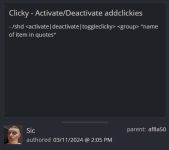
/cwtnra deactivate burn "Rage of Rolfron" (name of item in quotes)
 
While there is not a TLO to check if something is currently activated or deactivated, you can still set them.

/%s ToggleClicky|Activate|Deactivate %s \"Item Name\" or with a clicky item on your cursor - The item name must be in quotes."

Is the output when you try /shd toggleclicky for example.

/shd WhatToDo ItemGroup "Item Name"
/shd Deactivate downtime "Rage of Rolfron"

or /shd Deactivate while you have the rage of rolfron on the cursor.

Based on your description of what you're wanting to do, you should be able to achieve it with the name in quotes. Since this is a hotkey that you'll hit anytime you go into or out of raid mode. Then you should be able to broadcast it to the toons using the cwtn command for activating or deactivating based on if you're going into or out of raidmode, and then if it's on or off shouldn't matter. You can also add NoSave to the end to not save turning it on/off.
 
Guide - AddClicky Information

Users who are viewing this thread

Back
Top
Cart