



Here is some basic information on the addclickies:
We have a semi-major overhaul in the planning stages, which should add additional functionality, customization, and usability, but we don't have a timeline for that at this moment.
Downtime - when we're downtime (not fighting, not invis), and we are missing the buff from the item.
Defensive - when you are the target of the target you are fighting, and we are missing the buff from the item.
Offensive - when you are fighting (in melee combat), and we are missing the buff from the item, or your target is missing the buff from the item. This currently doesn't check for slowed% or anything else like that, and since it isn't checking for spell type for usage just "am i missing the buff AND is the mob missing the spell from it" it can and will spam on usage. it doesn't work like we/you want and this is high on the list of things we want to change when we do the aforementioned overhaul.)
Burn - when you are burning (burnallnamed and target is named, burn always, or xtargets is more or equal to burncount), and we are missing the buff from the item.
Summon - item that summons items, when we have less than our summoncount for that summon item (done during downtime)
- example:
ShrinkGroup - shrinks group members (you can add a pet shink in here now and it will use it to shrink your pet, if you have one).
PullItem - uses this clicky to pull with. Example: Staff of Viral Flux
ManaGroup - Used when a group member is below 60 mana (currently not adjustable, part of future updates)
ManaSelf - Used when you are below 60 mana (currently not adjustable, part of future updates)
HealthGroup - Used when a group member is below 60 health (currently not adjustable, part of future updates)
HealthSelf - Used when you are below 60 health (currently not adjustable, part of future updates)
Cure - Used when you have a detrimental that matches your cure clicky type - take care, this will nom nom nom clicky cure potions
Q. How do I get my group to stagger clickies?
A. This isn't an easy one to answer. The CWTN plugins don't track or wait for other toons to do anything. They say "Am i supposed to do my thing now, is my item ready, am I missing whatever buff it gives?" if those are true, it does it. so it is possible multiple characters start casting their abilities at the same time. For the next update (3/25/2021ish) we have some additional logic to try and help stagger items that give a group buff or drop an aura buff on the ground - things like the Unity Feather or the Rage of Rolfron for CopIV. This won't be perfect, but it adds extra "smarts" to try and help stagger those group buff items specifically.
Q. Familiars?
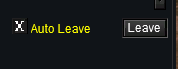
A. Add your familiar to your downtime clickies. You can use the built-in, zero-cost "Auto Leave" functionality of the familiar keyring to dismiss your familiar automatically. This does not require any purchases or unlocking, everyone has access to this.
(we automatically do this for you in September 2023 onward)
inventory -> keyrings -> familiars tab -> Auto Leave
Q. Mount?
A. Add your mount to your downtime clickies. If you have auto-dismount turned on, you will only cast it for the mount buff - If you don't have auto-dismount turned on you will check for the buff and for the missing mount. If a mount doesn't have a buff, we will assume you added the mount for the mount itself and the plugin will automatically disable auto-dismount
Q. Modrod?
A. Add this to your manaself clickies.
Q. Dispel Clicky?
A. Add this to your offensive or burn clickies.
Clickies:
For clickies, pick up the item you want to add and have the item on your cursor and do the following.
(using /clr as an exmaple, you would use your class shortname)
/clr AddClicky Downtime/Defensive/Offensive/Burn/Summon/ShrinkGroup/PullItem/ManaGroup/ManaSelf/HealthGroup/HealthSelf/Cure [If it's summon, how many you want to keep on you]
/clr RemoveClicky Downtime/Defensive/Offensive/Burn/Summon/ShrinkGroup/PullItem/ManaGroup/ManaSelf/HealthGroup/HealthSelf/Cure
/clr ShowClickies - will spit out current added/usable clickies.
We have a semi-major overhaul in the planning stages, which should add additional functionality, customization, and usability, but we don't have a timeline for that at this moment.
Downtime - when we're downtime (not fighting, not invis), and we are missing the buff from the item.
Defensive - when you are the target of the target you are fighting, and we are missing the buff from the item.
Offensive - when you are fighting (in melee combat), and we are missing the buff from the item, or your target is missing the buff from the item. This currently doesn't check for slowed% or anything else like that, and since it isn't checking for spell type for usage just "am i missing the buff AND is the mob missing the spell from it" it can and will spam on usage. it doesn't work like we/you want and this is high on the list of things we want to change when we do the aforementioned overhaul.)
Burn - when you are burning (burnallnamed and target is named, burn always, or xtargets is more or equal to burncount), and we are missing the buff from the item.
Summon - item that summons items, when we have less than our summoncount for that summon item (done during downtime)
- example:
/shd addclicky summon 3ShrinkGroup - shrinks group members (you can add a pet shink in here now and it will use it to shrink your pet, if you have one).
PullItem - uses this clicky to pull with. Example: Staff of Viral Flux
ManaGroup - Used when a group member is below 60 mana (currently not adjustable, part of future updates)
ManaSelf - Used when you are below 60 mana (currently not adjustable, part of future updates)
HealthGroup - Used when a group member is below 60 health (currently not adjustable, part of future updates)
HealthSelf - Used when you are below 60 health (currently not adjustable, part of future updates)
Cure - Used when you have a detrimental that matches your cure clicky type - take care, this will nom nom nom clicky cure potions
Q. How do I get my group to stagger clickies?
A. This isn't an easy one to answer. The CWTN plugins don't track or wait for other toons to do anything. They say "Am i supposed to do my thing now, is my item ready, am I missing whatever buff it gives?" if those are true, it does it. so it is possible multiple characters start casting their abilities at the same time. For the next update (3/25/2021ish) we have some additional logic to try and help stagger items that give a group buff or drop an aura buff on the ground - things like the Unity Feather or the Rage of Rolfron for CopIV. This won't be perfect, but it adds extra "smarts" to try and help stagger those group buff items specifically.
Q. Familiars?
A. Add your familiar to your downtime clickies. You can use the built-in, zero-cost "Auto Leave" functionality of the familiar keyring to dismiss your familiar automatically. This does not require any purchases or unlocking, everyone has access to this.
(we automatically do this for you in September 2023 onward)
inventory -> keyrings -> familiars tab -> Auto Leave
Q. Mount?
A. Add your mount to your downtime clickies. If you have auto-dismount turned on, you will only cast it for the mount buff - If you don't have auto-dismount turned on you will check for the buff and for the missing mount. If a mount doesn't have a buff, we will assume you added the mount for the mount itself and the plugin will automatically disable auto-dismount
Q. Modrod?
A. Add this to your manaself clickies.
Q. Dispel Clicky?
A. Add this to your offensive or burn clickies.
Clickies:
For clickies, pick up the item you want to add and have the item on your cursor and do the following.
(using /clr as an exmaple, you would use your class shortname)
/clr AddClicky Downtime/Defensive/Offensive/Burn/Summon/ShrinkGroup/PullItem/ManaGroup/ManaSelf/HealthGroup/HealthSelf/Cure [If it's summon, how many you want to keep on you]
/clr RemoveClicky Downtime/Defensive/Offensive/Burn/Summon/ShrinkGroup/PullItem/ManaGroup/ManaSelf/HealthGroup/HealthSelf/Cure
/clr ShowClickies - will spit out current added/usable clickies.
Last edited by a moderator:


