• You've discovered RedGuides, an EverQuest multi-boxing and scripting community 🧙‍♀️⚙️. We want you to play several EQ characters at once, come join us and say hello! 👋

  • A TLP without truebox has thawed (Very Vanilla ready)
    Frostreaver

One HUD to rule them all . . . . . .

Joined
Sep 12, 2004
RedCents
720¢
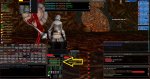
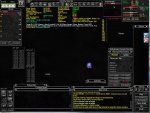
It took me many years to finally get a HUD display that contained every piece of information I would ever need ..... and one that I fully love.

This has been a labor of love.

Now that it is done, I'm sharing it with the community.

Even if its not your particular cup of tea, it may contain information that you would like to incorporate into your own HUD.

So enjoy.....


For those who are interested .. I use a customized varient of DrakahUI's "Default Old Interface"
 

Attachments
  • MQ2HUD.ini
    MQ2HUD.ini
    8.2 KB · Views: 126
  • 2015-01-15_173635.jpg
    2015-01-15_173635.jpg
    141.8 KB · Views: 876
Last edited:
How is your view? What resolution is this meant for? It doesn't look like smaller monitors could reasonably handle this. Bit hard to tell exactly what you can and can't see using your screenshot.
 
How is your view? What resolution is this meant for? It doesn't look like smaller monitors could reasonably handle this. Bit hard to tell exactly what you can and can't see using your screenshot.

That was taken from a laptop... running eq in 1024/780 resolution.. i have run it on laptops with small square screens.. and gaming pc's with extended wide screens.. and it works pretty good on all... the hud info is aligned in the center..... and i arrange my UI elements around the edges and bottom of screen to fit around the hud display.
 
Though I like this HUD a lot, looking to see if there's anything else out there that people use and recommend.
 
wonder how much of your CPU that hud eats up :) The more you put in your hud the more each instance of EQ using that hud uses btw. I put spawn searches for each zone for named in my hud and my CPU % went from 2% to 10% for each window :)
 
oh ya, ive been all over that thread. I got your kiss program running top notch in like 10 min other day, I have never been able to get the hud to work right for some damn reason lol.

- - - Updated - - -

the fps indicator in left hand corner toggles on and off, but no other infos. ive tried turning them all on and off lol

- - - Updated - - -

well just copied some new one and it works.. weird
 
wonder how much of your CPU that hud eats up :) The more you put in your hud the more each instance of EQ using that hud uses btw. I put spawn searches for each zone for named in my hud and my CPU % went from 2% to 10% for each window :)

Not a much as you would think... I know the CPU utilization spikes the more hud elements you add since it requires allot of cpu resources to maintain constant updates... but i get around that with using isoboxer.. and advanced memory management and staggered cpu processing (i specify one of my 4 cpu's to be dedicated to all procedures for the Mq2Hud.dll )

If i didn't... it would be a nightmare on my resources. Like i said.. its may not be everyone's cup of tea.. but i prefer using this hud display rather than loading 3 additional plugins to provide the same information.
 
Is this customizable at all? Such as, there's about half the information I'll never need based on the character I'm playing. If so, would that shrink the window down?
There are some components that are truly sweet though!
 
Sorry for necro, this is a great HUD but I notice it doesn't show my mana regen. It just shows (0). Not a huge deal was just wondering if anyone had a fix.

Thanks!
 
Sorry for necro, this is a great HUD but I notice it doesn't show my mana regen. It just shows (0). Not a huge deal was just wondering if anyone had a fix.

Thanks!

You would be missing close to a years worth of patches which is probably why things wouldnt work. I would highly suggest you check out the main creators website where this was modded from here which may better help you find something more up to date. I personally use his eq2 or wow ones, but you can mod almost anything and use older gems etc. You can even head over to eqinterface and throw together bits and pieces inside of something you like, which is basically what was done here.
 
You would be missing close to a years worth of patches which is probably why things wouldnt work. I would highly suggest you check out the main creators website where this was modded from here which may better help you find something more up to date. I personally use his eq2 or wow ones, but you can mod almost anything and use older gems etc. You can even head over to eqinterface and throw together bits and pieces inside of something you like, which is basically what was done here.

I'm not talking about the UI, I'm talking about the MQHud. Everything else works great except the mana regen display. I use a separate unrelated UI.
 
At a guess, I would say it is from " ${Me.ManaRegen} " not working apparently. Just tested ingame, getting 0 as well.

I can say that Mana Regen is now on your inventory/stat window as an EQ information item... which means it can be incorporated into UI pieces.

I use an info heavy player window that shows current mana regen. It is a slightly modified version of one you can get off of EQInterface. If you want to give it a try you can grab it from here. You will need the player window, and the file " player.dds " which are the graphics to go with the UI file.


Mana Regen.jpg
 
You guys got some serious UI action going on here. I may have to up my game a bit!
 
28 Nov 2016 by eqmule
- Fixed ${Me.ManaRegen}
- CButtonWnd now inherits CXWnd (cause it does).
- GetItemTimerValue has been renamed to GetItemRecastTimer
- Removed ManaGained, HealthGained, EnduranceGained from Pulse() and the exports.
Use GetEnduranceRegen(), GetHPRegen() and GetManaRegen() instead.
This change should make Pulse() a bit faster since we dont check that stuff constantly.

20 Nov 2016 by rswiders
- Fixed bug waiting for familiars keyring to load

Your HUD ought to be fixed as soon as RG updates from the mothership, and you run the patcher =)
 
One HUD to rule them all . . . . . .

Users who are viewing this thread

Back
Top
Cart