
• You've discovered RedGuides, an EverQuest multi-boxing and scripting community 🧙‍♀️⚙️. We want you to play several EQ characters at once, come join us and say hello! 👋

  • A TLP without truebox has thawed (Very Vanilla ready)
    Frostreaver

Question - Select item in a list

shollyd3169

Member
Joined
Sep 7, 2020
RedCents
251¢
What is the syntax to select an item in a list? I am attempting to search for a recipe in the tradeskill window and select it. I can view the items in the list using ${Window[TradeskillWnd].Child[RecipeList].List[1]} and iterate through the list until I find the item, but I don't know how to select it. From the documentation I find:

${Window[TradeskillWnd].Child[RecipeList].List[=CLASS 2 Wood Point Arrow (Small Groove)]}
Find an item in the tradeskill item list box by the exact name CLASS 2 Wood Point Arrow (Small Groove)

But that just gives me a can't parse error.

This language is a fairly big departure from c# and vb.net, so I am lost.
 
What is the syntax to select an item in a list? I am attempting to search for a recipe in the tradeskill window and select it. I can view the items in the list using ${Window[TradeskillWnd].Child[RecipeList].List[1]} and iterate through the list until I find the item, but I don't know how to select it. From the documentation I find:

${Window[TradeskillWnd].Child[RecipeList].List[=CLASS 2 Wood Point Arrow (Small Groove)]}
Find an item in the tradeskill item list box by the exact name CLASS 2 Wood Point Arrow (Small Groove)

But that just gives me a can't parse error.

This language is a fairly big departure from c# and vb.net, so I am lost.
The below grabs something i defined as itemtobuy, in the list 2 column, and then listselects it
Code:
/declare ListItem int local ${Window[MerchantWnd].Child[ItemList].List[=${ItemToBuy},2]}
/notify MerchantWnd ItemList listselect ${ListItem}
 
So, if I do:
Code:
    Sub Main ()
        /declare strRow string local "CLASS 2 Wood Point Arrow (Small Groove)"
        /echo (${strRow})
        /declare ListItem int local ${Window[TradeskillWnd].Child[RecipeList].List[${strRow}]}
        /notify TradeskillWnd RecipeList listselect ${ListItem} 
    /return

Ands start the macro (/mac tradeskill) it works like a champ. If I do:

Code:
    Sub Main (strRow)
        /echo (${strRow})
        /declare ListItem int local ${Window[TradeskillWnd].Child[RecipeList].List[${strRow}]}
        /notify TradeskillWnd RecipeList listselect ${ListItem} 
    /return

and start the macro (/mac tradeskill "CLASS 2 Wood Point Arrow (Small Groove)"), Listitem is always zero, and it doesn't select a row. It doesn't matter what string I type in for the parameter, it is always zero. The default type of a parameter is a string, right? Why won't the parameter work? In both examples, the /echo ${strRow} displays the same string in the MQ window. I am confused.
 
Oh my goodness. Nevermind. I was actually passing in 2 parameters in my working copy, and just simplified for my question, but the problem was, I was starting the mac like /mac tradeskill "CLASS 2 Wood Point Arrow (Small Groove)",2. However, the separator of parameters (apparently) is a space, not a comma.

Thanks so much for your help, Sic!
 
I had another question. I am trying to put a value in the search box in the tradeskill window. From lookiing at this wiki https://www.redguides.com/docs/projects/macroquest/reference/commands/notify/ the following command should work:

/notify TradeskillWnd COMBW_SearchTextEdit newvalue ${Param0}

I tried variations like

/notify TradeskillWnd ${Param0}
/notify TradeskillWnd COMBW_SearchTextEdit ${Param0}

I even tried the specific example on the wiki of

/notify BazaarSearchWnd ${SelectedItem.Name}

But none of them seem to do anything. There is no error, and my script will continue on and the rest will function properly.

Here is my whole short script so I don't have the same problem as earlier:
Code:
    Sub Main ()
        /echo ${Param0} ${Param1}
        /notify TradeskillWnd COMBW_SearchTextEdit newvalue ${Param0}

        /declare ListItem int local ${Window[TradeskillWnd].Child[RecipeList].List[${Param0}]}
        /notify TradeskillWnd RecipeList listselect ${ListItem}

        /declare intCtr int local
        /for intCtr 1 to ${Param1}
            /echo Combine attempt ${intCtr} of ${Param1}
            /notify TradeskillWnd CombineButton leftmouseup
            /doevents
            /delay 3s
            /notify TradeskillWnd AutoInvButton leftmouseup
            /while (${Cursor.ID} ) {
                /autoinv
                /doevents
                /delay 5
            }
            /delay 2
        /next intCtr
    /return
 
Some window text boxes are funky;

You gotta use the following sub for inputting text into the search box, like so;

INI:
    Sub Main ()
        /echo ${Param0} ${Param1}
        /call SetItemName ${Param0}

        /declare ListItem int local ${Window[TradeskillWnd].Child[RecipeList].List[${Param0}]}
        /notify TradeskillWnd RecipeList listselect ${ListItem}

        /declare intCtr int local
        /for intCtr 1 to ${Param1}
            /echo Combine attempt ${intCtr} of ${Param1}
            /notify TradeskillWnd CombineButton leftmouseup
            /doevents
            /delay 3s
            /notify TradeskillWnd AutoInvButton leftmouseup
            /while (${Cursor.ID} ) {
                /autoinv
                /doevents
                /delay 5
            }
            /delay 2
        /next intCtr
    /return
    
| --------------------------------------------------------------------------------------------
| SUB: SetItemName
| --------------------------------------------------------------------------------------------
    sub SetItemName(ItemName)
    /declare local_i int local


    /notify TradeskillWnd COMBW_SearchTextEdit leftmouse

    /for local_i 1 to ${ItemName.Length}

        /if (${ItemName.Mid[${local_i},1].Equal[ ]}) {
            /keypress space chat
        } else {
            /keypress ${ItemName.Mid[${local_i},1]} chat
        }
    /next local_i
    /return
 
Wow... you have to type each character.. crazy. So that worked.. almost. It is only passing the first word of the param string. I am guessing the spaces in the string are getting split up in the parameters. Is there a way to force the whole string? So, in my example, I am kicking off the macro with:
/mac Tradeskill "CLASS 2 Steel Silver Tip" 1

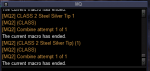
I added /echo (${ItemName}) in the sub you gave me. This is my output:

1609220304796.png
 
As I was hitting post, I got an idea. The solution is to call the sub like this:

/call SetItemName "${Param0}"

The syntax on this language is just odd. Thanks for your help!
 
Question - Select item in a list

Users who are viewing this thread

Back
Top
Cart