Has anyone messed with EQ ROF2 in Disassembly Seems like randomly the Module address are offset differently, Also the eqgame.exe Module is Protected by some sorta anti-Debug software im guess if this can be removed the random Module Address wont change, i was wondering if anyone found a way to reset the module Address back to client default address and not randomly change maybe by PE Headers im not sure how you would do this if anyone at all is able to help out thanks

-
 Hail, we're RedGuides. We want you to play six (yes, 6!) EverQuest characters at once. We have scripts and a friendly community to help, please join our playstyle and say hello! 👋
You are using an out of date browser. It may not display this or other websites correctly.
You should upgrade or use an alternative browser.
You should upgrade or use an alternative browser.
Question - ROF2 - ASM Modules Problems
- Thread starter 123123123
- Start date

- Commits
- 191
Someone like @brainiac or @eqmule might be able to help with this sort of question.
As far as I know the base address for EQ doesn't change and neither do the offsets. I'm unaware of anything that changes the offsets on the fly. Fairly sure the structs and offsets have remained the same for the RoF2 emu for many many years.
As far as I know the base address for EQ doesn't change and neither do the offsets. I'm unaware of anything that changes the offsets on the fly. Fairly sure the structs and offsets have remained the same for the RoF2 emu for many many years.

yeah the ASLR i have disable it on my windows Via bat File am i not changing correct one i was lookin in windows security center there is like 9 things with aslr on it for off and on
i change and restarted and address are still rotating on me
i change and restarted and address are still rotating on me
INI:
@ECHO OFF
SETLOCAL

ECHO ASLR Enable / Diable Batch Script - Please run as admin
set /p Choice=Want to e=Enable or d=Disable or r=Remove ASLR? (e or d or r):%=%

if "%Choice%"=="e" goto :ENABLE
if "%Choice%"=="d" goto :DISABLE
if "%Choice%"=="r" goto :REMOVE

:ENABLE
    reg add "HKLM\SYSTEM\CurrentControlSet\Control\Session Manager\Memory Management" /v "MoveImages" /t REG_DWORD /d 1 /f
    goto :EOF
:DISABLE
    reg add "HKLM\SYSTEM\CurrentControlSet\Control\Session Manager\Memory Management" /v "MoveImages" /t REG_DWORD /d 0 /f
    goto :EOF
:REMOVE
    reg delete "HKLM\SYSTEM\CurrentControlSet\Control\Session Manager\Memory Management" /v "MoveImages"
    goto :EOF

:EOF
exitwell i had found all the Docrack Offsets i use for the ROF2 client and each time my system restart they all change so i have to find them again kinda annoying
I even tried Hard coding them into eqgame.exe and when i load the Modified eqgame it changes all address again so my modified sections of code is excluded because address changed
I even tried Hard coding them into eqgame.exe and when i load the Modified eqgame it changes all address again so my modified sections of code is excluded because address changed
well i dont even have the mq2docrack.cpp or *.h files or anything lost them all when my HDD crashed i was just using cheat engine to turn them off and on on the fly as needed you dont happen to have source code for it by chance your willing to share would be cool if i can find Whole MQ2 source so i can compile it like i use too but haven hard time finding a good copy everytime i find one it has soo many errors i dont feel like fixing them all i tried different version of C++ hoping that would fix but no luck
Only version i can get to comple correct is from macroquest2 site but i dont have all the Source code for all the plug-ins since i lost all mine i had sadly ;(
Only version i can get to comple correct is from macroquest2 site but i dont have all the Source code for all the plug-ins since i lost all mine i had sadly ;(

Here:
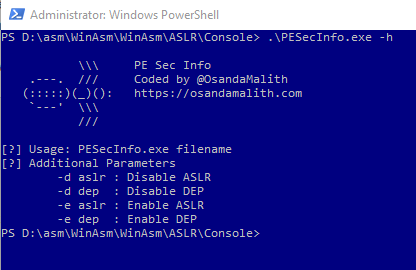
Use that on the exe to turn aslr off.
PE Sec Info – A Simple Tool to Manipulate ASLR and DEP Flags | ?Blog of Osanda
Recently I was interested in exploring the PE headers and writing simple programs to manipulate different headers. There are thousands of applications and code to be found on this topic. I started …
osandamalith.com
Use that on the exe to turn aslr off.
Users who are viewing this thread
Total: 1 (members: 0, guests: 1)
Share: