• You've discovered RedGuides, an EverQuest multi-boxing and scripting community 🧙‍♀️⚙️. We want you to play several EQ characters at once, come join us and say hello! 👋

  • A TLP without truebox has thawed (Very Vanilla ready)
    Frostreaver

Question - Question on new target window overlay

Joined
Jun 14, 2017
RedCents
1,962¢
Version of KissAssist.mac?
KissAssistVer=10.2.6
When did your problem start?
When overlay first appeared (but not really a problem, just a preference
Character Role?
  1. Assist
  2. Tank
  3. PetTank
  4. PullerPetTank
  5. Puller
  6. PullerTank
  7. Hunter
  8. HunterPetTank
  9. Petassist
What class is having this issue?
  1. Bard
How often does this issue occur?
Always
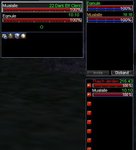
I love the new target window overlay which shows the level and class of the mob you are targeting. I am not using the default UI and I am assuming this is why my it is not lining up nicely for me. I looked around a bit and didn't see anywhere that gives instructions on how to tweak the position of the overlay in the target window. If anyone can point me to a resource on this I would appreciate it. Right now it is landing over some other info for me which is making it a bit harder to read quickly. I am hoping I can tweak the position a bit as I love having the new info. Thanks for any suggestions, AnotherJohn
 
Thanks for the quick response. I followed your link to MQ2targetinfo and found my MQ2targetinfo file and once EQ is back up I will start playing with the values to see if I can lock in a better position on my custom UI window. I am assuming (because I am such a novice at computer stuff) that I will be playing with this part of my ini folder: TargetInfoLoc=34,48,0,40 I am also guessing the first 2 numbers will be up and down and side to side while the last 2 numbers will be font size and color. If I am way off base let me know, otherwise I will trial and error values to see what I get (will start with very small value changes one at a time to see what happens). Again, I love this additional information on my screen. Thanks, AnotherJohn
 
Wow thanks. I hope this attachment is what you are looking for. I use the caster, melee and hybrid sets. I am guessing the target windows for all of them are the same (at least they look that way visually). I am locked in on the size of the window as I use isboxer's fxvideo to see hotkeys and windows on my mains screen. I only have one monitor so found this to be my best solution to see what the group is doing and to manually hit a hotkey if I need to. I am sure this is not the best setup but I started on isboxer before redguides and MQ2 came into my life so I just sort of layered things as I went along. Since I have hotkeys for what I need I don't need any in the target window. I just need to re position the level/class info and maybe the line of sight indicator on the existing windows. If that is something simple and you are willing to look at (which is a very generous offer) that would be wonderful. If it's not simple or would take you too much time, I can trial and error it on my end with the link to the info you gave me. Again, thanks for the previous info and this new offer of help, AnotherJohn
 

Attachments

Here is what your UI looks like with mq2targetinfo correctly configured:
SimpleStice.JPG

Here are the ini settings for all 3 of your UI's although they are exactly the same.
Paste these into your mq2targetinfo.ini and make sure if it already has these sections you replace them, then save the file and type
Code:
/groupinfo reload
in game and it should show up as in the picture above.

Code:
[UI_Caster]
DynamicUI=1
GroupDistanceFontSize=1
UseGroupLayoutBox=1
GroupDistanceOffset=0
GroupDistanceLoc=4,16,0,114
GroupDistanceElementPrefix=GW_Gauge
ComeToMeLoc=0,0,0,0
FollowMeLoc=0,0,0,0
MimicMeLoc=0,0,0,0
HotButton0Loc=0,0,0,0
HotButton1Loc=0,0,0,0
HotButton2Loc=0,0,0,0
TargetInfoAnchoredToRight=0
TargetInfoLoc=3,15,120,0
TargetDistanceLoc=26,38,160,195
UseExtLayoutBox=1
ExtDistanceLoc=0,0,0,-14
Label1=Player_ManaLabel
Label2=Player_FatigueLabel

[UI_Hybrid]
DynamicUI=1
GroupDistanceFontSize=1
UseGroupLayoutBox=1
GroupDistanceOffset=0
GroupDistanceLoc=4,16,0,114
GroupDistanceElementPrefix=GW_Gauge
ComeToMeLoc=0,0,0,0
FollowMeLoc=0,0,0,0
MimicMeLoc=0,0,0,0
HotButton0Loc=0,0,0,0
HotButton1Loc=0,0,0,0
HotButton2Loc=0,0,0,0
TargetInfoAnchoredToRight=0
TargetInfoLoc=3,15,120,0
TargetDistanceLoc=26,38,160,195
UseExtLayoutBox=1
ExtDistanceLoc=0,0,0,-14
Label1=Player_ManaLabel
Label2=Player_FatigueLabel

[UI_Melee]
DynamicUI=1
GroupDistanceFontSize=1
UseGroupLayoutBox=1
GroupDistanceOffset=0
GroupDistanceLoc=4,16,0,114
GroupDistanceElementPrefix=GW_Gauge
ComeToMeLoc=0,0,0,0
FollowMeLoc=0,0,0,0
MimicMeLoc=0,0,0,0
HotButton0Loc=0,0,0,0
HotButton1Loc=0,0,0,0
HotButton2Loc=0,0,0,0
TargetInfoAnchoredToRight=0
TargetInfoLoc=3,15,120,0
TargetDistanceLoc=26,38,160,195
UseExtLayoutBox=1
ExtDistanceLoc=0,0,0,-14
Label1=Player_ManaLabel
Label2=Player_FatigueLabel
 
Question - Question on new target window overlay

Users who are viewing this thread

Back
Top
Cart