• You've discovered RedGuides, an EverQuest multi-boxing and scripting community 🧙‍♀️⚙️. We want you to play several EQ characters at once, come join us and say hello! 👋

  • A TLP without truebox has thawed (Very Vanilla ready)
    Frostreaver

Problem - Puller - Waiting 5 seconds for mobs to respawn

terrietuf

Member
Joined
Mar 19, 2015
RedCents
240¢
Version of KissAssist.mac?
12.002
When did your problem start?
After a mesh download
Character Role?
  1. PullerPetTank
What class is having this issue?
  1. Necromancer
How often does this issue occur?
Always
Can you reproduce the issue?
Yes, I just reload the macro.
Hey All,

Having an issue where my puller just randomly stopped pulling targets, this coincided with me downloading and updating mesh files. I was getting a /echo ${Nav.PathExists[target]} =FALSE. I have managed to fix my mesh file and am getting /echo ${Nav.PathExists[target]} =TRUE. I have done a /echo ${Nav.PathLength[target]} which =8.54. Of note the current mobs CON indifferently however I took the group to another camp where they were previously pulling and attacking just fine. I would like to know what the issue is before i do another reinstall of MQ and start again. Any help would be great. Please see setting below.


[General]
KissAssistVer=12.002
Role=PullerPetTank
CampRadius=30
CampRadiusExceed=400
ReturnToCamp=0
ChaseAssist=1
ChaseDistance=25
MedOn=1
MedStart=20
MedStop=90
MedCombat=0
LootOn=1
RezAcceptOn=1|90
AcceptInvitesOn=1
GroupWatchOn=1|20
GroupWatchCheck=FALSE
CorpseRecoveryOn=0
EQBCOn=1
DanNetOn=0
DanNetDelay=20
IRCOn=0
CampfireOn=0
CharInfo=Necromancer|15|GOLD
DefaultUI=TRUE
DPSMeter=0
ScatterOn=0
LOSBeforeCombat=0
XTSlot=1


[Pull]
PullWith=Distant Strike
PullMeleeStick=0
MaxRadius=350
MaxZRange=100
UseWayPointZ=0
PullWait=5
PullRadiusToUse=120
PullRoleToggle=0
ChainPull=0
ChainPullHP=90
PullPause=30|2
PullLevel=0|0
PullArcWidth=0
PullOnReturn=0
[PullAdvanced]
PullLocsOn=0

[zone_name]
MezImmune=NULL
AAMezImmune=0
MobsToPull=ALL
MobsToIgnore=NULL
MobsToBurn=NULL
PullPath=Place holder for path file. Not yet impletmented.
PullLocsHelp=Y,X|Range. Ignore mobs in this area
PullLocs1=0
PullLocs2=0
PullLocs3=0
PullLocs4=0
PullLocs5=0
 
PullRadiusToUse=120 --- you can't use "120% of your abilities/spell/item's max range" leave this at 90
MaxZRange=100 --- this is a pretty smol z range

Updated
PullRadiusToUse=120 > 90
MaxZRange=100 --- this is a pretty smol z range > 200

Still yielding the same result, I am going to delete mq and reinstall without the mesh update and see what happens. Will report back.
 
Update: reinstalled MQ - set it back up without mesh update - same issue.
Moved back to start of the zone, ran the macro and it worked.
Moved my way up through the zone and the macro continued to work.
Moved into the last area of the zone and the macro stopped working.
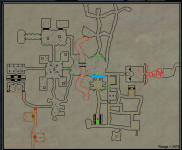
I have now figured out when I pass the blue line on the map my macro stops working and is unable to find spawns
As soon as I am not standing in the entrance it will work again.

Could there be a way the mobs are setup or the area is setup that would be making KA think there is nothing to target? I have previously tried to add the mobs to pull list but did not help.
Or could another .ini of one of the other target/moveutils/nav plugins need to be changed for it to think it could target something.
 

Attachments

  • nadox.png
    nadox.png
    239.3 KB · Views: 1
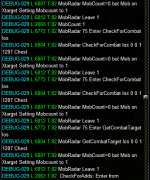
Debug Pic Attached

Also one major difference between the mobs is that the mobs it is not attacking are con as if they are raid targets i.e. "This creature would take an army to defeat!"
 

Attachments

  • debug.PNG
    debug.PNG
    84.7 KB · Views: 2
Update: reinstalled MQ - set it back up without mesh update - same issue.
Moved back to start of the zone, ran the macro and it worked.
Moved my way up through the zone and the macro continued to work.
Moved into the last area of the zone and the macro stopped working.
I have now figured out when I pass the blue line on the map my macro stops working and is unable to find spawns
As soon as I am not standing in the entrance it will work again.

Could there be a way the mobs are setup or the area is setup that would be making KA think there is nothing to target? I have previously tried to add the mobs to pull list but did not help.
Or could another .ini of one of the other target/moveutils/nav plugins need to be changed for it to think it could target something.
You'll want to see if your mesh has a break or a missing connection, and then fix it.

Mesh generator
 
That message means there's no mobs in range for it to pull, either in the horizontal radius or vertical z range.

You could do this to see if it's a mesh problem. Pause the macro, target a mob you think it should be pulling using in the in game map and type '/nav target'. If you can run to the mob and it's not pulling it, most likely a z range issue if its up a stairs or ramp. If the nav path isn't direct to the mob this could be making it out of range too.

If you can't run to it you need to use mesh generator and generate a new mesh, you might need to make a connection between two areas if there's no continuous shaded area between where you are and where the mob is, sometimes this happens at doorways or uneven terrain. You can select an option in game via the MQ menu to display the mesh in game which could help you see if this is the issue and where the break might be.
 
You'll want to see if your mesh has a break or a missing connection, and then fix it.

Mesh generator
So if I turn off MQ2Nav and use KA with MQ2Moveutils shouldn't this then prove that it is a mesh problem? I have swapped to Moveutils and the NPC's are still not targetable in MQ2. Does Moveutils work in the same way?

That message means there's no mobs in range for it to pull, either in the horizontal radius or vertical z range.

You could do this to see if it's a mesh problem. Pause the macro, target a mob you think it should be pulling using in the in game map and type '/nav target'. If you can run to the mob and it's not pulling it, most likely a z range issue if its up a stairs or ramp. If the nav path isn't direct to the mob this could be making it out of range too.

If you can't run to it you need to use mesh generator and generate a new mesh, you might need to make a connection between two areas if there's no continuous shaded area between where you are and where the mob is, sometimes this happens at doorways or uneven terrain. You can select an option in game via the MQ menu to display the mesh in game which could help you see if this is the issue and where the break might be.
So far I have done the following;

I was getting a /echo ${Nav.PathExists[target]} =FALSE.
I have managed to fix my mesh file and am getting /echo ${Nav.PathExists[target]} =TRUE.
I have done a /echo ${Nav.PathLength[target]} which =8.54.

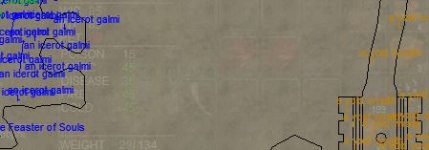
Can there still be a mesh connection between two areas if this is the case? Another funny thing is that on the map those particular NPC's are like an orange colour almost like MQ2 can see they are there but cannot define their level unless the
orange means something else. I will look at the mesh connection though that is a great suggestion!

nadoxmap.JPG
 
if you cant target the mobs, they cant be pulled.

the orange mobs probably means they are vendors or quest npcs, and not supposed to be killed.
 
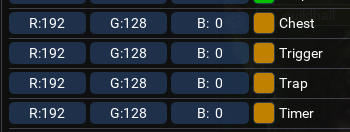
Those appear to be this color, so it appears mq thinks they are one of these types - in which case, kiss isn't going to pull

1692188920084.png

to answer your question about "should i unload nav to check for a broken connection instead of using meshgenerator or rending my navigation mesh and visibly finding out". no.
 
Those appear to be this color, so it appears mq thinks they are one of these types - in which case, kiss isn't going to pull

View attachment 50336

to answer your question about "should i unload nav to check for a broken connection instead of using meshgenerator or rending my navigation mesh and visibly finding out". no.
Ok that makes a lot of sense now, that is exactly why they are not being pulled! Thanks so much for this!
Also thank you for your insights into the navmesh stuff, I plant to get that sorted once I iron all of my other current issues out!
 
Those appear to be this color, so it appears mq thinks they are one of these types - in which case, kiss isn't going to pull

View attachment 50336

to answer your question about "should i unload nav to check for a broken connection instead of using meshgenerator or rending my navigation mesh and visibly finding out". no.
Just some clarity on this I did /echo ${Target.Type} and they are static spawns listed as Chests which makes total sense as to the issue.
 
Problem - Puller - Waiting 5 seconds for mobs to respawn

Users who are viewing this thread

Back
Top
Cart