• You've discovered RedGuides, an EverQuest multi-boxing and scripting community 🧙‍♀️⚙️. We want you to play several EQ characters at once, come join us and say hello! 👋

  • A TLP without truebox has thawed (Very Vanilla ready)
    Frostreaver

Problem - Need help - toons not playing

OldTymer

New member
Joined
Aug 9, 2013
RedCents
69¢
Version of KissAssist.mac?
Both 10 and 11
When did your problem start?
Recently
Character Role?
  1. Assist
  2. Tank
What class is having this issue?
  1. Shadow Knight
How often does this issue occur?
Always
Can you reproduce the issue?
Yes
I tried updating 10.x and I tried using 11 beta. Same issue for both.

I'm playing 1 PC. 2 accounts on a emu.

Main act is not using kiss.

2nd acct is set to be tank.

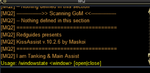
When /mac kiss11 or /mac kissassist it runs through its start up and seems to end saying a window state can be open or closed. The toon never assists or plays at all unless i use the ebcc commands to attack and have mq2melee run.

I've tried setting him as tank, toggling most settings on and off and nothing seems to get kiss to run ... help?
 
Sure

Code:
[General]
KissAssistVer=11.008 Beta
Role=Tank
CampRadius=30
CampRadiusExceed=400
ReturnToCamp=0
ChaseAssist=0
ChaseDistance=25
MedOn=0
MedStart=20
MedCombat=0
LootOn=0
RezAcceptOn=1
AcceptInvitesOn=1
GroupWatchOn=0
CastingInterruptOn=0
EQBCOn=1
IRCOn=0
MiscGem=8
MiscGemLW=0
MiscGemRemem=1
HoTTOn=0
CampfireOn=0
CharInfo=Shadow Knight|6|GOLD
DefaultUI=TRUE
DPSMeter=1
ScatterOn=0
[SpellSet]
LoadSpellSet=0
SpellSetName=KissAssist
[Buffs]
BuffsOn=0
BuffsSize=20
Buffs1=NULL
Buffs2=NULL
Buffs3=NULL
Buffs4=NULL
Buffs5=NULL
Buffs6=NULL
Buffs7=NULL
Buffs8=NULL
Buffs9=NULL
Buffs10=NULL
Buffs11=NULL
Buffs12=NULL
Buffs13=NULL
Buffs14=NULL
Buffs15=NULL
Buffs16=NULL
Buffs17=NULL
Buffs18=NULL
Buffs19=NULL
Buffs20=NULL
RebuffOn=1
CheckBuffsTimer=10
PowerSource=NULL
[Melee]
AssistAt=99
MeleeOn=1
FaceMobOn=1
MeleeDistance=75
StickHow=snaproll
AutoFireOn=0
UseMQ2Melee=1
[GoM]
GoMSHelp=Format - Spell|Target, MA Me or Mob, i.e. Rampaging Servant Rk. II|Mob
GoMSize=3
GoMSpell1=NULL
GoMSpell2=NULL
GoMSpell3=NULL
[GMail]
GMailHelp=Events currently support - Dead,Drag,GM,Level,Named,Leftgroup,Tells
GMailOn=0
GMailSize=5
GMail1=NULL
GMail2=NULL
GMail3=NULL
GMail4=NULL
GMail5=NULL
[AE]
AEOn=0
AESize=10
AERadius=50
AE1=NULL
AE2=NULL
AE3=NULL
AE4=NULL
AE5=NULL
AE6=NULL
AE7=NULL
AE8=NULL
AE9=NULL
AE10=NULL
[DPS]
DPSOn=1
DPSSize=20
DPSSkip=20
DPSInterval=2
DPS1=Taunt
DPS2=Slam
DPS3=NULL
DPS4=NULL
DPS5=NULL
DPS6=NULL
DPS7=NULL
DPS8=NULL
DPS9=NULL
DPS10=NULL
DPS11=NULL
DPS12=NULL
DPS13=NULL
DPS14=NULL
DPS15=NULL
DPS16=NULL
DPS17=NULL
DPS18=NULL
DPS19=NULL
DPS20=NULL
DebuffAllOn=0
[Aggro]
AggroOn=1
AggroSize=10
Aggro1=Taunt
Aggro2=NULL
Aggro3=NULL
Aggro4=NULL
Aggro5=NULL
Aggro6=NULL
Aggro7=NULL
Aggro8=NULL
Aggro9=NULL
Aggro10=NULL
[Heals]
Help=Format Spell|% to heal at i.e. Devout Light Rk. II|50
HealsOn=0
HealsSize=5
Heals1=NULL
Heals2=NULL
Heals3=NULL
Heals4=NULL
Heals5=NULL
XTarHeal=0
XTarHeal2=0
XTarHealList=NULL
HealGroupPetsOn=0
[Cures]
CuresOn=0
CuresSize=5
Cures1=NULL
Cures2=NULL
Cures3=NULL
Cures4=NULL
Cures5=NULL
[Pet]
PetOn=0
PetSpell=YourPetSpell
PetShrinkOn=0
PetShrinkSpell=Tiny Companion
PetBuffsOn=0
PetBuffsSize=8
PetBuffs1=NULL
PetBuffs2=NULL
PetBuffs3=NULL
PetBuffs4=NULL
PetBuffs5=NULL
PetBuffs6=NULL
PetBuffs7=NULL
PetBuffs8=NULL
PetCombatOn=1
PetAssistAt=95
PetToysSize=6
PetBreakMezSpell=NULL
PetRampPullWait=0
PetSuspend=0
MoveWhenHit=0
PetHoldOn=1
PetForceHealOnMed=0
[Burn]
BurnSize=15
BurnText=Decepticons Attack
BurnAllNamed=0
Burn1=NULL
Burn2=NULL
Burn3=NULL
Burn4=NULL
Burn5=NULL
Burn6=NULL
Burn7=NULL
Burn8=NULL
Burn9=NULL
Burn10=NULL
Burn11=NULL
Burn12=NULL
Burn13=NULL
Burn14=NULL
Burn15=NULL
UseTribute=0
[Pull]
PullWith=Melee
PullMeleeStick=0
MaxRadius=350
MaxZRange=50
UseWayPointZ=0
PullWait=5
PullRadiusToUse=90
PullRoleToggle=0
ChainPull=0
ChainPullHP=90
ChainPullPause=30|2
PullPause=30|2
PullLevel=0|0
PullArcWidth=0
[AFKTools]
AFKHelp=AFKGMAction=0 Off, 1 Pause Macro, 2 End Macro, 3 Unload MQ2, 4 Quit Game
AFKToolsOn=1
AFKGMAction=1
AFKPCRadius=500
CampOnDeath=0
ClickBacktoCamp=0
[Merc]
Help=To use: Turn off Auto Assist in Manage Mercenary Window
MercOn=0
MercAssistAt=92
[KissError]
LastCMD:=/end
ErrorDateTime:=10/06/2018 12:23:00
ErrorMsg:=NULL
DataError:=NULL
SyntaxError:=Usage: /windowstate <window> [open|close]
RunningTime:=1997232
BuildDate:=20180623
CurrentUI:=Default
[KConditions]
ConOn=0
CondSize=5
Cond1=TRUE
Cond2=TRUE
Cond3=TRUE
Cond4=TRUE
Cond5=TRUE
 
More data

If I /kissassist pullertank its SORTA works. He goes and pulls and SLOWLY returns to camp then SLOWLY takes on a melee TANK role.

If he is just in /kissassist tank mode he just stands there for the duration of all fights.
 
Is the other toon PL'n the lvl 6 SK? If the main account is bringing mobs that are aggro->main but they aren't in the same group, KA may not attack as it thinks it could be KS'n another group's mob.
 
I have this error always in my ini as well..

Code:
[KissError]
LastCMD:=/end
ErrorDateTime:=10/06/2018 12:23:00
ErrorMsg:=NULL
DataError:=NULL
SyntaxError:=Usage: /windowstate <window> [open|close]
RunningTime:=1997232
BuildDate:=20180623
CurrentUI:=Default


It ends like this in game when I start the macro

mq2screen.png
 
Last edited:
Am I doing this correct at a basic level?

1) Manual character does NOT have kiss enabled
2) kiss toon is tank, so he targets nothing and /kissassist tank (I have also tried targeting self and manual toon)
3) he should be ready to go right?
 
You can try just assisting:
You have to target the manual char.
Then do /mac kissassist
No tank keyword, you want him to assist the char u play manually if I understand u correctly.
 
If you are in doubt if this is a emu problem, I would log into test server and run the macro there on a test copied toon, if it works there you know it’s a emu problem, in which case a modification to kiss is needed.
 
You can try just assisting:
You have to target the manual char.
Then do /mac kissassist
No tank keyword, you want him to assist the char u play manually if I understand u correctly.

Yea I have tried that as well, the weird thing is if I do pullertank it all seems to work ok (he pulls, and then announces over ebc that he is now tanking, and all is right) , but I don't want him pulling so that wont work

EDIT Also all the other kiss stuff is working, he is setting camp and following mobs to kill them and then returning to camp, he is looting and all that, so it for sure seeing that ini file, he just wont attack.
 
I installed on a brand new PC and exact issue so I assume its related to the emu.

The emu has heavily modified uifiles folder... can anyone point me to anything there that could be breaking kissassist? Seems like the usage: windowstate close error message may have to do with this?
 
I tried it on CLEAN install on another emu and it works fine, so its definitely something in that emu files that is breaking me.

It seems to be erroring out on the part where it opens the blocked spells window, ideas?
 
So I removed this section from kissassist.mac and everything seems to be working now... yay?

Code:
 /ini "KissAssist_Buffs.ini" "${Me.ID}" Buffs "${Writebufflist}"
        /delay 15
        | Open Blocked Buffs window temporarily to read blocked buffs
        /if (!${Window[BlockedBuffWnd].Open} && !${BBWindowOpen}) {
            /windowstate BlockedBuffWnd open
            /varset BBWindowOpen 120m
            /delay 10
        }
        | Write all blocked buffs to Kissassist_Buffs.ini file
        /for k 0 to ${BlockedBuffsCount}
            /varset Blockedbuff ${Window[BlockedBuffWnd].Child[BW_BLOCKEDBUFF${k}_Button].Child[BBuff${k}].Tooltip}
            /if (${Blockedbuff.Length}) {
                /varset Blockedbufflist ${Blockedbufflist}|${Blockedbuff}
            }
        /next k
        /if (${Blockedbufflist.Length}) /ini "KissAssist_Buffs.ini" "${Me.ID}" Blockedbuffs "${Blockedbufflist}"
        /if (${Window[BlockedBuffWnd].Open}) /windowstate BlockedBuffWnd close
        /varset WriteBuffsTimer 30s
        /if (${DebugBuffs}) /echo \atDEBUGBUFFS WriteBuffs Leave \agLine#: ${Macro.CurLine}
 
Cool. Yeah that's what I was going to recommend. Since your emu doesn't have that information window, it was probably the hang up. Let us know if anything else pops up. In particular if you start having issues with Buffs after removing the blocked buffs reference.
 
Problem - Need help - toons not playing

Users who are viewing this thread

Back
Top
Cart