• Hail, we're RedGuides. We want you to play six (yes, 6!) EverQuest characters at once. We have scripts and a friendly community to help, please join our playstyle and say hello! 👋

Question - Nav Mesh - Automate lowering a bridge and crossing it?

biggysmalls999

Active member
There are two bridges in Veeshan's Peak. Right now I can walk up to them, hit a macro
/doortarget
/click left door

This will lower the bridge, I now have to jump then manually move forward, and the nav mesh will continue to work after that.

Is there any possible way to automate this within the Nav Mesh file or maybe veeshan_doors.json?
 
is the bridges there in the meshgen? if not, you cant mesh them, if they are, you just need to make it so it runs proper up to the triggers to activate it, it will generally do that, it takes some finagling
 
is the bridges there in the meshgen? if not, you cant mesh them, if they are, you just need to make it so it runs proper up to the triggers to activate it, it will generally do that, it takes some finagling
There are no bridges in the mesh file. I think I can probably figure this out by just making adjustments to my custom macro file.

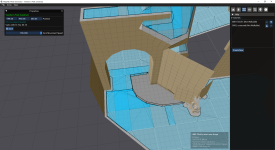
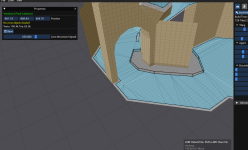
The other big problem with Veeshan's Peak (it doesn't happen with other zones). Is when you create a blocked path it creates these "extra" meshes around the blocked path, and now those are unpassable.

1771871033777.png


See attachment. The grey area is a blocked path so my characters won't get stuck behind the swinging door. But it creates this new "Blue path", that is also unpassable for some reason. And the worst part is when I delete the grey area, the blue area remains.... it's really confusing. Anyone know why it's doing this?
 
Question - Nav Mesh - Automate lowering a bridge and crossing it?

Users who are viewing this thread

Back
Top
Cart