• You've discovered RedGuides, an EverQuest multi-boxing and scripting community 🧙‍♀️⚙️. We want you to play several EQ characters at once, come join us and say hello! 👋

  • A TLP without truebox has thawed (Very Vanilla ready)
    Frostreaver

Question - MQ2Nav Mesh Files

Dead

Member
Joined
Jul 4, 2016
RedCents
40¢
I was thinking about going through and creating high resolution MQ2Nav files for every zone in the game, zipping them and posting them to the forums. Is this something you guys would use? I would separate them as MeshGenerator does (Base EQ, Ruins of Kunark, Scars of Velious, etc.).

I would assume High Resolution means tile size being > 100 for the most usability. Correct me if I am wrong.
 
We did this for the old mq2navigation. once we get MQ2Nav a little more stable I will start it again.
 
2 fold question here...

Did someone start doing this (especially for EoK)
-----------------------
In trying to edit the mesh for restricted area (damn crystal formations!) I found a few that the generator marked as unwalkable that I am trying to mark as "walkable" (tunnels inside Chardok, the "fort" near Overseer camp for instance)

I can edit the mesh and make a "walkable" custom object, but it doesn't appear to effect the pathing for allowing access down certain tunnels.

Is there a trick to this?
 
2 fold question here...

Did someone start doing this (especially for EoK)
-----------------------
In trying to edit the mesh for restricted area (damn crystal formations!) I found a few that the generator marked as unwalkable that I am trying to mark as "walkable" (tunnels inside Chardok, the "fort" near Overseer camp for instance)

I can edit the mesh and make a "walkable" custom object, but it doesn't appear to effect the pathing for allowing access down certain tunnels.

Is there a trick to this?

This^^

I also can't seem to get this figured out, as I am keen to set up a few spots where I want to restrict / funnel pathing options...
 
Some tips for you in your quest:

Tile size doesn't really matter, those are just the logical groupings of cells. So a higher tile size doesn't mean higher resolution. Resolution of the mesh is determined by the cells of the mesh, not the tiles. If you want a finer grain mesh, you want smaller cells. this comes with a computation cost when it comes to both generating and navigating on the mesh, though.

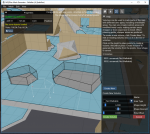
For making restricted areas on the mesh, check this part of the UI:
Screenshot 2017-11-28 00.05.20.png

edit: holy thread necro
 
Some tips for you in your quest:

Tile size doesn't really matter, those are just the logical groupings of cells. So a higher tile size doesn't mean higher resolution. Resolution of the mesh is determined by the cells of the mesh, not the tiles. If you want a finer grain mesh, you want smaller cells. this comes with a computation cost when it comes to both generating and navigating on the mesh, though.

For making restricted areas on the mesh, check this part of the UI:
View attachment 13098

edit: holy thread necro


I've tried cropping out some areas on a mesh in some zones were it wasn't pathing correctly, it didn't really help. I'm not sure if there is any real solution to these. Contact me on irc, and I can point out the problem areas in game when you have a chunk of time, brainiac.
 
What about the reverse?

As in, the tight area at the top (the "doorway" so to speak) if the "unwalkable" area of both sides of the wall touched, making the doorway "unwalkable" when in fact it is walkable.

I tried making a "volume" custom object that ranged from well into one walkable area to another, and skirted the walls closer. This didn't seem to effect the pathing though.
 
What about the reverse?

As in, the tight area at the top (the "doorway" so to speak) if the "unwalkable" area of both sides of the wall touched, making the doorway "unwalkable" when in fact it is walkable.

I tried making a "volume" custom object that ranged from well into one walkable area to another, and skirted the walls closer. This didn't seem to effect the pathing though.

The agent radius is a property that determines how much padding to add to walls. The effect is intended to simulate the size of the character so you don't get stuck on corners. If you have a doorway that is too narrow and won't let the character pass through, lower the agent radius a little bit and it will decrease that amount of padding. Be careful about lowering it too much, though.
 
Question - MQ2Nav Mesh Files

Users who are viewing this thread

Back
Top
Cart