
-
 Hail, we're RedGuides. We want you to play six (yes, 6!) EverQuest characters at once. We have scripts and a friendly community to help, please join our playstyle and say hello! 👋
You are using an out of date browser. It may not display this or other websites correctly.
You should upgrade or use an alternative browser.
You should upgrade or use an alternative browser.

Release MQ2Discord
- Thread starter alynel
- Start date


Allowing/tell etc doesnt work from discord but i think it has never worked.....what is required to send commands from discord to EQ?
[MQ2Discord] #*#
Makes it work I think. Tbh being able to respond to tells from my phone is one of the main reasons I use it

Bit of a feature request... I have mine set up to log looting, and it adds some kind of link info e.g. 000000000000000000055E4CD45Diamond when sending to Discord.
I was wondering... if that could be interpreted and made into Magelo links somehow? That would be most awesome! I'm pretty sure the same thing happens with item links in other channels too.
I was wondering... if that could be interpreted and made into Magelo links somehow? That would be most awesome! I'm pretty sure the same thing happens with item links in other channels too.
Bit of a feature request... I have mine set up to log looting, and it adds some kind of link info e.g. 000000000000000000055E4CD45Diamond when sending to Discord.
I was wondering... if that could be interpreted and made into Magelo links somehow? That would be most awesome! I'm pretty sure the same thing happens with item links in other channels too.
To do this, you'd simply cut off all the Digits prior to the first letter (all the hex related stuff that makes the link in game), then strip the item name down to a string, and parse it as "https://eq.magelo.com/items?q=<ITEM_NAME_STRING>". But I don't honestly see the usefulness in a feature like that.
I've updated the plugin, well more of a full rewrite really. It's attached, would encourage anyone who wants to use it to give it a go and give me feedback. Seems stable enough to me but I'm biased
Good new stuff:
* Multiple channels. You can have any number of channels, each with their own set of filters
* In addition to channels for a character, you can also configure global channels that all characters will join, as well as for a server, class, or a custom group
* Notifications. If you put a filter in the notify section instead allow, it will append @everyone to it
* Command responses. For a configurable amount of time after sending a command, all chat text will be send to the channel you issued the command on. So you can see if it worked or not.
Configuration is now yaml rather than json as it looks a bit nicer with the amount of nesting happening, no more worrying about matching braces. Sorry to those who finally got comfortable with json :p It should also give you a better output if something's wrong with it, i.e. tell you what line the error is on.
It's now a single file instead of one per character. An example will be generated on first run of the plugin. You will have to edit the file, I've removed the ingame commands as it's a bit too complicated to be worthwhile. Use
Here's an example, this is what I'm using:
Good new stuff:
* Multiple channels. You can have any number of channels, each with their own set of filters
* In addition to channels for a character, you can also configure global channels that all characters will join, as well as for a server, class, or a custom group
* Notifications. If you put a filter in the notify section instead allow, it will append @everyone to it
* Command responses. For a configurable amount of time after sending a command, all chat text will be send to the channel you issued the command on. So you can see if it worked or not.
Configuration is now yaml rather than json as it looks a bit nicer with the amount of nesting happening, no more worrying about matching braces. Sorry to those who finally got comfortable with json :p It should also give you a better output if something's wrong with it, i.e. tell you what line the error is on.
It's now a single file instead of one per character. An example will be generated on first run of the plugin. You will have to edit the file, I've removed the ingame commands as it's a bit too complicated to be worthwhile. Use
/discord reload to reload it once you've made your changes.Here's an example, this is what I'm using:
Code:
# This is your bot's token, see guide here for how to get one and it to your server:
# https://github.com/reactiflux/discord-irc/wiki/Creating-a-discord-bot-&-getting-a-token
token: asdfasdfasdfasdfasdfasdf.asdfas.asdfasdfasdfasdfasdfasdfasd
# A list of users that are allowed to send commands
# To get your user id, right click it in a channel in discord and select Copy ID
# You will need to enable developer mode via Settings -> Appearance
user_ids:
  - 123456789123456789
characters:
  # Individual character settings
  myserver_mychar1:
    # A list of channels for this character to join
    # Name is ignored, it's just for your reference
    - name: mychar1
      # To get a channel's id, right click it and select Copy ID
      id: 123456789123456789
      # A chat message (anything that appears in your chat window or your MQ2 window) will be sent to this channel if it:
      # * Matches anything in the allowed or notify section, AND
      # * Doesn't match anything in the blocked section
      allowed:
        # A list of things to match on, in MQ2 event format
        # A "#*#" (wildcard) will automatically be added to the start and end of whatever you put here, unless you have one at either end
        # e.g. since this has #*# at the end, it won't be added at the start. This means it will only match a line beginning with [MQ2], i.e. a /echo
        - "[MQ2]#*#"
      blocked:
        # See tells channel for example usage
        []
      notify:
        # See tells channel for example usage
        []
      # See deaths channel for example usage
      prefix: ""
      # True or false to enable sending commands from discord
      # To send a command, just type it in discord as you would in game e.g. /echo hello from discord
      allow_commands: true
      # After sending a command from discord, all in game messages will be sent to the channel for this many milliseconds, ignoring whatever allow/block filters you have
      # Allows you to see the result of your commands
      show_command_response: 2000
  # Next character(s), as above.
  myserver_mychar2:
    - name: mychar2
      id: 123456789123456789
      allowed:
        - "[MQ2]#*#"
      blocked:
        []
      notify:
        []
      prefix: ""
      allow_commands: true
      show_command_response: 2000
# I don't use this, but you can also configure channels for all characters on a particular server. The format is the same as for characters
# To use it, remove the {} and add your server per the commented out example
servers:
#  test:
#    - name: MyChannel
#      id: 123456789123456789
#      allowed:
#        []
#      blocked:
#        []
#      notify:
#        []
#      prefix: ""
#      allow_commands: false
#      show_command_response: 0
  {}
# Channels for all characters of a particular class. As above I don't use it, uncomment and remove {} if you want to
classes:
#  WAR:
#    - name: MyChannel
#      id: 123456789123456789
#      allowed:
#        []
#      blocked:
#        []
#      notify:
#        []
#      prefix: ""
#      allow_commands: false
#      show_command_response: 0
  {}
# Channels for custom groups of characters. All characters in the group will send to the configured channel based on its filters
# Note they don't have to be in the same group in game, or even the same server
groups:
  # Name of the group, it's ignored
  - name: Group 1
    # List of characters in the group
    characters:
      - myserver_mychar1
      - myserver_mychar2
      - myserver_mychar3
      - myserver_mychar4
      - myserver_mychar5
      - myserver_mychar6
    # List of channels for the group to use, same format as above
    channels:
      # This channel shows when someone dies
      - name: Deaths
        id: 123456789123456789
        allowed:
          - You have been slain by#*#
        blocked:
          []
        notify:
          []
        # Since there's multiple characters in the channel, this will let you know which one sent a particular message
        # It's parsed before sending, so you can use MQ2 variables
        prefix: "[${Me.Name}]"
        # If you enable commands here, all characters in the group will execute them. You may or may not want this
        allow_commands: false
        show_command_response: 0
      # This one outputs all DPS message from either kiss or core
      - name: DPS
        id: 123456789123456789
        allowed:
          # This will match DPS: anywhere in the message, i.e. it adds wildcards at the start and end, so the actual filter used is "#*#DPS:#*#"
          - "DPS:"
        blocked:
          # kiss outputs 2 lines for DPS, this blocks the second
          - "|${Me.CleanName}|'s DPS"
        notify:
          []
        prefix: "[${Me.Name}]"
        allow_commands: false
        show_command_response: 0
# List of channels to be joined by all characters
all:
  - name: Tells
    id: 123456789123456789
    allowed:
      []
    blocked:
      # The allow filter will also match tells from your pet. This will block it. Regular MQ2 event syntax, whatever's between the pipes gets evaluated
      - "|${Me.Pet.DisplayName}| tells you#*#"
    notify:
      # Anything that matches one of these will append @everyone to the message
      # It doesn't need to be in allowed as well
      - tells you
    prefix: "[${EverQuest.Server}_${Me.Name}]"
    # You probably don't want this enabled, if you replied to a tell then all your characters would send it
    allow_commands: false
    show_command_response: 0
Attachments

Absolute Legend!I've updated the plugin, well more of a full rewrite really. It's attached, would encourage anyone who wants to use it to give it a go and give me feedback. Seems stable enough to me but I'm biased
Good new stuff:
* Multiple channels. You can have any number of channels, each with their own set of filters
* In addition to channels for a character, you can also configure global channels that all characters will join, as well as for a server, class, or a custom group
* Notifications. If you put a filter in the notify section instead allow, it will append @everyone to it
* Command responses. For a configurable amount of time after sending a command, all chat text will be send to the channel you issued the command on. So you can see if it worked or not.
Configuration is now yaml rather than json as it looks a bit nicer with the amount of nesting happening, no more worrying about matching braces. Sorry to those who finally got comfortable with json :p It should also give you a better output if something's wrong with it, i.e. tell you what line the error is on.
It's now a single file instead of one per character. An example will be generated on first run of the plugin. You will have to edit the file, I've removed the ingame commands as it's a bit too complicated to be worthwhile. Use/discord reloadto reload it once you've made your changes.
Here's an example, this is what I'm using:
Code:# This is your bot's token, see guide here for how to get one and it to your server: # https://github.com/reactiflux/discord-irc/wiki/Creating-a-discord-bot-&-getting-a-token token: asdfasdfasdfasdfasdfasdf.asdfas.asdfasdfasdfasdfasdfasdfasd # A list of users that are allowed to send commands # To get your user id, right click it in a channel in discord and select Copy ID # You will need to enable developer mode via Settings -> Appearance user_ids: - 123456789123456789 characters: # Individual character settings myserver_mychar1: # A list of channels for this character to join # Name is ignored, it's just for your reference - name: mychar1 # To get a channel's id, right click it and select Copy ID id: 123456789123456789 # A chat message (anything that appears in your chat window or your MQ2 window) will be sent to this channel if it: # * Matches anything in the allowed or notify section, AND # * Doesn't match anything in the blocked section allowed: # A list of things to match on, in MQ2 event format # A "#*#" (wildcard) will automatically be added to the start and end of whatever you put here, unless you have one at either end # e.g. since this has #*# at the end, it won't be added at the start. This means it will only match a line beginning with [MQ2], i.e. a /echo - "[MQ2]#*#" blocked: # See tells channel for example usage [] notify: # See tells channel for example usage [] # See deaths channel for example usage prefix: "" # True or false to enable sending commands from discord # To send a command, just type it in discord as you would in game e.g. /echo hello from discord allow_commands: true # After sending a command from discord, all in game messages will be sent to the channel for this many milliseconds, ignoring whatever allow/block filters you have # Allows you to see the result of your commands show_command_response: 2000 # Next character(s), as above. myserver_mychar2: - name: mychar2 id: 123456789123456789 allowed: - "[MQ2]#*#" blocked: [] notify: [] prefix: "" allow_commands: true show_command_response: 2000 # I don't use this, but you can also configure channels for all characters on a particular server. The format is the same as for characters # To use it, remove the {} and add your server per the commented out example servers: # test: # - name: MyChannel # id: 123456789123456789 # allowed: # [] # blocked: # [] # notify: # [] # prefix: "" # allow_commands: false # show_command_response: 0 {} # Channels for all characters of a particular class. As above I don't use it, uncomment and remove {} if you want to classes: # WAR: # - name: MyChannel # id: 123456789123456789 # allowed: # [] # blocked: # [] # notify: # [] # prefix: "" # allow_commands: false # show_command_response: 0 {} # Channels for custom groups of characters. All characters in the group will send to the configured channel based on its filters # Note they don't have to be in the same group in game, or even the same server groups: # Name of the group, it's ignored - name: Group 1 # List of characters in the group characters: - myserver_mychar1 - myserver_mychar2 - myserver_mychar3 - myserver_mychar4 - myserver_mychar5 - myserver_mychar6 # List of channels for the group to use, same format as above channels: # This channel shows when someone dies - name: Deaths id: 123456789123456789 allowed: - You have been slain by#*# blocked: [] notify: [] # Since there's multiple characters in the channel, this will let you know which one sent a particular message # It's parsed before sending, so you can use MQ2 variables prefix: "[${Me.Name}]" # If you enable commands here, all characters in the group will execute them. You may or may not want this allow_commands: false show_command_response: 0 # This one outputs all DPS message from either kiss or core - name: DPS id: 123456789123456789 allowed: # This will match DPS: anywhere in the message, i.e. it adds wildcards at the start and end, so the actual filter used is "#*#DPS:#*#" - "DPS:" blocked: # kiss outputs 2 lines for DPS, this blocks the second - "|${Me.CleanName}|'s DPS" notify: [] prefix: "[${Me.Name}]" allow_commands: false show_command_response: 0 # List of channels to be joined by all characters all: - name: Tells id: 123456789123456789 allowed: [] blocked: # The allow filter will also match tells from your pet. This will block it. Regular MQ2 event syntax, whatever's between the pipes gets evaluated - "|${Me.Pet.DisplayName}| tells you#*#" notify: # Anything that matches one of these will append @everyone to the message # It doesn't need to be in allowed as well - tells you prefix: "[${EverQuest.Server}_${Me.Name}]" # You probably don't want this enabled, if you replied to a tell then all your characters would send it allow_commands: false show_command_response: 0


Did you download the zip? I think alynel was putting it out as a beta.I'm still getting the old MQ2Discord_server_character.json ini files

Tiger
Well-known member
Did you download the zip? I think alynel was putting it out as a beta.
Ah ok. Not compatible with latest VV it seems.


Sum1
Warriors are inferior (read: crybaby) tanks
Can anyone who's modified their .json file to allow tells, say, ooc, and maintain the ability to do commands (like respond to tells) share your file? I'm getting a TON of spam in my discord window.... it looks like it's essentially dumping everything from EQBC into discord, PLUS a some spammy MQ2DISCORD error messages.
Probably you have a misconfiguration in your json file. Take a look at the starter I have here:Nevermind, after editing the .json files a bunch and doing a bunch of plugin unloading and loading, the damn plugin crashes me when I try to load it. awesome.
https://www.redguides.com/community/threads/mq2discord.62755/post-383307
Replace the channel, token, and user with what you already have.
Sum1
Warriors are inferior (read: crybaby) tanks
Probably you have a misconfiguration in your json file. Take a look at the starter I have here:
https://www.redguides.com/community/threads/mq2discord.62755/post-383307
Replace the channel, token, and user with what you already have.
I reverted back to a .json version that had worked before, but it’s still CTD’ing me. I left for the weekend, so I’ll try again later on tomorrow.


- Commits
- 191
Do you have a crash report for the crash you are getting?
Which one is working? I am trying to use the one included with vanilla compile and plugin keeps crashing. Is the version linked in discussion working well?
mq2Discord in the VV compile works as I use it regularly on live.
Fixed my notification issues by resetting all notification settings in my discord channels and setting the Push Notification AFK timer down to two minutes.
Which one is working? I am trying to use the one included with vanilla compile and plugin keeps crashing. Is the version linked in discussion working well?
There's not much error handling on a bad json file, in the one with VV. I'd start with making sure your config is good and proper. https://jsonlint.com/
- Commits
- 191
I recieved the crash report. For the most part it seemed like some crash handler in the plugin was mostly on top of the stack. The first reference I get where it's not part of a crash handler is in Connect(std::string connectMsg) at line 47. after that it's all downhill.
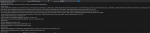
Being item on the stack at line 47 in the connect Function that appears to spiral everything downhill.
next thing prior on the stack points at an ending bracket. Which doesn't make sense to me.
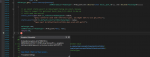
But then again, a large portion of this particular plugin doesn't make sense to me.
C++:
std::string channel = config["channel"].get<std::string>();Being item on the stack at line 47 in the connect Function that appears to spiral everything downhill.
next thing prior on the stack points at an ending bracket. Which doesn't make sense to me.
But then again, a large portion of this particular plugin doesn't make sense to me.

wizman1
Active member
I sent that crash report to ChatWithThisName and what's really strange is it worked fine yesterday with same json file. I use ultraedit to modify and it shows no errors in the file.There's not much error handling on a bad json file, in the one with VV. I'd start with making sure your config is good and proper. https://jsonlint.com/
wizman1
Active member
I've checked the channel- appears correct- not sure what the issue is- I will mess around some more and see if I can figure it out.JSON value type doesn't match what is expected is what that error is telling you.
@wizman1 Check your config for the "channel" entry on the character that crashed.
Odd request, I think. One thing I love using MQ2Discord for is the simple stuff--like trying to sell stuff while in my living room. The problem is that I can't link items through discord. So instead, I've tried to work around it by using discord to issue the keyboard command to cycle to my last chat message and then send that, but I'm having trouble on the "send" part.
Example: I use discord to /keypress Shift+UP and then try to /keypress ENTER but instead of sending the stuff in my chat box, it just removes the blinking cursor from the chat line, leaving my string of text un-sent. If that makes sense. No matter how I have tried to spin it, I have never gotten MQ2 to send something that is typed into my chatbox unless it was a literal /say or /ooc command (but again, I can't link items doing that).
So is there a way around this? Maybe a "submit chat" command I'm not aware of?
If I'm not explaining it well (a habit) here's what I am trying to do. I am at my keyboard, physically, and I type "/4 WTS Prize: Visage of the Siren Enticer PST" with the item linked, and send that to the General channel. Now let's say 10 minutes later I am on my couch watching TV, and I want to send it again because I haven't had any takers. I want to use discord/MQ2 to cycle back to the last item I sent in chat and send it again, that way the item link is intact. Is that doable?
Example: I use discord to /keypress Shift+UP and then try to /keypress ENTER but instead of sending the stuff in my chat box, it just removes the blinking cursor from the chat line, leaving my string of text un-sent. If that makes sense. No matter how I have tried to spin it, I have never gotten MQ2 to send something that is typed into my chatbox unless it was a literal /say or /ooc command (but again, I can't link items doing that).
So is there a way around this? Maybe a "submit chat" command I'm not aware of?
If I'm not explaining it well (a habit) here's what I am trying to do. I am at my keyboard, physically, and I type "/4 WTS Prize: Visage of the Siren Enticer PST" with the item linked, and send that to the General channel. Now let's say 10 minutes later I am on my couch watching TV, and I want to send it again because I haven't had any takers. I want to use discord/MQ2 to cycle back to the last item I sent in chat and send it again, that way the item link is intact. Is that doable?
Does anyone still maintain this plugin? It has definitely been crashing me and my friends clients increasingly for the last 2 months. I have crash dumps that indicate it was the culprit but as far as fixing it I do not have the skills. If anyone is interested in the dumps for fixing I can provide.
This is one of the plugins that me and my friends use as far as ease of sharing controls over distance. EQBC has been ok, but has its own challenges.
This is one of the plugins that me and my friends use as far as ease of sharing controls over distance. EQBC has been ok, but has its own challenges.

wymranar
I <3 SKs *kissy face*
Love mq2discord... I just started using it and everything was working perfectly.
Today, out of the blue, I'm getting an error that says, "error. youre being blocked from accessing our api temporarily due to exceeding our rate limits frequently...... blah blah "
I'm paraphrasing here, but has anyone experienced anything similar??
Today, out of the blue, I'm getting an error that says, "error. youre being blocked from accessing our api temporarily due to exceeding our rate limits frequently...... blah blah "
I'm paraphrasing here, but has anyone experienced anything similar??
I've occasionally gotten rate limit messages. The default mq2discord options really need to be paired down. I've also noticed that if you don't provide an individual channel for each of your characters you're going to get rate limited a lot more. Doing these two things and waiting for the temporary ban to be limited should help you out.
wymranar
I <3 SKs *kissy face*
I've occasionally gotten rate limit messages. The default mq2discord options really need to be paired down. I've also noticed that if you don't provide an individual channel for each of your characters you're going to get rate limited a lot more. Doing these two things and waiting for the temporary ban to be limited should help you out.
Damn, Ok. So, make a specific channel for each character? Then trim down my allow filters on my non-driving toon channels?
Do you remember how long the ban lasts? I love this plugin
Users who are viewing this thread
Total: 1 (members: 0, guests: 1)
Share: