• You've discovered RedGuides, an EverQuest multi-boxing and scripting community 🧙‍♀️⚙️. We want you to play several EQ characters at once, come join us and say hello! 👋

  • A TLP without truebox has thawed (Very Vanilla ready)
    Frostreaver

Problem - MQ2 AutoLogin - Stuck at Username/Password Screen (SOLVED)

klipche

Member
Joined
Aug 23, 2015
RedCents
129¢
I just installed the RedGuides MQ2 for EMU today. I was trying to get auto login to work but am having troubles. I watched the youtube video you guys posted step by step. I filled in each section besides the hotkey section. It has my user name and password. It is pointed at the correct directory. But when I click to load the profile it just starts EQ and sits at the login screen. It does not even input the user name and password. Not sure what I need to do. Like i said i have watched the video several times now and cannot see what i am not doing correct.

I am a couple hours into just trying to get MQ2 paid version to load one character.

Thanks for any help. I read through other folks auto login errors that have been posted but they did not have the same issue as myself. That is why i am posting. If i missed a post that answers this I am sorry. Please just provide the post without the normal forum flames that come with it. Thanks
 
Last edited:
I just installed the RedGuides MQ2 for EMU today. I was trying to get auto login to work but am having troubles. I watched the youtube video you guys posted step by step. I filled in each section besides the hotkey section. It has my user name and password. It is pointed at the correct directory. But when I click to load the profile it just starts EQ and sits at the login screen. It does not even input the user name and password. Not sure what I need to do. Like i said i have watched the video several times now and cannot see what i am not doing correct.

Also when I exit out of MQ2 and relaunch the profile i just created dissapears and i no longer am able to click on it to load. I am forced to recreate it and still it does the same thing.

I am a couple hours into just trying to get MQ2 paid version to load one character.

Thanks for any help. I read through other folks auto login errors that have been posted but they did not have the same issue as myself. That is why i am posting. If i missed a post that answers this I am sorry. Please just provide the post without the normal forum flames that come with it. Thanks
Yeah past patch or two autologin has been acting *crazy* for a few of us :(

are you getting the thing where it says the usergroup_server:name or similar?

is this the issue you were talking about? (you had mentioned not having the same issues as others, so just wanna try and get a baseline so we're talking about the same thing)
There is an issue on the VV gitlab > HERE <
if not then let's double check a couple of things

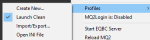
if you right click on your mq2 icon you can see these options here
you can see for me at themoment MQ2Login is: Disabled
Definiltey want that enabled to do its thing
1596743726305.png

if i click on the Open INI File on the left you can see the mq2autologin ini information
UseMQ2Login would need to be set to 1 (or if you use innerspace, like i do, to launch you would use the Station Names thing instead)

INI:
[Settings]
# Must be disabled.
UseMQ2Login=0
# NOTE: The following line is optional, as it defaults to off.  However, it cannot be set to 1 to use sessions.
UseStationNamesInsteadOfSessions=0
NotifyOnServerUP=0

Re: the forum flames - we don't do that here. We're happy to help! RedGuides is built upon a strong foundation of community involvement
 
Okay let me respond the best i can a lot to go through here.

1) are you getting the thing where it says the usergroup_server:name or similar?
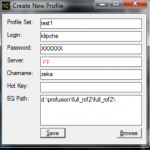
No idea to be honest which means probably no? I create my profile. I click save and get a pop up that says it was created. PNG attached.

I then try to log in by clicking on the new profile PNG that it exist attached also. It then takes me to login screen where both fields are blank. Cursor is sitting in the password field doing nothing.

2) I do not have the problem of the wrong user name being entered. However if i change the value of UseMQ2Login=1 to Zero it will put something into user name field that does not belong and nothing in the password field. I have attached a PNG of the INI file after i have created my profile. However if i exit MQ2 and restart it my profile is no longer visible but still remains in INI.

3) My MQ2Login is Enabled

Hope this was helpful. I know it is something so dumb it always is with me with anything i try to do on a computer.
 
(i deleted your third one since it had your blob details in it just for safety)

@Enine there anything special that needs to happen for your emu and autologin? (we can get enine in here and he'll know what's up)

re: something dumb - nah dude you're doing fine
 
ok looking at the > ProFusion Site <

looks like we might have to set it up in a special way

Code:
MQ2 AutoLogin plugin
In the MQ2AutoLogin.ini add in [Servers] section:
[Servers] PF=[] Enine's ProFusion

and each user account:
[AccountName] Password=Password Server=PF Character=CharName
 
Do i just add in

[Servers] PF=[] Enine's ProFusion
[AccountName] Password=Password Server=PF Character=CharName

Below everything already in the INI or am i supposed to delete the stuff in the INI and replace with the above?
 
Do i just add in

[Servers] PF=[] Enine's ProFusion
[AccountName] Password=Password Server=PF Character=CharName

Below everything already in the INI or am i supposed to delete the stuff in the INI and replace with the above?
hoping someone else is able to chime in as i haven't logged into an emu using autologin before.

I believe you can just add those sections to your mq2autologin.ini


[Servers] PF=[] Enine's ProFusion

and then you would hardcode in the next section here with your account name in brackets, your password, then charname
example:
[SicRogue] Password=SicRoguePasswword Server=PF Character=SicRogue
[AccountName] Password=Password Server=PF Character=CharName
 
I added:

[Servers] PF=[] Enine's ProFusion
[AccountName] Password=Password Server=PF Character=CharName

I put this below everything in the INI file. I hard coded in the accountname info and it just loads eq and does same thing. I appreciate the help regardless. Kind of wish i did not bother with this auto login. Clicking on 5 different EQ.exe on my desktop was not such a big deal in hindsight.
 
I added:

[Servers] PF=[] Enine's ProFusion
[AccountName] Password=Password Server=PF Character=CharName

I put this below everything in the INI file. I hard coded in the accountname info and it just loads eq and does same thing. I appreciate the help regardless. Kind of wish i did not bother with this auto login. Clicking on 5 different EQ.exe on my desktop was not such a big deal in hindsight.
well once one of the emu dudes chimes in the both of us will know how! and then easy street
 
Here is screen shot of INI without blob info and password has been erased in Paint. It is there.
 
Reading the profusion website it seems we might have to use the old system of setting up profiles in the autologin.ini
however you can try the profile system first.

INI:
[Servers]
PF=[] Enine's ProFusion

This needs to be in your ini file, make sure you dont have any spacing or what so ever, the name has to be exact to what the server is called on the emulator login server.

1596752668287.png
Login:
- Should be the account name you have for the login server.​

Password:
- Use the password for the account name

Server:
- We set up a custom servername in the server list from before. so use PF

this might not work.

as i believe emus use the old school account name system for profiles, i believe the same that isboxer and so on makes you use.
 
That fixed it sir. Thank you so much. Now I am still left with the problem of my profiles disappearing when i exit MQ2 and reload it, but I will create a new post for this problem so this thread can be considered closed and solved. Thanks again everyone.
 
Last edited:
Problem - MQ2 AutoLogin - Stuck at Username/Password Screen (SOLVED)

Users who are viewing this thread

Back
Top
Cart