• You've discovered RedGuides, an EverQuest multi-boxing and scripting community 🧙‍♀️⚙️. We want you to play several EQ characters at once, come join us and say hello! 👋

  • A TLP without truebox has thawed (Very Vanilla ready)
    Frostreaver

Question - MQ2 Autologin - Project Lazarus

Leifer1969

Member
Joined
Sep 25, 2020
RedCents
133¢
I've been looking at posts all over on this and nothing seems to solve my issue. Essentially, I'm new to Project Lazarus. I've been using RedGuides on both Live and Rizlona for over a year. I just cannot get the autologin to work when I log into Project Lazarus. It stalls at the server select screen. I presume I just don't have the "Server" shortname correct in the Autologin Profile Editor. Does anyone know what to use in that field? I've tried project lazarus, laz, projlaz, and about a dozen other things with no luck.
 
Solution
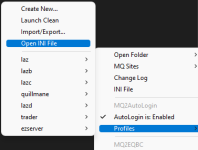
right click mq icon > autologin > open autologin ini
add new section in the file it opens in notepad

Code:
[Servers]
Project Lazarus=Project Lazarus
Project Lazarus=[] Project Lazarus

right click mq icon > autologin > create new create a new profile with server set as project lazarus

right click mq icon > autologin > open autologin ini
add new section in the file it opens in notepad

Code:
[Servers]
Project Lazarus=Project Lazarus
Project Lazarus=[] Project Lazarus

right click mq icon > autologin > create new create a new profile with server set as project lazarus

 
Solution
right click mq icon > autologin > open autologin ini
add new section in the file it opens in notepad

Code:
[Servers]
Project Lazarus=Project Lazarus
Project Lazarus=[] Project Lazarus

right click mq icon > autologin > create new create a new profile with server set as project lazarus


Thank you for your reply. I don't have an mq icon anywhere. I used the Redquides installer and I launch everything from the RedGuides Launcher. I'm very much a novice at these 3rd party tools, and I apologize I need such hand holding help. Where would I find the autologin ini ?
 
Thank you for your reply. I don't have an mq icon anywhere. I used the Redquides installer and I launch everything from the RedGuides Launcher. I'm very much a novice at these 3rd party tools, and I apologize I need such hand holding help. Where would I find the autologin ini ?
1670631894525.png
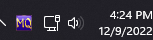
this MQ icon in your taskbar when you launch MQ.
1670631914038.png

Its just a shortcut to MQ2Autologin.ini, which it sounds like you may have had open already anyways.
 
Set this up in the MacroQuest.ini at the very bottom:

[Servers]
Project Lazarus=Project Lazarus
Project Lazarus=[] Project Lazarus

Then

Set this up in the MQ2Autologin.ini at the very bottom:

[Servers]
Project Lazarus=Project Lazarus
Project Lazarus=[] Project Lazarus

So, its in both ini files.

Then

set the server in the autologin profile editor to: project lazarus.

Still stops at the Server Select Screen when trying to autologin. Not sure what could be wrong.
 
Set this up in the MacroQuest.ini at the very bottom:

[Servers]
Project Lazarus=Project Lazarus
Project Lazarus=[] Project Lazarus

Then

Set this up in the MQ2Autologin.ini at the very bottom:

[Servers]
Project Lazarus=Project Lazarus
Project Lazarus=[] Project Lazarus

So, its in both ini files.

Then

set the server in the autologin profile editor to: project lazarus.

Still stops at the Server Select Screen when trying to autologin. Not sure what could be wrong.
you don't need to touch MacroQuest.ini, that servers section only goes in MQ2AutoLogin.ini.

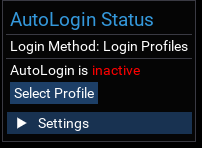
Does the autologin ui window show that it selected a profile? This thing
1670633009819.png
 
Yes. The Autologin Status looks fine. Says its running in the upper left hand side of the screen.. but EQ is still stuck on the Server Select screen.

I can manually click "Play Everquest" from here and autologin finishes logging in my toon just fine... It just gets stuck here at Server Select.
 
Question - MQ2 Autologin - Project Lazarus

Users who are viewing this thread

Back
Top
Cart