• You've discovered RedGuides, an EverQuest multi-boxing and scripting community 🧙‍♀️⚙️. We want you to play several EQ characters at once, come join us and say hello! 👋

  • A TLP without truebox has thawed (Very Vanilla ready)
    Frostreaver

Problem - MQ Crashing in Towns D3DXCreateEffect

Pankakes

Member
Joined
Apr 6, 2024
RedCents
80¢
Hey all,

I'm playing on Lazarus (if it matters) and I get a frequent MQ Crash (mostly in POK, Marr, Nexus):

---------------------------
EverQuest Crash Detected
---------------------------
MacroQuest caught a crash:

Process ID: 31408
Version: 3.1.0.0
Location: D3DXCreateEffect+0 (C:\Windows\SYSTEM32\d3dx9_30.dll+000EA08E)

CrashID: Not reported

You can either:
* [RETRY] Continue execution and hope for the best.
* [CANCEL] Write a crash dump and terminate EverQuest.

Copy the contents of this dialog to your clipboard by pressing Ctrl+C

---------------------------
Retry Cancel
---------------------------

Wanted to see if anyone was familiar with the D3DXCreateEffect error and if they knew a solution!

thanks a ton,
Pankakes
 
Can do absolutely nothing with this.

Check your drivers, make sure you have the 4gb memory patch. Check for other overlay software interfering. Don't launch with steam. Thats about all I can say.
Thanks Brainiac!

When you do "can do absolutely nothing with this" , do you mean with the information I provided, or just with the information MQ gives about the crash, it's tough to tell?

I'll double check all you mentioned.. I don't use steam.. What do you mean by other overlay software?

thanks again!!
 
When you do "can do absolutely nothing with this" , do you mean with the information I provided, or just with the information MQ gives about the crash, it's tough to tell?

Can't do anything with the information you provided because the information isn't present in the dialog, its present in the crash report, which wasn't submitted because you have it disabled (i don't know why you have it disabled)
 
Can't do anything with the information you provided because the information isn't present in the dialog, its present in the crash report, which wasn't submitted because you have it disabled (i don't know why you have it disabled)
3.1.0.0 would be self build, right?
 
if you're on lazarus then you should follow any/all of these

  • Most crashes are caused by the 32 bit process and out of memory errors. (the three below will resolve most crashing issues)
  • Use 4gb patch on the RoF2 client exe (eqgame.exe)
  • Use old models
  • Minimizing the global load for models (details below)
    ==============================
  • 4gb patch Webpage
  • Eqgame.exe already patched if you don't want to do it yourself (RoF2 client)
  • if on lazarus here is a more trimmed down global load that retains MOST of the modelsNewGlobalLoads_2023-09-25.zip
  • if not or you want as bare bones as you can get. Make a backup of the existing GlobalLoad.txt in your EQ\Resources directory and replace with this oneGlobalLoad.txt(this will disable a lot of models, get used to seeing human male warriors running around, if that's important to you, do this last)
  • If using frame limiter (highly recommended), disable particle effects on background characters.
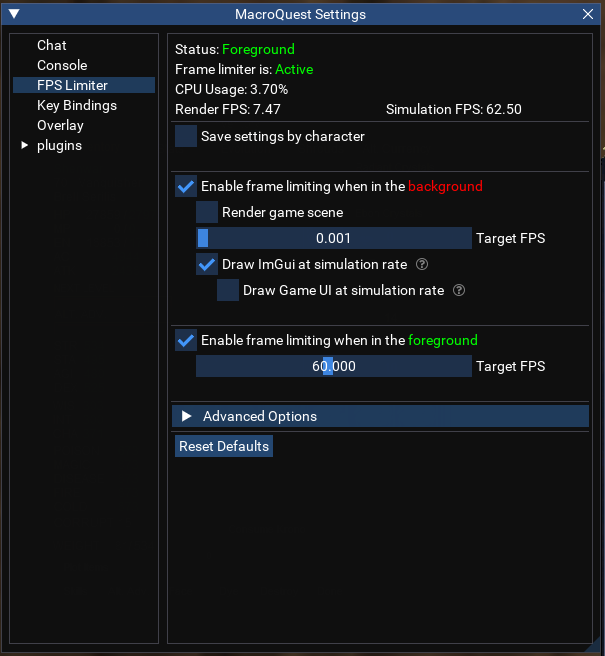
  • Frame limiter settings - Want background frame limiting enabled, low Target FPS, and want minimum simulation rate under advanced option at least 30 FPS

image


if you're on lazarus then you should follow any/all of these

  • Most crashes are caused by the 32 bit process and out of memory errors. (the three below will resolve most crashing issues)
  • Use 4gb patch on the RoF2 client exe (eqgame.exe)
  • Use old models
  • Minimizing the global load for models (details below)
    ==============================
  • 4gb patch Webpage
  • Eqgame.exe already patched if you don't want to do it yourself (RoF2 client)
  • if on lazarus here is a more trimmed down global load that retains MOST of the modelsNewGlobalLoads_2023-09-25.zip
  • if not or you want as bare bones as you can get. Make a backup of the existing GlobalLoad.txt in your EQ\Resources directory and replace with this oneGlobalLoad.txt(this will disable a lot of models, get used to seeing human male warriors running around, if that's important to you, do this last)
  • If using frame limiter (highly recommended), disable particle effects on background characters.
  • Frame limiter settings - Want background frame limiting enabled, low Target FPS, and want minimum simulation rate under advanced option at least 30 FPS

image


thanks! I'll try the MQ settings and new global loads first!

Already ran the 4gb patch!
 
Can't do anything with the information you provided because the information isn't present in the dialog, its present in the crash report, which wasn't submitted because you have it disabled (i don't know why you have it disabled)
that's how it was initially.. not sure why it was disabled. When it happens again i'll post the report!

thanks for all the help Braniac!
 
Project Lazarus is quite fun, but like aquietone already posted above, it needs some special care to help you have fun there.
 
Project Lazarus is quite fun, but like aquietone already posted above, it needs some special care to help you have fun there.
Hey I had a question about the global load file for Lazarus!

Do you replace the resource file with this new one, and where do i place the poknowledge_chr.txt file?

Sorry a bit of a noob when it comes to this stuff.
 
You might have figured this out already, but here you go:

So you have installed a new EQ client, yes? RoF2?

1. In that directory, replace the PoK file with the one in the zip.
2. There is a subdirectory in that folder, called "Resources", that's where the GlobalLoad file goes.
 
You might have figured this out already, but here you go:

So you have installed a new EQ client, yes? RoF2?

1. In that directory, replace the PoK file with the one in the zip.
2. There is a subdirectory in that folder, called "Resources", that's where the GlobalLoad file goes.
thanks a ton! sorry for the delay :)
 
Problem - MQ Crashing in Towns D3DXCreateEffect

Users who are viewing this thread

Back
Top
Cart