



Hello RedGuides!
This is a post with some sample code, that wished to share to help explain idea of macro flow, exits and command binds & alias.
I pulled this together as part of my learning, then thought to revisit it and post here on the off chance it can help others learn a bit too.
The working source for this, is attached.
I'm going to assume you have seen some macros before. Familiar with the idea, they run, they do some defined tasks and then finish themselves. Or there are macros that are started, and you interact with them by giving some commands in the chat window, including finishing its indefinite execution with '/end'.
Macro Functionality Brief
The basic brief for this macro is as follows:
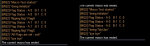
example outputs from runtime use:
Macro flow - part 1
We know the core of a macro is driven in it's "Main" subroutine.
The most simple of macro can be:
Instead of pointlessly output "hello world" to the MQ2 window, to be of some value it would have a series of instructions that did things.
The first macro I pushed public on RG is Neriak Wines (here) and it's an example of procedural macro in which the bulk of the work are held soley in the "Main" sub.
If the macro is short, perhaps this isn't a problem. But there are macros out there with thousands of lines of code!
This is where having more subs introduced can help with the understanding, and parcelling up the code into segments. This leads to better structure, better readability and maintainability.
As it stands, that is just going to "Initialze" then "DoSomeStuff" and finish.
I'm not going to debate the different looping types, but if wish to indefinately 'do some stuff', there are a couple of lazy approaches:-
On the left, the while true, and on the right is the goto.
Both of those are tight around the call to DoSomeStuff, and so it won't progress any further down the main sub.
If the user types /end, then yes, the macro will finish. Otherwise it will continue execution doing whatever is tasked inside DoSomeStuff.
To get this back on track of the brief, the code being discussed will do this:
As it stands, that will continue to execute, spitting out the Flag status of A B and C, each two seconds until the user /ends.
Next section, will field the user interaction to change the flag status while the macro runs.
Custom macro slash (/) commands
If you type in an unknown slash command, EQ will spit back the red text "That is not a valid command. Please user /help."
As per the brief, the macro requires the ability to enter /flipa, /flipb or /flipc and have it take some action. if i don't define this code, it will be considered "not valid commands" and spit the error.
The first piece is the bind statement.
This instructs that if the slash command, /flipflag, is entered then run the subroutine "FlipFlag".
That sub is special, in that it gets it's named suffixed with Bind, as in "Bind_FlipFlag".
The sub gets a parameter passed, the name of the flag variable to flip. The code defendes itself to ensure it's a valid name that has been declared already, outputs the activty and then using boolean logic changes the flag state. If it's already set (1/true) then it goes unset 0, else its set to 1.
As it stands now, while the macro is running the user can enter: /flipflag somename
If "somename" marries up to a declared variable, then it will change its value. I mentioned in the opening brief, there are three variables - FlagA, FlagB and FlagC.
These would do valid processing:
To fulfill the brief, i create some shorthand aliases.
Now the user can (case insenstive) enter the commands in the chat window.
In the macro instruction documents, we would explain to the user what each of those /flipa, /flipb and /flipc would do, and not need to expose them to /flipflag.
Macro flow - part 2
As it stands, we have a macro thats long running, and the user can change the values of the flags "in flight". These changes are being output to the MQ2 window.
Now to add another sub that will test the flags, and if they are all set it will end the macro.
The main sub would get edited as follows:
If the three flags are set, it will output the message acknowledging it, and then exit. Or the macro will also exit if the user types /end.
Now I wish you to imagine the scenario where there are a lot more features to the macro. A lot more subroutines that are doing activities.
There are many different reasons why a macro could end. A bug in the code, something wrong in an ini file, an event in game.
Having the macro written with lots of "/endmacro" can have things left in an unknown state.
There is a special goto tag, that can help with this.
:OnExit
When that is used in the macro, when the execution encounters /endmacro, it doesn't just stop execution at that point. Instead it jumps, it goes to that :OnExit tag and carries out the instructions there. The same also applies if the user types in /end.
Now regardless of what happens, if its to finish by the flags set or the user /end, it will output "bye bye" first and then stop.
Rather than just say "bye bye", it would be more useful to house keep. Perhaps write something to a log file, or some config info to the ini files.
In which you would put whatever code you require, into the TidyUps sub.
In closing
If you've stayed this far through the post, hopefully it was of value.
I may have some mistakes, there is likely some better practices out there. No doubt they shall appear in the comments.
Regards and Best Wishes
This is a post with some sample code, that wished to share to help explain idea of macro flow, exits and command binds & alias.
I pulled this together as part of my learning, then thought to revisit it and post here on the off chance it can help others learn a bit too.
The working source for this, is attached.
I'm going to assume you have seen some macros before. Familiar with the idea, they run, they do some defined tasks and then finish themselves. Or there are macros that are started, and you interact with them by giving some commands in the chat window, including finishing its indefinite execution with '/end'.
Macro Functionality Brief
The basic brief for this macro is as follows:
- The macro will be started, and remain running untl the user ends it manually, /end.
- It has some internal state, by means of three variables that I call "FlagA", "FlagB" and "FlagC" ( inital values of 0, 1, 0 respective).
- Periodically, the macro will output the state of the three flag variables.
- If all three of those flag variables are set, then the macro will also end.
- The user can change the state of the flags, by using a command in the chat window; /flipa /flipb /flipc
example outputs from runtime use:
(on the left, commands issued to set the flags and so it exits. On the right, it was /end to finish without extra flags changing first ).
Macro flow - part 1
We know the core of a macro is driven in it's "Main" subroutine.
The most simple of macro can be:
INI:
Sub Main
    /echo "Hello World."
/return
Instead of pointlessly output "hello world" to the MQ2 window, to be of some value it would have a series of instructions that did things.
The first macro I pushed public on RG is Neriak Wines (here) and it's an example of procedural macro in which the bulk of the work are held soley in the "Main" sub.
(The synopsis of that Neriak Wines code;
If you're not in Neriak, it uses /travelto to get you there. If you have no red wine, it goes to vendor to buy it. Next it moves to the turn in NPC and goes over picking up wine from the inventory and turning them in. That's 50 something lines of macro code, all within the Main sub. It works it's way through, procedural, top to bottom and then finishes.)
This is where having more subs introduced can help with the understanding, and parcelling up the code into segments. This leads to better structure, better readability and maintainability.
Code:
Sub Main
    /echo "My Macro"
    /call Initialize
    /call DoSomeStuff
/return

Sub Initialize
    /echo "doing Initialize"
/return

Sub DoSomeStuff
    /echo "doing some stuff!"
/return
As it stands, that is just going to "Initialze" then "DoSomeStuff" and finish.
I'm not going to debate the different looping types, but if wish to indefinately 'do some stuff', there are a couple of lazy approaches:-
|
Code:
|
Code:
|
On the left, the while true, and on the right is the goto.
Both of those are tight around the call to DoSomeStuff, and so it won't progress any further down the main sub.
If the user types /end, then yes, the macro will finish. Otherwise it will continue execution doing whatever is tasked inside DoSomeStuff.
To get this back on track of the brief, the code being discussed will do this:
Code:
Sub Main
    /echo "My Macro"
    /call Initialize
    /while (1) {
        /call DoSomeOutputs
        /delay 2s
    }

/return

Sub Initialize
    /echo "doing Initialize"
    /declare FlagA int outer 0
    /declare FlagB int outer 1
    /declare FlagC int outer 0
/return

Sub DoSomeOutputs
    /echo Flag Status - A:${FlagA}   B:${FlagB}  C: ${FlagC}
/return
As it stands, that will continue to execute, spitting out the Flag status of A B and C, each two seconds until the user /ends.
Next section, will field the user interaction to change the flag status while the macro runs.
Custom macro slash (/) commands
If you type in an unknown slash command, EQ will spit back the red text "That is not a valid command. Please user /help."
As per the brief, the macro requires the ability to enter /flipa, /flipb or /flipc and have it take some action. if i don't define this code, it will be considered "not valid commands" and spit the error.
The first piece is the bind statement.
Code:
#bind FlipFlag /flipflagThis instructs that if the slash command, /flipflag, is entered then run the subroutine "FlipFlag".
That sub is special, in that it gets it's named suffixed with Bind, as in "Bind_FlipFlag".
Code:
Sub Bind_FlipFlag(string TheFlag)
    /if (${Defined[${TheFlag}]}) {
        /echo "flipping flag" ${TheFlag}
        /if (${${TheFlag}}) {
                /varset ${TheFlag} 0
            } else {
                /varset ${TheFlag} 1
            }
    }
/return
The sub gets a parameter passed, the name of the flag variable to flip. The code defendes itself to ensure it's a valid name that has been declared already, outputs the activty and then using boolean logic changes the flag state. If it's already set (1/true) then it goes unset 0, else its set to 1.
As it stands now, while the macro is running the user can enter: /flipflag somename
If "somename" marries up to a declared variable, then it will change its value. I mentioned in the opening brief, there are three variables - FlagA, FlagB and FlagC.
These would do valid processing:
- /flipflag FlagA
- /flipflag FlagB
- /flipflag FlagC
To fulfill the brief, i create some shorthand aliases.
Code:
    /squelch /alias /FlipA    /flipflag FlagA
    /squelch /alias /FlipB    /flipflag FlagB
    /squelch /alias /FlipC    /flipflag FlagC
Now the user can (case insenstive) enter the commands in the chat window.
- /FlipA
- /flipb
- /FLIPC
In the macro instruction documents, we would explain to the user what each of those /flipa, /flipb and /flipc would do, and not need to expose them to /flipflag.
Macro flow - part 2
As it stands, we have a macro thats long running, and the user can change the values of the flags "in flight". These changes are being output to the MQ2 window.
Now to add another sub that will test the flags, and if they are all set it will end the macro.
Code:
Sub DoFlagTests
    /if ( ${FlagA} && ${FlagB} && ${FlagC}) {
        /echo "All Flags are set - exit"
        /endmacro
    }
/return
The main sub would get edited as follows:
Code:
Sub Main
    /echo "My Macro"
    /call Initialize
    /while (1) {
        /call DoSomeOutputs
        /delay 2s
       /call DoFlagTests
    }
/return
If the three flags are set, it will output the message acknowledging it, and then exit. Or the macro will also exit if the user types /end.
Now I wish you to imagine the scenario where there are a lot more features to the macro. A lot more subroutines that are doing activities.
There are many different reasons why a macro could end. A bug in the code, something wrong in an ini file, an event in game.
Having the macro written with lots of "/endmacro" can have things left in an unknown state.
There is a special goto tag, that can help with this.
:OnExit
When that is used in the macro, when the execution encounters /endmacro, it doesn't just stop execution at that point. Instead it jumps, it goes to that :OnExit tag and carries out the instructions there. The same also applies if the user types in /end.
Code:
Sub Main
    /echo "My Macro"
    /call Initialize
    /while (1) {
        /call DoSomeOutputs
        /delay 2s
       /call DoFlagTests
    }
:OnExit
    /echo "bye bye"
    /endmacro
/return
Now regardless of what happens, if its to finish by the flags set or the user /end, it will output "bye bye" first and then stop.
Rather than just say "bye bye", it would be more useful to house keep. Perhaps write something to a log file, or some config info to the ini files.
Code:
Sub Main
. . .
:OnExit
    /call TidyUps
    /echo "bye bye"
    /endmacro
/return

Sub TidyUps
    /echo "doing TidyUps"
/return
In which you would put whatever code you require, into the TidyUps sub.
In closing
If you've stayed this far through the post, hopefully it was of value.
I may have some mistakes, there is likely some better practices out there. No doubt they shall appear in the comments.
Regards and Best Wishes
Attachments
Last edited:

