• You've discovered RedGuides, an EverQuest multi-boxing and scripting community 🧙‍♀️⚙️. We want you to play several EQ characters at once, come join us and say hello! 👋

  • A TLP without truebox has thawed (Very Vanilla ready)
    Frostreaver

Problem - ini files not visable

Phugly

New member
Joined
Nov 13, 2021
RedCents
30¢
Version of KissAssist.mac?
v12.001.012
When did your problem start?
At the start of set up after installation.
Character Role?
  1. Assist
What class is having this issue?
  1. Necromancer
How often does this issue occur?
Always
After I run /mac kissassist to create the ini file. I open the MQ folder then search in the Macro sub folder and I see no ini file titled kissassist_character name.ini, it just isn't visible. What am I missing?
 
After I run /mac kissassist to create the ini file. I open the MQ folder then search in the Macro sub folder and I see no ini file titled kissassist_character name.ini, it just isn't visible. What am I missing?
well i checked that you weren't running macroquest "Next" but it doesn't appear so in your download history - if you *ARE* using MacroQuest "Next" it is because inis are inside your config folder for Next

if you are using MQ2 Legacy - I would double check that the macros folder that you're looking in is the folder that your mq2 is actually launched from - sometimes folks end up installing in more than 1 location and will be looking in 1, but launching from another
 
also reemember that you might not have your windows showing extensions for known files. so you wont see the .ini part
 
also reemember that you might not have your windows showing extensions for known files. so you wont see the .ini part
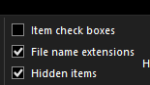
if this is the case you can make the file extension visible like this

open your release folder, Click the "View" tab
1636895759127.png

Move over to the right and select "File Name Extensions"
1636895768311.png
 
Problem - ini files not visable

Users who are viewing this thread

Back
Top
Cart