My monk is always trying to move behind the mob. I don't want this behavior. I set stick to "hold 15" in kiss ini and then set the mq2melee setting to "hold 15". Nothing seems to work. Anyone know how to just make my monk assist and stick to mob without trying to always move behind?

-
 Hail, we're RedGuides. We want you to play six (yes, 6!) EverQuest characters at once. We have scripts and a friendly community to help, please join our playstyle and say hello! 👋
You are using an out of date browser. It may not display this or other websites correctly.
You should upgrade or use an alternative browser.
You should upgrade or use an alternative browser.
Question - how to stop stick from going behind mob
- Thread starter someguy
- Start date

[General]
KissAssistVer=11.005
CampRadius=30
CampRadiusExceed=400
ReturnToCamp=1
ChaseAssist=0
ChaseDistance=25
MedOn=1
MedStart=20
MedCombat=0
LootOn=0
RezAcceptOn=0|98
AcceptInvitesOn=1
GroupWatchOn=0
CastingInterruptOn=0
EQBCOn=0
IRCOn=0
HoTTOn=0
CampfireOn=0
CharInfo=Monk|50|GOLD
DPSMeter=1
ScatterOn=0
Role=Assist
GroupWatchCheck=FALSE
DanNetOn=0
DanNetDelay=20
XTSlot=1
[Buffs]
BuffsOn=0
BuffsCOn=0
BuffsSize=20
Buffs1=NULL
Buffs2=NULL
Buffs3=NULL
Buffs4=NULL
Buffs5=NULL
Buffs6=NULL
Buffs7=NULL
Buffs8=NULL
Buffs9=NULL
Buffs10=NULL
Buffs11=NULL
Buffs12=NULL
Buffs13=NULL
Buffs14=NULL
Buffs15=NULL
Buffs16=NULL
Buffs17=NULL
Buffs18=NULL
Buffs19=NULL
Buffs20=NULL
RebuffOn=1
CheckBuffsTimer=10
PowerSource=NULL
[Melee]
AssistAt=98
MeleeOn=1
FaceMobOn=1
MeleeDistance=75
StickHow=hold 15
AutoFireOn=0
UseMQ2Melee=1
TargetSwitchingOn=0
[GMail]
GMailHelp=Events currently support - Dead,Drag,GM,Level,Named,Leftgroup
GMailOn=0
GMailSize=5
GMail1=NULL
GMail2=NULL
GMail3=NULL
GMail4=NULL
GMail5=NULL
[AE]
AEOn=0
AESize=10
AERadius=50
AE1=NULL
AE2=NULL
AE3=NULL
AE4=NULL
AE5=NULL
AE6=NULL
AE7=NULL
AE8=NULL
AE9=NULL
AE10=NULL
[DPS]
DPSOn=0
DPSSize=20
DPSSkip=20
DPSInterval=2
DPS1=NULL
DPS2=NULL
DPS3=NULL
DPS4=NULL
DPS5=NULL
DPS6=NULL
DPS7=NULL
DPS8=NULL
DPS9=NULL
DPS10=NULL
DPS11=NULL
DPS12=NULL
DPS13=NULL
DPS14=NULL
DPS15=NULL
DPS16=NULL
DPS17=NULL
DPS18=NULL
DPS19=NULL
DPS20=NULL
DebuffAllOn=0
[Aggro]
AggroOn=0
AggroSize=5
Aggro1=NULL
Aggro2=NULL
Aggro3=NULL
Aggro4=NULL
Aggro5=NULL
[Heals]
Help=Format Spell|% to heal at i.e. Devout Light Rk. II|50
HealsOn=0
HealsSize=5
Heals1=NULL
Heals2=NULL
Heals3=NULL
Heals4=NULL
Heals5=NULL
XTarHeal=0
HealGroupPetsOn=0
XTarHealList=Xtar slots here Example: 5|6|7
[Cures]
CuresOn=0
CuresSize=5
Cures1=NULL
Cures2=NULL
Cures3=NULL
Cures4=NULL
Cures5=NULL
[Burn]
BurnSize=15
BurnText=Decepticons Attack
BurnAllNamed=0
Burn1=NULL
Burn2=NULL
Burn3=NULL
Burn4=NULL
Burn5=NULL
Burn6=NULL
Burn7=NULL
Burn8=NULL
Burn9=NULL
Burn10=NULL
Burn11=NULL
Burn12=NULL
Burn13=NULL
Burn14=NULL
Burn15=NULL
UseTribute=0
[Pull]
PullWith=Melee
PullMeleeStick=0
MaxRadius=350
MaxZRange=50
UseWayPointZ=0
PullWait=5
PullRadiusToUse=90
PullRoleToggle=0
ChainPull=0
ChainPullHP=90
ChainPullPause=30|2
PullLevel=0|0
PullPause=30|2
PullArcWidth=0
[AFKTools]
AFKHelp=AFKGMAction=0 Off, 1 Pause Macro, 2 End Macro, 3 Unload MQ2, 4 Quit Game
AFKToolsOn=1
AFKGMAction=1
AFKPCRadius=500
CampOnDeath=0
ClickBacktoCamp=0
[Merc]
Help=To use: Turn off Auto Assist in Manage Mercenary Window
MercOn=0
MercAssistAt=92
[KConditions]
ConOn=0
CondSize=5
Cond1=TRUE
Cond2=TRUE
Cond3=TRUE
Cond4=TRUE
Cond5=TRUE
[KissError]
LastCMD:=/endmacro
ErrorDateTime:=06/12/2020 09:45:19
ErrorMsg:=Plugin 'MQ2Posse' could not be loaded.
DataError:=NULL
SyntaxError:=NULL
RunningTime:=14102123
BuildDate:=20200607
CurrentUI:=defaultplus
KissAssistVer=11.005
CampRadius=30
CampRadiusExceed=400
ReturnToCamp=1
ChaseAssist=0
ChaseDistance=25
MedOn=1
MedStart=20
MedCombat=0
LootOn=0
RezAcceptOn=0|98
AcceptInvitesOn=1
GroupWatchOn=0
CastingInterruptOn=0
EQBCOn=0
IRCOn=0
HoTTOn=0
CampfireOn=0
CharInfo=Monk|50|GOLD
DPSMeter=1
ScatterOn=0
Role=Assist
GroupWatchCheck=FALSE
DanNetOn=0
DanNetDelay=20
XTSlot=1
[Buffs]
BuffsOn=0
BuffsCOn=0
BuffsSize=20
Buffs1=NULL
Buffs2=NULL
Buffs3=NULL
Buffs4=NULL
Buffs5=NULL
Buffs6=NULL
Buffs7=NULL
Buffs8=NULL
Buffs9=NULL
Buffs10=NULL
Buffs11=NULL
Buffs12=NULL
Buffs13=NULL
Buffs14=NULL
Buffs15=NULL
Buffs16=NULL
Buffs17=NULL
Buffs18=NULL
Buffs19=NULL
Buffs20=NULL
RebuffOn=1
CheckBuffsTimer=10
PowerSource=NULL
[Melee]
AssistAt=98
MeleeOn=1
FaceMobOn=1
MeleeDistance=75
StickHow=hold 15
AutoFireOn=0
UseMQ2Melee=1
TargetSwitchingOn=0
[GMail]
GMailHelp=Events currently support - Dead,Drag,GM,Level,Named,Leftgroup
GMailOn=0
GMailSize=5
GMail1=NULL
GMail2=NULL
GMail3=NULL
GMail4=NULL
GMail5=NULL
[AE]
AEOn=0
AESize=10
AERadius=50
AE1=NULL
AE2=NULL
AE3=NULL
AE4=NULL
AE5=NULL
AE6=NULL
AE7=NULL
AE8=NULL
AE9=NULL
AE10=NULL
[DPS]
DPSOn=0
DPSSize=20
DPSSkip=20
DPSInterval=2
DPS1=NULL
DPS2=NULL
DPS3=NULL
DPS4=NULL
DPS5=NULL
DPS6=NULL
DPS7=NULL
DPS8=NULL
DPS9=NULL
DPS10=NULL
DPS11=NULL
DPS12=NULL
DPS13=NULL
DPS14=NULL
DPS15=NULL
DPS16=NULL
DPS17=NULL
DPS18=NULL
DPS19=NULL
DPS20=NULL
DebuffAllOn=0
[Aggro]
AggroOn=0
AggroSize=5
Aggro1=NULL
Aggro2=NULL
Aggro3=NULL
Aggro4=NULL
Aggro5=NULL
[Heals]
Help=Format Spell|% to heal at i.e. Devout Light Rk. II|50
HealsOn=0
HealsSize=5
Heals1=NULL
Heals2=NULL
Heals3=NULL
Heals4=NULL
Heals5=NULL
XTarHeal=0
HealGroupPetsOn=0
XTarHealList=Xtar slots here Example: 5|6|7
[Cures]
CuresOn=0
CuresSize=5
Cures1=NULL
Cures2=NULL
Cures3=NULL
Cures4=NULL
Cures5=NULL
[Burn]
BurnSize=15
BurnText=Decepticons Attack
BurnAllNamed=0
Burn1=NULL
Burn2=NULL
Burn3=NULL
Burn4=NULL
Burn5=NULL
Burn6=NULL
Burn7=NULL
Burn8=NULL
Burn9=NULL
Burn10=NULL
Burn11=NULL
Burn12=NULL
Burn13=NULL
Burn14=NULL
Burn15=NULL
UseTribute=0
[Pull]
PullWith=Melee
PullMeleeStick=0
MaxRadius=350
MaxZRange=50
UseWayPointZ=0
PullWait=5
PullRadiusToUse=90
PullRoleToggle=0
ChainPull=0
ChainPullHP=90
ChainPullPause=30|2
PullLevel=0|0
PullPause=30|2
PullArcWidth=0
[AFKTools]
AFKHelp=AFKGMAction=0 Off, 1 Pause Macro, 2 End Macro, 3 Unload MQ2, 4 Quit Game
AFKToolsOn=1
AFKGMAction=1
AFKPCRadius=500
CampOnDeath=0
ClickBacktoCamp=0
[Merc]
Help=To use: Turn off Auto Assist in Manage Mercenary Window
MercOn=0
MercAssistAt=92
[KConditions]
ConOn=0
CondSize=5
Cond1=TRUE
Cond2=TRUE
Cond3=TRUE
Cond4=TRUE
Cond5=TRUE
[KissError]
LastCMD:=/endmacro
ErrorDateTime:=06/12/2020 09:45:19
ErrorMsg:=Plugin 'MQ2Posse' could not be loaded.
DataError:=NULL
SyntaxError:=NULL
RunningTime:=14102123
BuildDate:=20200607
CurrentUI:=defaultplus

Suggestion you might just want to change the StickHow=hold 15 to just StickHow=front or one of the other settings.
StickHow= Tells character how to stick to mob when fighting. !front (not in front), behindonce (hit em one time from behind), snaproll rear, front. See mq2moveutils for more valid commands and descriptions.
Note: Stick while in combat will try and use MAX melee distance. To adjust for this, use the % option in your StickHow command to move closer to the mob.
Example: StickHow=MoveBack 50% loose
StickHow= Tells character how to stick to mob when fighting. !front (not in front), behindonce (hit em one time from behind), snaproll rear, front. See mq2moveutils for more valid commands and descriptions.
Note: Stick while in combat will try and use MAX melee distance. To adjust for this, use the % option in your StickHow command to move closer to the mob.
Example: StickHow=MoveBack 50% loose
i've tried both suggestions above. mq2melee is controlling the stick, however its not respecting the commands i put into the ini. for whatever reason. mq2melee is always using !front (regardless of the command i put into the ini). is there some plugin overriding this that i'm missing?
i also tried: UseMQ2Melee=0 , and this is the stick behavior i want, however i lose out on my melee characters using their abilities.
i also tried: UseMQ2Melee=0 , and this is the stick behavior i want, however i lose out on my melee characters using their abilities.
Let KA handle positioning, change this:
Does it follow your "hold 15" after that? At this point you can just change the stick settings in your KA ini to work on it. You shouldn't have to worry about the plugin settings.
You could try some of the other mq2moveutils stick settings if hold isn't working. Or just a distance like "15" or "20%"
INI:
[Melee]
UseMQ2Melee=0
Does it follow your "hold 15" after that? At this point you can just change the stick settings in your KA ini to work on it. You shouldn't have to worry about the plugin settings.
You could try some of the other mq2moveutils stick settings if hold isn't working. Or just a distance like "15" or "20%"
Smokeybear72
Only YOU can prevent forest fires !
For my Melee I use : StickHow=snaproll !front 10 moveback uw
This will keep your melee toon out of the front arc which is where Cone AE as well as mobs ability to defend themselves with block, parry, and riposte etc.
I am curious why you would want any melee fighting from the front of any mob as you will lose dps and take more damage from ripostes and cone spells etc ?
This will keep your melee toon out of the front arc which is where Cone AE as well as mobs ability to defend themselves with block, parry, and riposte etc.
I am curious why you would want any melee fighting from the front of any mob as you will lose dps and take more damage from ripostes and cone spells etc ?

I'm gonna guess you're editing the wrong ini file. With UseMQ2Melee=1, it does *not* use the setting in your kissassist ini file, it uses the [Melee] section in your <servername>_<charname>.ini file.i've tried both suggestions above. mq2melee is controlling the stick, however its not respecting the commands i put into the ini. for whatever reason. mq2melee is always using !front (regardless of the command i put into the ini). is there some plugin overriding this that i'm missing?
i also tried: UseMQ2Melee=0 , and this is the stick behavior i want, however i lose out on my melee characters using their abilities.
I got the correct ini. Its the <servername>_<charname>.ini. But it doesn't matter what value I put there. It always defaults to !front
[MQ2Melee]
ancestral=20
disarm=1
enrage=1
enragingkick=25
facing=1
feigndeath=30
flyingkick=1
groupcheck=1
infuriate=1
kick=1
melee=1
mend=20
override=1
plugin=1
provokeend=20
provokemax=1000
resume=20
roundkick=1
sneakdelay=1000
stickbreak=1
stickrange=70
stickmode=1
stickcmd=hold 15
[MQ2Melee]
ancestral=20
disarm=1
enrage=1
enragingkick=25
facing=1
feigndeath=30
flyingkick=1
groupcheck=1
infuriate=1
kick=1
melee=1
mend=20
override=1
plugin=1
provokeend=20
provokemax=1000
resume=20
roundkick=1
sneakdelay=1000
stickbreak=1
stickrange=70
stickmode=1
stickcmd=hold 15

- Commits
- 191
Line 967: /squelch /melee stickmode=0
KA turns off stickmode to disallow Mq2Melee from controlling stick. Try commenting out the line or deleting the line.
This is in the copy I'm using and may not be the same version you're using. So the line numbers might not match.
You'll also find that KA modifies some of the values of MoveUtils.
Line 995: /stick set autosave off
Line 996: |/stick set moveback 12
Line 997: /stick set verbflags 0
Line 998: /stick set breakonkb on
Line 999: /stick set breakonmouse off
Line 1000: /stick set breakdist ${CampRadiusExceed}
Line 1001: /stick set breakonwarp on
Line 1002: /stick set usefleeing on
Line 1003: /stick set delaystrafe on
Line 1004: /stick set feign on
KA turns off stickmode to disallow Mq2Melee from controlling stick. Try commenting out the line or deleting the line.
This is in the copy I'm using and may not be the same version you're using. So the line numbers might not match.
You'll also find that KA modifies some of the values of MoveUtils.
Line 995: /stick set autosave off
Line 996: |/stick set moveback 12
Line 997: /stick set verbflags 0
Line 998: /stick set breakonkb on
Line 999: /stick set breakonmouse off
Line 1000: /stick set breakdist ${CampRadiusExceed}
Line 1001: /stick set breakonwarp on
Line 1002: /stick set usefleeing on
Line 1003: /stick set delaystrafe on
Line 1004: /stick set feign on
- Commits
- 191
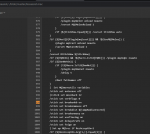
You say that....but here's the screenshot directly from the KA repo on gitlab.
Thanks everyone for the help. I figured it out. Every time I start kiss, it resets mq2melee to default values, therefore ignoring my settings in the mq2melee ini. So here is my work around. I just created a macro.
This finally works the way I want it. I don't want my characters to constantly reposition using !front, especially in dungeon with tight hallways. This would cause my characters to spend most of their time moving around than actually fighting.
/bca //mac kissassist assist 98
/pause 30
/bca //melee reload
This finally works the way I want it. I don't want my characters to constantly reposition using !front, especially in dungeon with tight hallways. This would cause my characters to spend most of their time moving around than actually fighting.
Oh yeah I wasn't doubting you at all - I just mean that whenever I have kissassist running I always have to '/melee stickbreak=1' myself manually after starting the macro if I want to pull away from a mob - so I'm surprised to see that MQ2MoveUtils command in the code because KA is not operating that way for me - can't pull off a mob by default once autoattack is on. I can't test things out now but will report back later. Could be some sort of conflict between MQ2Melee and MQ2MoveUtils that is unique to the way I have things loaded?View attachment 22536
You say that....but here's the screenshot directly from the KA repo on gitlab.
- Commits
- 191
Well MQ2Melee uses MQ2MoveUtils to determine if it's sticking, and uses other settings internally to keep stick locked on. There's a setting specifically for MQ2Melee and one that's part of MQ2MoveUtils. My plugins are done much the same way. MQ2Melee has access to a bool variable in MQ2MoveUtils to know if it's sticking or not sticking, but doesn't have access to know if breakonkb is set or not, and if it should break because of a keypress. So even though this is being set, it doesn't have any effect.


so here is my thing im in a dungion with water and drops i want everyone to fight on front of mob how would i achieve that i tried loose but they still seem to be moving around to back of mob thus falling into water off cliffs and such
Check all the options for the stick command here:- https://www.redguides.com/community/resources/mq2moveutils.144/
I'd just use:
front
as the setting, but beware of ripostes

Users who are viewing this thread
Total: 1 (members: 0, guests: 1)
Share: