



This is a "How To" for setting up Ninjadvloot. The info used here are from trial and error and feedback from the community. Thank You for your hard work. Enjoy!
Step one:
Ninjadvloot code must be in the macros used.
At the very beginning of any macro being used (kissassist, autocleric, autowarrior, ect...) enter #include ninjadvloot.inc
After the line Sub Main but before the main loop add the command /call SetupAdvLootVars
Somewhere in the main loop add the command /if ((${AdvLoot.SCount}||${AdvLoot.PCount}) && !${LootTimer} && ${Me.CombatState.NotEqual[combat]}) /call UseAdvLoot
Three files are included for use and/or reference to where to add said code. View attachment AutoCleric.mac, View attachment autowarrior.mac, View attachment kissassist.mac
Step Two:
In Game /advloot must be set up properly on all Toons.
1. Go in game and open the main option window and uncheck "Loot All"
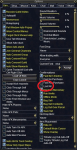
2. open /advloot ( /advl )
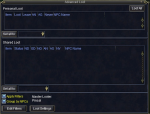
3. open loot settings and make ALL toons /advloot look like this
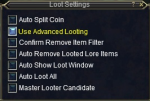
4. close all said windows and have your group leader choose a Master Looter by right clicking on there name, mouse over Role and left click Master looter.
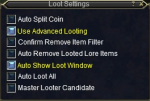
5. your master looter loot settings window can look like this
Step Three:
Ninjadvloot uses a .ini file called Loot.ini found in the MQ2 > Release > Macros folder. This can be edited by you. here is an example for use or reference ---> View attachment Loot.ini
loot should have a =Keep, =destroy =quest|1 tag behind it.
Step Four:
If you are using /advloot then we want the loot to be rolled on and distributed to the winner.
1. Go to your EQ directory (the folder where your maps and UI folder is) and locate the Userdata folder. inside are the files for edit.
2. look here for more info: EoK Loot Tables - someday this will be a wiki
3. The only file that needs to be edited is the file that looks like this: LF_AN_masterlootername_yourservername if you dont have one read EoK Loot Tables - someday this will be a wiki
here is one for use or reference : View attachment LF_AN_masterlootername_servername.ini if you use this, name it LF_AN_AAA_servername.ini
4. ON YOUR MASTER LOOTER open /advloot and click Edit Filters
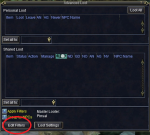
5. on this window click Merge/Replace Filters on top left. You will NOT have the gem names listed
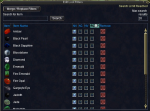
6. copy loot filters will open.
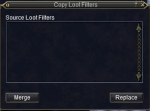
under source loot filter select the file View attachment LF_AN_masterlootername_servername.ini and click merge and accept. if you used LF_AN_AAA_servername.ini, select it.
Read this if you do not see a file. EoK Loot Tables - someday this will be a wiki
ALL toons must do number 4, 5, 6 above
If I missed anything let me know so i can update it. I will try and keep this updated.
Special Thanks to:
Hoosierbilly
Razkle
Maskoi
Razkle
Maskoi
Last edited: