• You've discovered RedGuides, an EverQuest multi-boxing and scripting community 🧙‍♀️⚙️. We want you to play several EQ characters at once, come join us and say hello! 👋

  • A TLP without truebox has thawed (Very Vanilla ready)
    Frostreaver

Problem - (fixed: Patch) CWTN Crashing on the new 9/20 **Test** compile

Status
Not open for further replies.
Joined
Feb 14, 2012
RedCents
132¢
Evening,

Apologies if this should be in the test thread. I don't believe this issue is related to Macroquest itself rather the CWTN plugin so I figured it belonged here.

I wanted to report that, upon installing the new test version of MQ, my CWTN characters instantly are crashed to desktop with no error of any kind.

I can confirm that characters that are loaded with CWTN turned off do not crash, and they only immediately close upon loading of CWTN. I have tested every class specific variant of CWTN all the same effect.

I understand that test just went live and that some plugins may have been affected by the changes.

Just wanted to raise awareness!
 
Solution
Brain found a rogue (as in a renegade, not the everquest class) offset and MQ/RG is repatching for test.

Please make sure you patch (after the build is posted).

Thank you for your patience.

if'n ya feel like shooting brain some lunch or coffee bux im sure he'd appreciate it, he had a long night getting us all updated asap.

brainiac's tip thread is here:
Donate to the MQ Dev "brainiac"
Thank you!
Speaking for the TEST version only:

I have updated MQ and attempted to log in the characters again using the autologin profiles.

All CWTN characters still crashing immediately upon load. Ranger/Bard successfully loaded. (no CWTN)

I went into my Macroquest ini and MQ2Druid=0, then attempted to log in the druid.

The druid logged in completely fine. I then manually plugged in MQ2druid and the window closed.

My characters are either in guild hall (neighborhood, modest guild hall) or lavastorm mountains (not sure if this has any impact, figured maybe worth noting).

The characters do not crash when loaded without mq.
 
Speaking for the TEST version only:

I have updated MQ and attempted to log in the characters again using the autologin profiles.

All CWTN characters still crashing immediately upon load. Ranger/Bard successfully loaded. (no CWTN)

I went into my Macroquest ini and MQ2Druid=0, then attempted to log in the druid.

The druid logged in completely fine. I then manually plugged in MQ2druid and the window closed.

My characters are either in guild hall (neighborhood, modest guild hall) or lavastorm mountains (not sure if this has any impact, figured maybe worth noting).

The characters do not crash when loaded without mq.
Having the same issue on Test
 
If you're on live - patch. it is fixed and is working. - this includes checking your "plugin" tab on the RG launcher to ensure you have up to date plugins.

if you're on test - we appreciate your patience. EQ is doing a lot of updates, and MQ on test is doing its best. It is likely an eq->MQ issue, and not something directly in mq2mage. cwtn and I will obviously try and help track down and help get it fixed all the same, but it likely isn't a "let me just update this code in mq2mage real fast"
 
Thanks Sic, I had assumed this thread was discussing **Test** only as the title implies, and the issue I'm having is test only.

**Live works great from what I've seen.
 
Thanks Sic, I had assumed this thread was discussing **Test** only as the title implies, and the issue I'm having is test only.

**Live works great from what I've seen.
well, i didn't make the thread, and folks are posting about other servers, but yes, > i < can read it says test in the title
 
If you're on live - patch. it is fixed and is working.

if you're on test - i appreciate your patience. EQ is doing a lot of updates, and MQ on test is doing its best. It is likely an eq->MQ issue, and not something directly in mq2mage. cwtn and I will obviously try and help track down and help get it fixed all the same, but it likely isn't a "let me just update this code in mq2mage real fast"
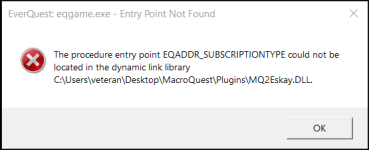
I don't know if this is related or not, but I'm getting this on live:1695297400302.png
It's happening for my MQ2eskay, shaman, cleric, and zerker. None of them are working on any of my six accounts. All accounts are subscription accounts.
 
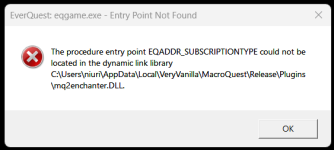
Hi, not sure how to proceed. I'm still getting the error in live, and plugins were already patched. I checked the path and DLLs are not there as error says. What do you recommend I try next? Thanks!
1695303842491.png
1695303884938.png
 
Just to add echo for test, CTD when MQ runs. Standing by =)
there is zero need for "add echo for test CTD"
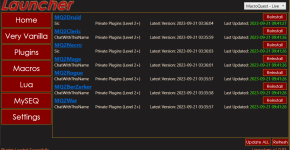
If you're on live - patch. it is fixed and is working. - this includes checking your "plugin" tab on the RG launcher to ensure you have up to date plugins.

if you're on test - we appreciate your patience. EQ is doing a lot of updates, and MQ on test is doing its best. It is likely an eq->MQ issue, and not something directly in mq2mage. cwtn and I will obviously try and help track down and help get it fixed all the same, but it likely isn't a "let me just update this code in mq2mage real fast"
 
Hi, not sure how to proceed. I'm still getting the error in live, and plugins were already patched. I checked the path and DLLs are not there as error says. What do you recommend I try next? Thanks!
View attachment 51080
View attachment 51081
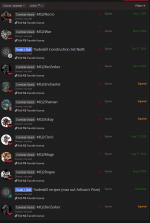
you let your license expire

and you can see in the picture you shared that mq2enchanter is not listed there.

1695303987962.png


If you have already checked the RG Launcher Plugin Tab then read the following:
- The RG Launcher is unable to *delete* old files.
-- This means you will get an error box if you don't have a current plugin that matches the mq build
-- your options are:
--- a: purchase a license
--- b: delete the old .dll in your plugin folder, and/or
--- c: change your macroquest.ini to MQ2PluginName=0 under [Plugins]
 
you let your license expire

and you can see in the picture you shared that mq2enchanter is not listed there.

View attachment 51082


If you have already checked the RG Launcher Plugin Tab then read the following:
- The RG Launcher is unable to *delete* old files.
-- This means you will get an error box if you don't have a current plugin that matches the mq build
-- your options are:
--- a: purchase a license
--- b: delete the old .dll in your plugin folder, and/or
--- c: change your macroquest.ini to MQ2PluginName=0 under [Plugins]
Thanks, makes total sense now.
 
Brain found a rogue (as in a renegade, not the everquest class) offset and MQ/RG is repatching for test.

Please make sure you patch (after the build is posted).

Thank you for your patience.

if'n ya feel like shooting brain some lunch or coffee bux im sure he'd appreciate it, he had a long night getting us all updated asap.

brainiac's tip thread is here:
Donate to the MQ Dev "brainiac"
Thank you!
 
Solution
Problem - (fixed: Patch) CWTN Crashing on the new 9/20 **Test** compile
Status
Not open for further replies.

Users who are viewing this thread

Back
Top
Cart