
-
 Hail, we're RedGuides. We want you to play six (yes, 6!) EverQuest characters at once. We have scripts and a friendly community to help, please join our playstyle and say hello! 👋
You are using an out of date browser. It may not display this or other websites correctly.
You should upgrade or use an alternative browser.
You should upgrade or use an alternative browser.
Resource icon
Release ChatWnd (core plugin) (1 Viewer)
- Thread starter IamBigDaddy
- Start date

- Commits
- 192

Each resource on RG has an Overview / Discussion Thread and either a link to their wiki or tabs with FAQ, Commands, Etc.Been searching for a while, all I find is mq2labels, but that doesnt seem to be getting me what I want. Tried captions, but I believe that's just player titles, etc. Use to know how to do this, but forgot and can't seem to figure it out this early. How do you change the title of the MQ window to something custom. With the EQ windows it's just simply a right click.
Thanks!
Please make sure to post in the respective discussion thread, and check the FAQ/Commands/Wiki for information before posting.
Thanks man i'll check into that next time.Each resource on RG has an Overview / Discussion Thread and either a link to their wiki or tabs with FAQ, Commands, Etc.
Please make sure to post in the respective discussion thread, and check the FAQ/Commands/Wiki for information before posting.
Somehow I "threw" the mq2 window up high enough that now I can't "grab" it to move it. So I can't choose the tabs - so the character is not usable like this. Is there a restore to original position fix for that? I have restarted the game completely - still has it out of bounds. Thank you!

/mqchat resetSomehow I "threw" the mq2 window up high enough that now I can't "grab" it to move it. So I can't choose the tabs - so the character is not usable like this. Is there a restore to original position fix for that? I have restarted the game completely - still has it out of bounds. Thank you!


- Commits
- 191
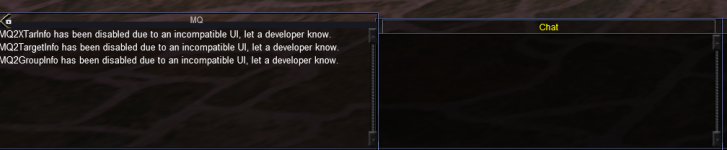
visually, or all the output?Anyone know if its possible and if so what file i would be needing to change make my MQ chat window match my UI's? this is what i have at the moment
View attachment 67272
- Commits
- 191
Best I can tell there is no XML file for MQ2ChatWnd - which means if you can't do it from in-game, you'll likely be unable to do it.Just visual, bugging me that it looks differnet
Edit - Looked at the code, there is in fact no XML file to edit.
Users who are viewing this thread
Total: 2 (members: 0, guests: 2)
Share: