
• You've discovered RedGuides, an EverQuest multi-boxing and scripting community 🧙‍♀️⚙️. We want you to play several EQ characters at once, come join us and say hello! 👋

  • A TLP without truebox has thawed (Very Vanilla ready)
    Frostreaver

Question - Camera Controls

Bogreaper

Member
Joined
Feb 8, 2017
RedCents
113¢
I have been trying to find a way to set my viewport back to the way I like it after loading in/death, but have not found how to control it as of yet.

Could anyone point me in the direction to mouse wheel down, and set view angle about 10 degrees down from directly ahead? to give a view about like so..
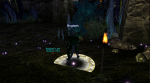
view.png

Thanks and Peace
 
hit F9 till you in first person, then use mouse wheel to scroll out to the distance you want then press left mouse and move it up or down to get the angle you want
 
Aye , but I should have been clearer.

I run a 24 character Army, and I would like to be able to get them all to the right view at once.. It is a pain to do 24, or even to just forget about it and have to fix view everytime I need to tab over and do something.

/stick uw

will make them look up , down where ever, and after a death they are usually looking up in the sky, and if I need to interact with an npc or object or what ever, its annoying.

Maybe its just a pet peeve of mine, hehee, but still something that has been bugging me and we should be able to automate it.

Going through the eq ini files I see where they have it, but it always just reverts back, and doing some web searches I see that others have experienced the same thing, no matter how they set it in the ini file it gets reverted back.

Thanks and Peace
 
set the ini like oyu want, then make it read only?
 
Aye that would work.

But I am sure we can automate the view.. thats what I am really after heeheh

Peace
 
I use a different view, but I do it with something like this

Num_Slash is my topview, and Num_3 is tilt down.

/bcga //keypress alt+Num_Slash
/bcga //keypress alt+Num_3 hold

So your view is probably First Person View key and a few press of zoom out.

- - - Updated - - -

i thought this will work for you, but apparently there is no keybind right now that is exactly equal to the mouse wheel zoom out. I was wondering if anyone knows?

/bcga //keypress FIRST_PERSON_CAMERA
/bcga //keypress ZOOMOUT hold
/bcga //keypress PITCHDOWN hold
 
would be a neat feature if this was added to mq2camera to have a fixed setting for the zoomout and pitch and what mode to be in. etc.
 
I use isboxer for this =p

Just broadcast and set the view i want.

would be nice if you could simply save a certain view and use it every time though.
 
Well with all the cool stuff I see everyone doing with mq2 and plugins, there has to be a way to just roll the mouse wheel back 1/4 of a roll then rightmousebutton fold and tilt down 10 degrees.. I just really dont know the key words to search.

Peace
 
Question - Camera Controls

Users who are viewing this thread

Back
Top
Cart