


Thank you to aquietone for opening this post as a wiki-post.
Frame limiter:
- Make your eqgame.exe Large Address Aware (aka, the "4GB Patch"): This will prevent crashes by allowing the old 32-bit client to use more memory. https://ntcore.com/4gb-patch/
- Update your drivers: Motherboard, GPU.
- Some users have found the following helpful if they are still experiencing regular crashes:
- Ensure the complete DirectX 9.0 SDK is installed (not simply downloaded using the .exe): https://www.microsoft.com/en-us/download/details.aspx?id=8109
- Try turning on Direct Play as a legacy Windows feature https://recordit.co/rWl4oWpiXS
- If on a laptop, EQ should be set to use the discrete graphics card, if there is one.
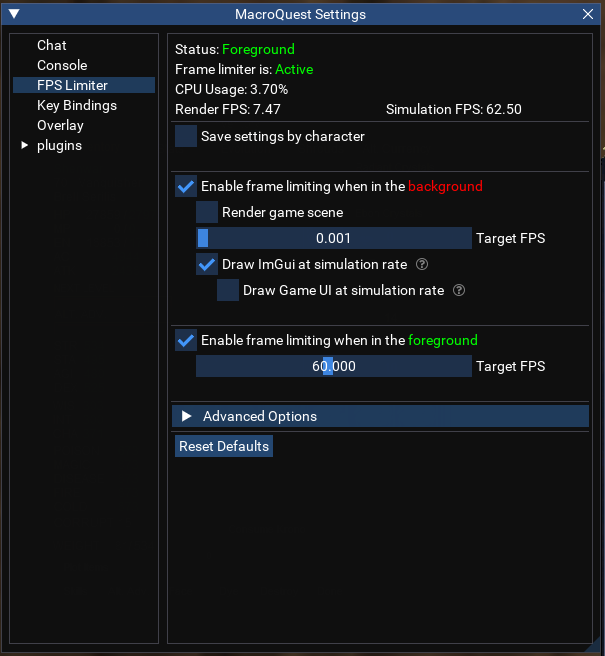
- Set up the MQ Frame Limiter. It is superior to (and trumps) the built-in frame limiting in EQ (Algar's personal settings below). More info below.
- Use in-game settings or eqclient.ini tweaks to further adjust performance once the above steps have been taken.
- Some users have more than one EQ install, so one install can have a client ini with "prettier" settings for their driver.
- An example eqclient.ini can be found on Rekka's E3Next git wiki, linked elsewhere in this post. I recommend understanding what you are changing by using it.
- Beware of using performance guides aimed at "Modern EQ" (like Fanra's). Some of the information may not be relevant or correct, as EMU currently uses an older 32-bit client.
- The fix for everything being stuck in "Turbo Mode" (aka "the AMD bug"): https://github.com/RekkasGit/E3Next/wiki/5)-Common-issues---FAQ#help-everything-is-moving-too-fast
- Modern-gen Intel processors with P/E cores may require further tuning of core use with something like Process Lasso (this is very rare and non-trivial).
- Gaming overlays can cause conflicts with MQ (Discord, Nvidia, Overwolf, etc).
Frame limiter:
- The "community standard" is typically minimum background FPS. I've found 1fps stops ImGui Animations from being stuck on screen for a very long time.
- Foreground FPS is generally for the user's preference.
- It is recommended to turn spell particle effects off for background characters when using the frame limiter. (/showspelleffects off, or edit the ini).
Last edited:

