• You've discovered RedGuides, an EverQuest multi-boxing and scripting community 🧙‍♀️⚙️. We want you to play several EQ characters at once, come join us and say hello! 👋

  • A TLP without truebox has thawed (Very Vanilla ready)
    Frostreaver
AlphaBuff - The Ultimate Buff & Song Windows

Release AlphaBuff - The Ultimate Buff & Song Windows 3.5.3

No permission to download
Apologies, everyone, for causing your windows to reset again; this should be the last time.
Size and position settings are now saved in individual files for each toon instead of relying on the default mqoverlay.ini.
You shouldn't have any trouble now with windows remembering their size and position.
 
rawmotion

I really don't mean to give you a downer here after all the hard work you have put in on this. Especially the fact that you put the lock position switch in there. When I saw this I excitedly went to my main char and tried it out. Andddd..... it didn't work. I tried it just changing the position of the window and locking it. Switched characters and switched back and it had gone back to default position again. And I had to unlock it to change it's position again. (Shrug) Then I tried the "Sic" way. Changed position and locked, then turned off the Lua and started it back up again. Switched back and forth and.... no help. Sorry man, I don't know what to say.

I use ISBoxer btw for displaying and switching toons. I have 2 monitor's and one is for the main toon (full screen) and the other has all 5 of the other toons in smaller boxes on it and then ISBoxer has keys you can designate to use for fast switching between toons. I don't know if this makes any difference or not. I use several other Lua's and don't have this problem switching from one toon to the other.

Just to re iterate I absolutely love this Lua.

Vrak
 
rawmotion

I really don't mean to give you a downer here after all the hard work you have put in on this. Especially the fact that you put the lock position switch in there. When I saw this I excitedly went to my main char and tried it out. Andddd..... it didn't work. I tried it just changing the position of the window and locking it. Switched characters and switched back and it had gone back to default position again. And I had to unlock it to change it's position again. (Shrug) Then I tried the "Sic" way. Changed position and locked, then turned off the LUA and started it back up again. Switched back and forth and.... no help. Sorry man, I don't know what to say.

I use ISBoxer btw for displaying and switching toons. I have 2 monitor's and one is for the main toon (full screen) and the other has all 5 of the other toons in smaller boxes on it and then ISBoxer has keys you can designate to use for fast switching between toons. I don't know if this makes any difference or not. I use several other LUA's and don't have this problem switching from one toon to the other.

Just to re iterate I absolutely love this LUA.

Vrak
Hmm, weird.
It's almost midnight over here, but I'll see if I can debug it for you tomorrow and figure out what's happening.
 
Understood. I will give it a whirl and maybe adjust my layout. I did notice you can hid title bar, I would rather hide the setting/sort bar for a cleaner look. I won't be doing much sorting on the fly. Just a thought.
 
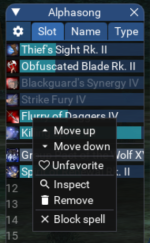
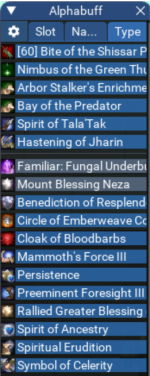
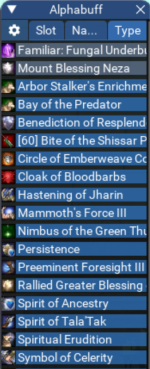
You can now pin favorite buffs to the top and reorder them.
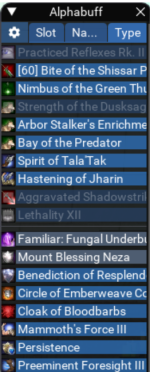
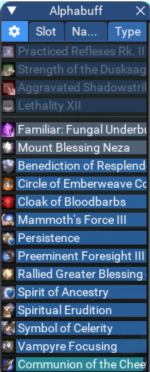
Buffs you don't currently have on will be grayed out so you know what you're missing.

1677870292680.png
 
Not sure what happened, but tonight - the windows disappeared. Typing the commands to bring them up, will display title only, nothing else. Cannot move, get into settings, drag, extend windows, nothing. I had to go into the config for the particular character and changed the "locked" values from true to false. For whatever reason, they became minimized and nothing was available, even though I have it always to show the windows and buffs.
 
Not sure what happened, but tonight - the windows disappeared. Typing the commands to bring them up, will display title only, nothing else. Cannot move, get into settings, drag, extend windows, nothing. I had to go into the config for the particular character and changed the "locked" values from true to false. For whatever reason, they became minimized and nothing was available, even though I have it always to show the windows and buffs.
That is odd. Did you fix it?
If not, can you DM me the contents of your config file?
I've noticed some other bugs and am currently working on fixing them. But this isn't something I've seen.
 
That is odd. Did you fix it?
If not, can you DM me the contents of your config file?
I've noticed some other bugs and am currently working on fixing them. But this isn't something I've seen.
Yea, changing the two locked values to false, stopping and restarting script allowed me to reposition and view the buff windows again. I guess I shouldn't use lock? I was also using TCN - only other script that might have caused them to disappear in the first place?
 
Yea, changing the two locked values to false, stopping and restarting script allowed me to reposition and view the buff windows again. I guess I shouldn't use lock? I was also using TCN - only other script that might have caused them to disappear in the first place?
Lock should be working fine. It could be the bug before today's 3.0.2 update. After a while, it would make all the buffs disappear if you had set anything to favorite. That's fixed now.
 
Incoming in 3.1.0

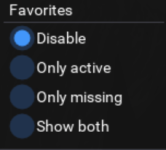
Favorite settings:
Choose how to display buffs that you've marked as favorites.

1678642432314.png

Show both
Show all buffs you've favorited
Only missing
Show only favs you're missing
Only active
Show only active favs
Disabled
Sort favs normally (un-pin)
1 show both.png2 only missing.png3 only active.png4 disabled.png
 
Last edited:
By popular request. Upcoming in 3.2.0:
For people who only care about monitoring a handful of select buffs: the option to hide non-favorites.

ezgif.com-video-to-gif.gif
 
I keep having random crashes while literally sitting around and doing nothing. I will sometimes hang in GL while I go afk, come back and AB is never enabled because of some random crash. This time I managed to catch a snippet.

Code:
ImGui Failure:
C:\***\lua\alphabuff\init.lua:767: attempt to concatenate a nil value
stack traceback:
    C:\***\lua\alphabuff\init.lua: in function <C:\***\lua\alphabuff\init.lua:755>
 
I keep having random crashes while literally sitting around and doing nothing. I will sometimes hang in GL while I go afk, come back and AB is never enabled because of some random crash. This time I managed to catch a snippet.

Code:
ImGui Failure:
C:\***\lua\alphabuff\init.lua:767: attempt to concatenate a nil value
stack traceback:
    C:\***\lua\alphabuff\init.lua: in function <C:\***\lua\alphabuff\init.lua:755>
Hmm thanks. I'll try to find what's wrong.
 
I keep having random crashes while literally sitting around and doing nothing. I will sometimes hang in GL while I go afk, come back and AB is never enabled because of some random crash. This time I managed to catch a snippet.

Code:
ImGui Failure:
C:\***\lua\alphabuff\init.lua:767: attempt to concatenate a nil value
stack traceback:
    C:\***\lua\alphabuff\init.lua: in function <C:\***\lua\alphabuff\init.lua:755>
Okay, I just committed 3.2.2. When it shows up on here (can take a bit), can you update and let me know if it still happens?
 
Ok, latest update applied, will keep you informed and THANKS!
 
Love the script so far!

Feature suggestion: As a TLP player constantly going through different expansions and spell upgrades with different ranks of buffs, it would be nice if I could group certain ones together and it would just display the group name, and if any of the buffs are active in it it would show the time of the shortest one. I would use this to favorite different Ranks of the same spell under 1 group, or possibly all the buffs in a combined buff spell to save space.
 
Release AlphaBuff - The Ultimate Buff & Song Windows

Users who are viewing this thread

Back
Top
Cart