
• You've discovered RedGuides, an EverQuest multi-boxing and scripting community 🧙‍♀️⚙️. We want you to play several EQ characters at once, come join us and say hello! 👋

  • A TLP without truebox has thawed (Very Vanilla ready)
    Frostreaver

Question - New Macroquest Console

Psy

I run with scissors,break crayons,and eat paste
Creator
Joined
Sep 26, 2021
RedCents
23,884¢
I know the new MQ console window has been around for quite a while now and it pops up when I load up each day, but for some reason I can not get it to save in a different spot. It always load on the left middle side of the windowed EQ instance. See photo below. How can I close the old one on the bottom left and use the new shiny one only and get it to stay where the old one is now?
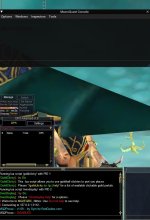
mq console.jpg
 
Solution
The old window is called MQ2ChatWnd, and the command /mqmin will minimize it. You can completely unload it with /plugin mq2chatwnd unload.

As for the new window, /mqconsole, it should automatically stay where you place it. If not, make sure the MacroQuest_Overlay.ini in your config folder isn't being write-protected by something on your PC. And if all else fails, you can manually edit that file.

Example,
INI:
[Window][MacroQuest Console]
ViewportPos=536,718
ViewportId=0xDA874036
Size=1280,400
Collapsed=0
DockId=0x00000009,0

Change the ViewportPos and you're set.
The old window is called MQ2ChatWnd, and the command /mqmin will minimize it. You can completely unload it with /plugin mq2chatwnd unload.

As for the new window, /mqconsole, it should automatically stay where you place it. If not, make sure the MacroQuest_Overlay.ini in your config folder isn't being write-protected by something on your PC. And if all else fails, you can manually edit that file.

Example,
INI:
[Window][MacroQuest Console]
ViewportPos=536,718
ViewportId=0xDA874036
Size=1280,400
Collapsed=0
DockId=0x00000009,0

Change the ViewportPos and you're set.
 
Solution
The old window is called MQ2ChatWnd, and the command /mqmin will minimize it. You can completely unload it with /plugin mq2chatwnd unload.

As for the new window, /mqconsole, it should automatically stay where you place it. If not, make sure the MacroQuest_Overlay.ini in your config folder isn't being write-protected by something on your PC. And if all else fails, you can manually edit that file.

Example,
INI:
[Window][MacroQuest Console]
ViewportPos=536,718
ViewportId=0xDA874036
Size=1280,400
Collapsed=0
DockId=0x00000009,0

Change the ViewportPos and you're set.
Amazing, thank you very much. I edited the file with your suggested info and it started up with the new console in the center of the screen, but once I resized and placed it where I wanted and closed it, it now saves there and loads that way each time. You guys rock!
 
Amazing, thank you very much. I edited the file with your suggested info and it started up with the new console in the center of the screen, but once I resized and placed it where I wanted and closed it, it now saves there and loads that way each time. You guys rock!
Ok, I spoke too soon. After I did the fix this morning, I turned off my computer. Came back and logged in this evening and the window had reset itself. I looked at the MacroQuest_Overlay.ini file and it went back to the default entry I overwrote this morning. I'm on Win11 and I did go into virus and threat protection and excluded the entire folder over a month ago and I did not update anything in the launcher, so I have no idea why it would have reverted to the old file. Any thoughts/suggestions would be welcome. For now, back to the old window /sigh

edit - I also use isboxer and I notice that when I move the new console to it's new location and then change to a different toon with isboxer and then go back to the toon that I adjusted the new console in, it reverts back to the middle left where it was when I logged in. Leads me to belive that isboxer is the culprit here.
 
is there a way to take this off of the keystroke ctrl ` it locks my ctrl key down every so often and makes me disband alot lol
 
is there a way to take this off of the keystroke ctrl ` it locks my ctrl key down every so often and makes me disband alot lol
You could edit in your MacroQuest.ini

You could also just /mqconsole show
 
You could edit in your MacroQuest.ini

You could also just /mqconsole show
thank you so much sic, sure enough it was bound to ctrl+` and my Adhd side always swappin windows and bashing ` when tryin to heal hopefully that resolves it for me. thank you again sir
 
Question - New Macroquest Console

Users who are viewing this thread

Back
Top
Cart