Hello. In the interest of working the Table Flipper achievement, I plotted the locations of the ten Rotwood Spores in Blightfire moors. I then created a macro that is simple. Travel to first set of coordinates, add delay to allow for travel to to arrive. Then Fire off an AE nuke to kill the spore without having to target it. Add another delay to let the spell finish. Then travel to the next location and begin again. Since I don't know how to create a loop in this system, I simply repeated the steps ten times. The macro works just fine. I created a social button to launch the macro and bound a key to it using a hotkey box. All this works. The problem is I have to physically press the button every time I want the macro to work. Since I know the respawn time of the spores, is there any coding I can add to make the macro delay for respawn then start over again? So that it is fully automated?
you have a couple of choices for keeping macros going. I am not a very good macro writer, so take what i say with a grain of salt.
some folks like to use a :goto
MQ2Wiki GoTo
but many would suggest using a while loop
MQ2Wiki While Loop --- This wiki entry ommits this, but it is generally understood that you need to have some kind of delay in a while loop
an example of this would be like this quick macro i made for a user a couple of days ago. They wanted to just have a macro going that would /gmail them if there was a GM or if are dead (the gm trigger would end the macro, the hovering would just wait).
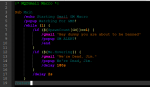
you can see the /while (1) - since 1 is a real thing, it will just go forever - the delay 2s keeps this from cycling too quickly, but will still check every 2 seconds.
[CODE lang="ini" title="While Loop"]
|* MQ2Gmail Macro *|
Sub Main
/echo Starting Gmail GM Macro
/popup Watching For GMS!
/while (1) {
/if (${SpawnCount[GM]}>=1) {
/gmail "Hey dummy you are about to be banned"
/popup GM ALERT!
/end
}
/if (${Me.Hovering}) {
/gmail "We're Dead, Jim."
/popup We're Dead, Jim.
/delay 180s
}
/delay 2s
}
/return[/CODE]
This image of my notepad++ might show a little more visually how the two if statements are wrapped in that while loop - basically since 1 is real/true, it will continue to stay in that while loop until it is ended