
Jelly Belly
Member
I have 1 account who's auto log in is failing with the wrong password when launching a profile of multiple accounts. Can someone point me to where I would correct this? I think i created all these via wizard.



I would recommend deleting and then recreating the loginI have 1 account who's auto log in is failing with the wrong password when launching a profile of multiple accounts. Can someone point me to where I would correct this? I think i created all these via wizard.

All your auto login information is in the MQ icon, you can right click it and go to profiles.I have 1 account who's auto log in is failing with the wrong password when launching a profile of multiple accounts. Can someone point me to where I would correct this? I think i created all these via wizard.
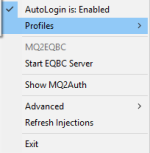

I would recommend doing a computer reboot, and then launching from mq as normal (without isboxer)Ok, I've checked everything I know. My account(s) are not auto logging in. I have not been in game the last 2 days. There was an update on the MQ launcher that I updated. The game launches to the I AGREE I DECLINE page. The little box that usually loads the login info is not popping up. I have checked that my account's login info is still inputted into the auto login.
Key Notes: I use ISBoxer mainly and that is not getting me where it normally does either. I have tried loading with just MQ, same issue as above.
are you sure you dind't install to a different directory than you think you did? as in, you installed a fresh install, instead of patchingI had all my auto logins working yesterday. I loaded up Redguides Launcher today, and magically my logins disappeared. Any clue where they went?
Signed
Desperate and Confused
There is a list in the mq2autologin resource https://www.redguides.com/community/resources/mq2autologin.86/Title is straight forward. Been having issues trying to set up shortnames for the auto launcher. Is there a list for current servers?


Seems I need to search better, because I swear I searched shortname and that didn't pop up for mehttps://www.redguides.com/docs/projects/everquest/general/server-short-names/
Searching this site, or google returns that
[Profiles]
DefaultEQPath=h:\eq\everquest
[Settings]
UseMQ2Login=0
UseStationNamesInsteadOfSessions=1
InstantCamp=0
KickActiveCharacter=1
NotifyOnServerUP=1

[Dragon1]
Password=1Dragon
Server=HomeServer
Character=MyTank

[Dragon2]
Password=2Dragon
Server=HomeServer
Character=MyHealer

..... 1 more block for each toon of this teamyes, create multiple groupings of toonsRequest: extend ini to be able to choose which group I want to login
Remember I had to spend a decent amount of time to got it right at first attempt.
Once I got It working, I was really happy with the added functionality I got from this plugin. It never broke for me as I never tried to change anything once I got it working.
As I felt it wasn't easy to get it running, I don't want to stick my fingers into the ini and attempt to get the changes done by try and error.
Konfiguration: windows 11 + ISBoxer + EQ, playing on standard Server
5 different mq2autologin.ini each containing 1 Team of 6 chars I want to login, depend of the task I want to do
I always play 1 group of 6 toons, but for different tasks I want different chars to be logged in from the same 6 accounts
Actually each time before I launch a setting I open 2 mqautologin.ini in Notepad++ and copy/paste the right data for the todays task from one of the "personalized" ini like "mqautologinDefault.ini" into "mqautologin.ini".
As I use ISBoxer the actual file-strucure is the following:
Autologin.ini
Code:[Profiles] DefaultEQPath=h:\eq\everquest [Settings] UseMQ2Login=0 UseStationNamesInsteadOfSessions=1 InstantCamp=0 KickActiveCharacter=1 NotifyOnServerUP=1 [Dragon1] Password=1Dragon Server=HomeServer Character=MyTank [Dragon2] Password=2Dragon Server=HomeServer Character=MyHealer ..... 1 more block for each toon of this team
For me this plugin is a greate improvement and nice time-saver to get my team up and running.
Is there a way to extend this file in a way I can manage multiple teams and have a way to choose which team I want to launch at startup?
For me this would be a nice improvement of qol.
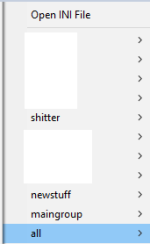
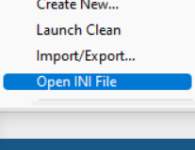
you should use the "create new" there imo and create them that way instead of the old wayI created the Ini manually and have no groups to choose from.
View attachment 40321
Is it possible to modify the ini in order to be able to choose which group to load, or do I have to recreate the ini with the MQ-functions?

login names are not case sensitive....Problem with auto login....
So maybe I was a dope, I created an account that has a mix of capital and lowercase letters and for the life of me I can't seem to get the profile input correctly so that mq2autologin will get the account logged in without bombing out due to not being able to input capital letters in the profile. Please help.
nope, all of my paid and f2p accounts use autologindoes the autologin only work with paid accounts? Tried it with 2 free to play and it would not get past sign-in.
that means that you need to log in your character via the daybreak launcher and accept terms of conditions for that newly created accounti keep getting message: this login requires a valid everquest subscription. Please make sure you have signed up for this via the billing option. Of course, I have been having sign-in issues all day with the launchpad and keep getting the 4-503 problem. Several hours now and still cannot get in.
1) Open launcher and wait for error message
2) Open task manager
3) Click more details
4) Click dropdown for daybreak
5) Close the "child" processes under daybreak until it works”


