• You've discovered RedGuides, an EverQuest multi-boxing and scripting community 🧙‍♀️⚙️. We want you to play several EQ characters at once, come join us and say hello! 👋

  • A TLP without truebox has thawed (Very Vanilla ready)
    Frostreaver

Problem - MQ2Nav - Zone Name Mismatch!

BigRig

Member
Joined
Aug 28, 2015
RedCents
113¢
Hey Guys,

Playing on an EMU with custom zone names, and keep getting a MQ2Nav - Zone Name Mismatch error when I go to load the navmesh. I have changed the XXXXXXX.navmesh file to the zone short name and also changed the zone reference in the zone.ini to the exact zone name on the server and keep getting Zone Name Mismatch! mesh is for "zonea" error.

Couple of questions,
Is there anything else I need to change other than the Zone.ini and the .navmesh file?
Somehow it knows what the old zone shortname meshfile was.
Does anything need to be changed in the Eq folder as I haven't touched that.
Does anything extra need to be done on the mesh generator?

Just an FYI i did have this working last week just fine as I was troubleshooting something else, between then and now something has gone a miss I am just not sure what.

Regards
 
Just an update, even if I delete the MQ2Nav folder I am still able to load the zone meshes as normal. If I rename the Zone in the Zone.Ini and open the zone even if the navmesh does not have the same zone shortname it still allows me to load it. I thought the meshes were pulled from the Resource/MQ2Nav folder.
 
Renaming the mesh won't work. The shortname is stored in the mesh file itself. If you have to rename the mesh file, you'll get the error.
 
Just an update, even if I delete the MQ2Nav folder I am still able to load the zone meshes as normal. If I rename the Zone in the Zone.Ini and open the zone even if the navmesh does not have the same zone shortname it still allows me to load it. I thought the meshes were pulled from the Resource/MQ2Nav folder.
Zones.ini file tells the plugin the zone long name and file name in the directory for EQ. You would need to find that name in the list of files and load the zone, then create a mesh for the zone you've identified. Then it would create the mesh file for the zone you're wanting to do.

So lets say the name of the zone you want to show up is "Taco Bell" and the name of the file in the eq directory is "thinkoutsidethebun" and you want it to have it's own section in the zone list. It may look something like this.

[Special EMU Stuff]
Taco Bell=thinkoutsidethebun

1693335712835.png
Now in the MeshGenerator it would appear like this. You would click that, it would attempt to load the file (If it exists).

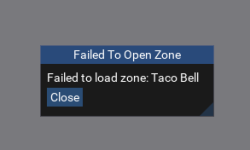
If you didn't do this part right it may indicate as much by showing you an error
1693335772151.png

So to recap.
Add section to the ini [Anything you want to name it]
give the zone a name, and say which file it is
load NavMeshGenerator, click File->Open Zone then at the bottom expand the section you named, which should only contain the zone you added and click the zone
NMG should load that zone.
Click Build Mesh
Click Save
 
Zones.ini file tells the plugin the zone long name and file name in the directory for EQ. You would need to find that name in the list of files and load the zone, then create a mesh for the zone you've identified. Then it would create the mesh file for the zone you're wanting to do.

So lets say the name of the zone you want to show up is "Taco Bell" and the name of the file in the eq directory is "thinkoutsidethebun" and you want it to have it's own section in the zone list. It may look something like this.

[Special EMU Stuff]
Taco Bell=thinkoutsidethebun

View attachment 50556
Now in the MeshGenerator it would appear like this. You would click that, it would attempt to load the file (If it exists).

If you didn't do this part right it may indicate as much by showing you an error
View attachment 50557

So to recap.
Add section to the ini [Anything you want to name it]
give the zone a name, and say which file it is
load NavMeshGenerator, click File->Open Zone then at the bottom expand the section you named, which should only contain the zone you added and click the zone
NMG should load that zone.
Click Build Mesh
Click Save
Hey Thanks heaps for this. This is exactly what I did, I changed the zone.ini to incorporate the zone name changed the navmesh file to be the shortname of the zone so for example i renamed nadox.navmesh to tacobell.navmesh, I can confirm this was the case because the zone loaded in mesh generator with the correct name of the zone. Build mesh and save when i do a /nav reload it still thinks that mesh is for the old zone name, which is really confusing me. The other weird thing is that I deleted the MQ2Nav folder out of resources and the NMG would still let me open the zones. Which I am not sure how it can if mq2navmesh folder is empty.
 
yes.

you also sound like you might not be generating the mesh files into the proper folder. the mesh generator wants the location of macroquest.exe for the mq path, and eqgame.exe for the eq path. make sure you didn't select something else.
 
yes.

you also sound like you might not be generating the mesh files into the proper folder. the mesh generator wants the location of macroquest.exe for the mq path, and eqgame.exe for the eq path. make sure you didn't select something else.
Thank you so much, user error as always! I had the Output folder selected as the mq2/resources not mq2 folder with the .exe as soon as i did this it was fixed. So sorry that should have been an easy one. I misunderstood the guide the second time around!
 
Problem - MQ2Nav - Zone Name Mismatch!

Users who are viewing this thread

Back
Top
Cart