

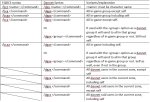
TLDR; At the most basic level, if you want to know which commands to use in place of eqbcs commands, here are the most commonly used Dannet Variants of EQBCS commands that I use, plus the new ones specific to Dannet:
 Edited: 211031 to correct dgz->dgze
-=-=-=-=-=-=-=-=-=-=-=-=-=-=-=-=-=-=-=-=-=-=-=-=-=-=-=-=-=-=-=-=-=-=-=-=-=-=-=-=-=-=-=-=-=-=-=-=-=-=-=--=-
Longer explanation:
What is the difference between EQBCS and Dannet from a less technical user perspective:
At the base level, both systems perform the same basic functions for a user, allowing communication and commands between different characters logged into the game at the same time, assuming all are using MQ2Dannet or EQBCS, and accessing the same communication channels. MQ2Dannet allows for some additional functionality, and requires less setup. Dannet also in my experience suffers less from lag issues using multiple toons, and tends to be more functional for command issuance.
I decided to install DanNet and start to switch over from EQBCS due to frustration with EQBCS and resource problems as EQBCS always started failing on me after running for awhile. Here’s the process I went through, and while I got it working, there was much confusion. So I thought I’d post a little brain dump of what I followed/found/questioned. (After I wrote all of this of course, Dannuic tells me there’s a readme file on github, go figure! That helped me with a few confusing points and 2 missing commands, but I’m not going to throw this out, so I’m still posting it!)
Both DanNet and EQBCS can be run concurrently, so you can transition commands over to DanNet until everything is moved and you’ve trained yourself to quit typing /bc commands and double slashes(//). In the meantime, you can use both interchangeably. Granted this could cause some confusion as the commands are not exactly linear, although close. I find myself typing a mishmash of commands sometimes, and trying to figure out which command syntax I need isn’t always intuitive for me.
New with Dannet that is separate from EQBCS, and further adds flavor and enhancement to it’s functionality, especially when used in conjunction with macros and plugins are the dquery and dobserve options. I must do more futzing with these before I can post some usage examples, though at my base level of understanding I believe they allow you to assign another toon's TLO information such as percent hps to a variable that you can query without using the entire string.
If I've made errors please let me know so that I can correct them.
Edited: 211031 to correct dgz->dgze-=-=-=-=-=-=-=-=-=-=-=-=-=-=-=-=-=-=-=-=-=-=-=-=-=-=-=-=-=-=-=-=-=-=-=-=-=-=-=-=-=-=-=-=-=-=-=-=-=-=-=--=-
Longer explanation:
What is the difference between EQBCS and Dannet from a less technical user perspective:
At the base level, both systems perform the same basic functions for a user, allowing communication and commands between different characters logged into the game at the same time, assuming all are using MQ2Dannet or EQBCS, and accessing the same communication channels. MQ2Dannet allows for some additional functionality, and requires less setup. Dannet also in my experience suffers less from lag issues using multiple toons, and tends to be more functional for command issuance.
I decided to install DanNet and start to switch over from EQBCS due to frustration with EQBCS and resource problems as EQBCS always started failing on me after running for awhile. Here’s the process I went through, and while I got it working, there was much confusion. So I thought I’d post a little brain dump of what I followed/found/questioned. (After I wrote all of this of course, Dannuic tells me there’s a readme file on github, go figure! That helped me with a few confusing points and 2 missing commands, but I’m not going to throw this out, so I’m still posting it!)
Both DanNet and EQBCS can be run concurrently, so you can transition commands over to DanNet until everything is moved and you’ve trained yourself to quit typing /bc commands and double slashes(//). In the meantime, you can use both interchangeably. Granted this could cause some confusion as the commands are not exactly linear, although close. I find myself typing a mishmash of commands sometimes, and trying to figure out which command syntax I need isn’t always intuitive for me.
- I started with the guide that gSe7en posted in the forums labeled “How to ditch that rubbish EQBC and get with the times with the sexy MQ2DanNet”
- First of all, I disagree with his obviously negative Nickelback bias, but I never claimed to have an ear for music. I just like what I like, and it’s pretty eclectic. No comment on Bob Ross, he’s cool.
- Seriously helpful post to get started, although I’m still finding the transition complicated and confusing.
- Help files and information on commands are very limited with the plugin, hopefully this post will assist there, and maybe Dannuic will add some more documentation with time.
- Dannet, like EQBCS will transmit commands to a variety of recipients:
- An individual toon by name
- All of your in game group members using the plugin except yourself
- All of your in game group members using the plugin including yourself
- Everyone using the plugin, regardless of grouping status, if you’re connected, you’re seeing the command
- Additional Dannet Scenarios:
- Everyone using the plugin is also added to some pre-defined ”Dan-Goups” hereafter referred to Dgroup to differentiate from in-game “group”
- Each character will be auto-added to a Dgroup for:
- All
- Class
- Group (in-game group)
- Function (tank/melee/caster/priest etc)
- Zone
- The user can also create temporary, or permanent Dgroups for each character to be added to as well.
- For instance, I created a bunch of mules on some FTP accounts, and some of them hold tradeskill supplies and some hold defiant armor. I created and added each of those toons to a set of new permanent Dgroups called TS and Defiant respectively. Now, I can issue a command to each group of characters to do something without having to have them grouped in game. So I log all of the TS mules in, give my TS materials to those toons, and say I want to log them off but keep the defiant armor holders online. I can issue a command from any toon in game:
/dgex ts /camp desktopand just the TS tagged toons log out, but the defiant grouped toons remain in game.
- For instance, I created a bunch of mules on some FTP accounts, and some of them hold tradeskill supplies and some hold defiant armor. I created and added each of those toons to a set of new permanent Dgroups called TS and Defiant respectively. Now, I can issue a command to each group of characters to do something without having to have them grouped in game. So I log all of the TS mules in, give my TS materials to those toons, and say I want to log them off but keep the defiant armor holders online. I can issue a command from any toon in game:
- Each character will be auto-added to a Dgroup for:
- Everyone using the plugin is also added to some pre-defined ”Dan-Goups” hereafter referred to Dgroup to differentiate from in-game “group”
- Additional Dannet Scenarios:
- I tried to make a cheat-sheet of command comparators up above, and here are some notes and clarifications:
- /dgt can be used to send a message to one of the Dgroups, for instance, I run 3 berserkers, and they all autojoin a group called [ber] as a function of dannet by default.
- I can do
/dgt ber <message>and the berserkers only would get a message sent to them. This is informational only, not command execution - Without a defined Dgroup it sends to the [all] group by default
- I can do
- /dte is a message to a specific character, not a Dgroup.
- Again this is message only, not commands
- /dex sends a command to a specific character to execute a command, similar to /bct.
- Does not work with a group target, only a character name
- /dgex will send a command to a Dgroup, but exclude the character sending the command, even if they are in one of those defined groups.
/dgex ber /sitwould make all berserkers in the ber channel sit. This will also sit all berzerkers regardless of computer on the network, so if you have two groups running and you want to issue commands locally to just the berzerkers on one computer, I'd recommend using /djoin commands on the berzerkers to make a berzerker channel just for that computer, and adjust hotkeys for that group accordingly. It's no fun to issue commands on one computer and realize the zerks on the other computer just took off running to pok from wherever they were before.
- Caveats/Variances/Comments:
- Single / in front of the command, not //
- Example:
/dex dufus /sit - Tell to execute a command for a Dgroup:
/dgex <groupname> /command - Tell to execute a command for your in-game group:
/dgge /command - Tell to execute a command for your in-game group and including yourself:
/dgga /command - /dgga vs /dgae is the same differentiator as /bcga vs /bcaa, it’s everyone in group including self, vs everyone in the communication service including self.
- As a warning, /dgae will send to everyone connected to dannet, even on other computers on the network
- Additional commands not found in EQBC:
- /dgre and /dgra for raid execute and raid+self execute
- Can’t find a help command listing available commands for the plugin.
- /dghelp – no Bueno!
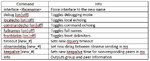
- /dnet gives a few parameters to toggle, but no command list
- Example usages (
/dnet <command>): /dnetby itself will list a few toggle-able flags/dnet infowill give you a list of groups and members/djoin <groupname>will either join or create a group, adding “save” to the end and that character will auto-rejoin next login to that group, otherwise it’s forgotten on logging out.- There is no feedback when you create a new group and join it with this command, but a
/dnet infowill list the new group and member - No
/djoin removecommand – /dleave instead - Very helpful command if you want to be able to send tells to a select set of characters that don’t fit one of the pre-defined lists. For my purposes, one of the key times I use it, is if I have a Dgroup for my out of group characters, and I can send them tells to come to me, camp, etc separate from the group only versions that are part of the group window when using mq2labels.
- There is no feedback when you create a new group and join it with this command, but a
/dleave <groupname>will leave the group you’re part of, if you are actually in that group- No feedback when done, but
/dnet infowill list current groups. - Use the save variable after the command to make the change permanent (
/dleave foobar save)
- No feedback when done, but
- /dgt can be used to send a message to one of the Dgroups, for instance, I run 3 berserkers, and they all autojoin a group called [ber] as a function of dannet by default.
New with Dannet that is separate from EQBCS, and further adds flavor and enhancement to it’s functionality, especially when used in conjunction with macros and plugins are the dquery and dobserve options. I must do more futzing with these before I can post some usage examples, though at my base level of understanding I believe they allow you to assign another toon's TLO information such as percent hps to a variable that you can query without using the entire string.
If I've made errors please let me know so that I can correct them.
Last edited:


