• You've discovered RedGuides, an EverQuest multi-boxing and scripting community 🧙‍♀️⚙️. We want you to play several EQ characters at once, come join us and say hello! 👋

  • A TLP without truebox has thawed (Very Vanilla ready)
    Frostreaver

Question - How to set up that always Xtar 1 is the target

Almafa

Well-known member
Joined
Mar 28, 2019
RedCents
1,789¢
Hi Guys,

I would like to set up somehow that if we have multiple targets, the actual target the MA is attacking is xtar 1.
I tried MQ2XAssist. The following is from my SK's ini:

Command1=/plugin MQ2XAssist load
Command2=/xtar set 1 groupassisttarget

This would work on all assist (group members), but when MA buffs the pet, the pet becomes the target, and the entire crew waits for the pet to be attacked, even the MA. So, we end up sitting around and doing nothing...

I am sure you all have figured out how to switch targets.

The reason I would like to do this is to manage future missions I am currently failing miserably, where I would have to switch to adds easily (in my mind with 1 click), and ensure my entire crew switches and kills the add.
I would like to do the following:

I am playing around with a hotkey like this. of course not always xtar 1 is the target when there are more mobs on xtar.

/Xtar 2 (switch to add, which should be xtar 2)
/Switchnow (entire team switches target)

Thanks for your advice.

A
 
The /Switchnow command has 2 options/paramaters See below:

/switchnow [0/1] [#]Switch to your MA's Current Target. First parameter is for locking onto(1)/releasing(0) the target. 0 is default. Second parameter can be a spawn ID. Both parameters are optional

Using the second option you can pass the Targets ID to the other characters and you can use the first option to tell the crew to Lockon to that target until dead or you issue a new /switchnow command.

So you could switch your target to the add and use the /switchnow 1 ${Target.ID} command to get the crew to switch to the add and then switch back to the original target on your MA, but the others will not switch back and stay on the add.
 
The /Switchnow command has 2 options/paramaters See below:

/switchnow [0/1] [#]Switch to your MA's Current Target. First parameter is for locking onto(1)/releasing(0) the target. 0 is default. Second parameter can be a spawn ID. Both parameters are optional

Using the second option you can pass the Targets ID to the other characters and you can use the first option to tell the crew to Lockon to that target until dead or you issue a new /switchnow command.

So you could switch your target to the add and use the /switchnow 1 ${Target.ID} command to get the crew to switch to the add and then switch back to the original target on your MA, but the others will not switch back and stay on the add.

Thank you for the explanation. It is clear, I made the adjustments.

So, if I run Kiss, I would need to do the following:
1, mqp on
2, select the add by clicking on it in extended target window
3, /switchnow 1 ${Target.ID}
4, mqp off

Is that correct? It takes care of my problem of locking on, however, I wonder if all this could be executed with a signle click.

Back in the days when I used ISBOXER, I would always attack with my crew xtar 1. so if I had to switch to xtar 2, it was just a hotkey, since xtar 2 was always an add, if any...
 
The /Switchnow command has 2 options/paramaters See below:

/switchnow [0/1] [#]Switch to your MA's Current Target. First parameter is for locking onto(1)/releasing(0) the target. 0 is default. Second parameter can be a spawn ID. Both parameters are optional

Using the second option you can pass the Targets ID to the other characters and you can use the first option to tell the crew to Lockon to that target until dead or you issue a new /switchnow command.

So you could switch your target to the add and use the /switchnow 1 ${Target.ID} command to get the crew to switch to the add and then switch back to the original target on your MA, but the others will not switch back and stay on the add.

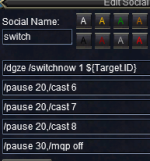
I set up the following hotkey.

First I click on my MQP button, so Kiss stops.
Then I select the add by clicking on it in extended target window

then I hit the switch hotkey:

1706454795877.png

Ass soon as mqp off is executed, it seems my MA switches back to the original target, and of course the entire crew assists.
Could you please help with what I am missing?
 
The only thing I can think of is make sure you have TargetSwitchingOn turned on for your MA. With Target Switching on you should not have to use /mqp to pause kiss. Also make sure you have UseMQ2Melee turned off on all characters.

TargetSwitchingOn lets you manually switch targets in KA manually and not switch back to original target.

What I would do is test the /dgze /switchnow 1 ${Target.ID} only. Get rid of the other /pause, /cast lines for now just to make sure everything is flowing correctly.

After using the /dgze /switchnow 1 ${Target.ID} hot button check your other characters and see if they are /echoing a message like this:

New target called! TargetedModName
 
The only thing I can think of is make sure you have TargetSwitchingOn turned on for your MA. With Target Switching on you should not have to use /mqp to pause kiss. Also make sure you have UseMQ2Melee turned off on all characters.

TargetSwitchingOn lets you manually switch targets in KA manually and not switch back to original target.

What I would do is test the /dgze /switchnow 1 ${Target.ID} only. Get rid of the other /pause, /cast lines for now just to make sure everything is flowing correctly.

After using the /dgze /switchnow 1 ${Target.ID} hot button check your other characters and see if they are /echoing a message like this:

New target called! TargetedModName
Ah, I am so 1985 I am still using mq2melee holyshits. So maybe that's why it is not working properly.

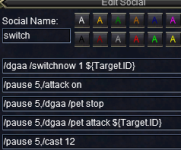
By trial and error I came up with the following hotkey that actually works. Need to hit mqp first and manually target the add.
1706457075877.png

Pets did not switch target, so I had to add that they would stop attack and attack new target.

I have to think it through if I want to shut down mq2melee altogether. I have some life saving holyshits there for my mage summoning me when I get beaten up etc.

Please let me know if you come up with a more elegant solution, or something that does not involve shutting down mq2melee.

Thank you!
 
I added some code to the Switchnow routine to now switch your pet, if the pet is in combat. I will have to think about how to include logic for MQ2Melee
Thank you so much.
For the time being, I turned mq2melee off. Switch is working nicely.
My mage was using mq2melee to coth me when I was getting beat up during pull, and I used hate's attraction to tag mobs during pull when I was already in camp, and sometime they would stop and nuke me. I guess, I can live without those holys during missions...
 
Question - How to set up that always Xtar 1 is the target

Users who are viewing this thread

Back
Top
Cart