


Howdy!
You're likely reading this because you would like some information on how to get started with the CWTN class plugins - or maybe you are already "Started" but you missed out how to get some important information on usage.
This place is a good spot to start and it will point you in the right direction so you can hit the ground running.
I made a video going over this stuff - or you can just read below for the information
First - CWTN (@ChatWithThisName) and I (@Sic ), would like to extend our deepest appreciation for the love and support everyone gives the cwtn plugins - I don't think cwtn expected them to be this popular, and when I started hanging out with chat, I didn't intend on becoming a programmer but I guess things happen. Thank you from the bottom of our hearts - we mean this with the absolute most sincerity possible.
The CWTN plugins are intended to be a mostly "out-of-the-box" experience with little to no adjustments to your settings. They don't offer granular specificity for what/when/how/why - we take most of that decision-making out of the equation so you can just focus on the game, and not on trying to become an expert at all of the 16 classes.
Because you don't get granular specificity there are some trade-offs on things you can and can't adjust, or accomplish, but for a good chunk of folks, these will work just fine - and there are plenty of other tools for the jobs that these tools don't meet the needs of.
Each class plugin we release will have an overview video going over some of the functions/features/options of that specific plugin, as well as the information being in the class-specific resource FAQ and Commands tab.
For example:
In this image, you can see the "Overview", "Commands", "Instructions", "F.A.Q", etc.
Each of the class plugins has this information available, and you will find answers to many of your questions there (some you didn't even know you had).

Suggested watch order: UI Vid -> any class-specific video -> moving your toons guide - > addclicky info
(I go over pulling in the moving toons vid, the mq2war vid, and the mq2eskay vid.)
#1 - UI Vid
CWTN UI Vid
CWTN old xml UI Vid
#2 - your class-specific vid
MQBard Vid -> MQ2Bard Overview
MQ2Berzerker Vid - > MQ2BerZerker Overview
MQ2Bst Vid -> MQ2Bst Overview
MQ2Cleric Vid -> MQ2Cleric Overview
MQ2Druid Vid -> MQ2Druid Overview
MQ2Enchanter Vid -> MQ2Enchanter Overview
MQ2Eskay Vid -> MQ2Eskay Overview
MQ2Mage Vid -> MQ2Mage Overview
MQ2Monk Vid -> MQ2Monk Overview
MQ2Necro Vid -> MQ2Necro Overview
MQ2Paladin Vid -> MQ2Paladin Overview
MQ2Rogue Vid -> MQ2Rogue Overview
MQ2Shaman Vid -> MQ2Shaman Overview
MQ2War Vid -> MQ2War Overview
MQ2Wizard Vid -> MQ2Wizard Overview
#3 - moving / hotkeys
>>> Sic's Moving Toons and Hotkeys Vid <<<
>>> Sic's Hotkey Resource <<<
[Other Important FAQ / Discussions]
Q. What level are these designed for?
A. They are designed to work from lvl 1 to current game.
Q. If i have multiple toons of the same class, do i need multiple licenses?
A. Nope, just 1 license per class you are using. You can use them on multiple computers/installs that are your computers, on your pcs, that you are using.
Q. Can I get a trial?
A. they are included in your level 2 Very Vanilla for the Test server if you want to try them, and we (cwtn and I) would strongly recommend doing so to become familiar with them. you can /testcopy your toons over to the test server and try them out there before "committing" so you can give them a whirl and decide if that is something for you.
Q. Do I need to run a macro, like kissassist with the plugins??
A. No, and you want to avoid using anything that is going to be doing conflicting behavior/automations.
Q. I don't know what a slash command is - What is a slash command?
A. A slash command is something like
Q. Aureate's Bane?
A. We automatically use this, there's nothing you need to do
Q. I have an expired licenses popup?
A: > Check this link <
If you have already checked the RG Launcher Plugin Tab then read the following:
- The RG Launcher is unable to *delete* old files.
-- This means you will get an error box if you don't have a current plugin that matches the mq build
-- your options are:
--- a: purchase a license
--- b: delete the old .dll in your plugin folder, and/or
--- c: change your macroquest.ini to MQ2PluginName=0 under [Plugins]
> CWTN AddClicky Info <
> Adjusting StickHow settings <
> ${CWTN} TLO/Member Stuff <
> Custom BYOS Stuff <
> Class Release Schedule / Are you doing XYZ Class? <
> No Out Of Group Assisting? Discussion <
> Attacking Players / PVP <
> How to Request Help <
> How do I know when my license expires? <
> Can I sync licenses? or get multi-license discount? <
> Can I start the plugins paused? <
> Is there a way to have a pull priority? < (Using the /alert system)
> Not assisting after death/rez? <
> Raidmode? <
> 14th Gem Slot? <
> CWTN on Emu? <
> cwtn swag <
> What payment methods do you take? Do you take krono? <
> Bundle Price / bulk purchase<
> 2025 price increase to $30 <
We add functions, and features, and tweak and update frequently - so the videos are "time capsules" for that specific moment in time - sometimes that information has changed, or been updated or expanded - sometimes things we say "we will not do xyz", we do end up doing etc.
Each of the class-specific plugins has an "Updates" tab that will list specific updates made to that specific plugin. For functions/features that are universal to all the "CWTN" plugins, you can find those updates in the MQ2CWTNCommons resource.
How To Block A Spell:
Q. I don't want the a buff or the plugin to cast xyz buff on a toon.
A. Any buff you don't want cast upon someone, you would just have that character add it to their blocked buffs.
EQ Menu -> Character -> Blocked Buffs
EQ Menu -> Character -> Blocked Pet Buffs (to add to anyone's pet blocked spells)
/blockspell add me id
/blockspell add pet id
Other Misc Info:
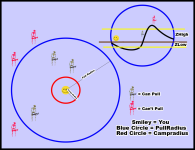
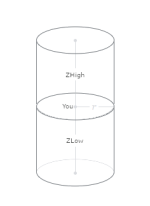
ZRadius
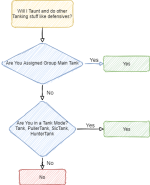
Basic mode reference chart by @raw > here <
This color is assist mode
This color is a tank mode
(vorpal has not and is not and won't be a tanking mode. it is an assisting mode)
You're likely reading this because you would like some information on how to get started with the CWTN class plugins - or maybe you are already "Started" but you missed out how to get some important information on usage.
This place is a good spot to start and it will point you in the right direction so you can hit the ground running.
I made a video going over this stuff - or you can just read below for the information
First - CWTN (@ChatWithThisName) and I (@Sic ), would like to extend our deepest appreciation for the love and support everyone gives the cwtn plugins - I don't think cwtn expected them to be this popular, and when I started hanging out with chat, I didn't intend on becoming a programmer but I guess things happen. Thank you from the bottom of our hearts - we mean this with the absolute most sincerity possible.
The CWTN plugins are intended to be a mostly "out-of-the-box" experience with little to no adjustments to your settings. They don't offer granular specificity for what/when/how/why - we take most of that decision-making out of the equation so you can just focus on the game, and not on trying to become an expert at all of the 16 classes.
Because you don't get granular specificity there are some trade-offs on things you can and can't adjust, or accomplish, but for a good chunk of folks, these will work just fine - and there are plenty of other tools for the jobs that these tools don't meet the needs of.
Each class plugin we release will have an overview video going over some of the functions/features/options of that specific plugin, as well as the information being in the class-specific resource FAQ and Commands tab.
For example:
In this image, you can see the "Overview", "Commands", "Instructions", "F.A.Q", etc.
Each of the class plugins has this information available, and you will find answers to many of your questions there (some you didn't even know you had).
Suggested watch order: UI Vid -> any class-specific video -> moving your toons guide - > addclicky info
(I go over pulling in the moving toons vid, the mq2war vid, and the mq2eskay vid.)
#1 - UI Vid
CWTN UI Vid
CWTN old xml UI Vid
#2 - your class-specific vid
MQBard Vid -> MQ2Bard Overview
MQ2Berzerker Vid - > MQ2BerZerker Overview
MQ2Bst Vid -> MQ2Bst Overview
MQ2Cleric Vid -> MQ2Cleric Overview
MQ2Druid Vid -> MQ2Druid Overview
MQ2Enchanter Vid -> MQ2Enchanter Overview
MQ2Eskay Vid -> MQ2Eskay Overview
MQ2Mage Vid -> MQ2Mage Overview
MQ2Monk Vid -> MQ2Monk Overview
MQ2Necro Vid -> MQ2Necro Overview
MQ2Paladin Vid -> MQ2Paladin Overview
MQ2Rogue Vid -> MQ2Rogue Overview
MQ2Shaman Vid -> MQ2Shaman Overview
MQ2War Vid -> MQ2War Overview
MQ2Wizard Vid -> MQ2Wizard Overview
#3 - moving / hotkeys
>>> Sic's Moving Toons and Hotkeys Vid <<<
>>> Sic's Hotkey Resource <<<
[Other Important FAQ / Discussions]
Q. What level are these designed for?
A. They are designed to work from lvl 1 to current game.
Q. If i have multiple toons of the same class, do i need multiple licenses?
A. Nope, just 1 license per class you are using. You can use them on multiple computers/installs that are your computers, on your pcs, that you are using.
Q. Can I get a trial?
A. they are included in your level 2 Very Vanilla for the Test server if you want to try them, and we (cwtn and I) would strongly recommend doing so to become familiar with them. you can /testcopy your toons over to the test server and try them out there before "committing" so you can give them a whirl and decide if that is something for you.
Q. Do I need to run a macro, like kissassist with the plugins??
A. No, and you want to avoid using anything that is going to be doing conflicting behavior/automations.
Q. I don't know what a slash command is - What is a slash command?
A. A slash command is something like
/who. You type / followed by other stuff. EQ has made you use slash commands forever. the interaction with MQ and MQ utilities all utilize slash commands as well. A slash command for mq2eskay might be /shd help or /shd usebeza on.Q. Aureate's Bane?
A. We automatically use this, there's nothing you need to do
Q. I have an expired licenses popup?
A: > Check this link <
If you have already checked the RG Launcher Plugin Tab then read the following:
- The RG Launcher is unable to *delete* old files.
-- This means you will get an error box if you don't have a current plugin that matches the mq build
-- your options are:
--- a: purchase a license
--- b: delete the old .dll in your plugin folder, and/or
--- c: change your macroquest.ini to MQ2PluginName=0 under [Plugins]
> CWTN AddClicky Info <
> Adjusting StickHow settings <
> ${CWTN} TLO/Member Stuff <
> Custom BYOS Stuff <
> Class Release Schedule / Are you doing XYZ Class? <
> No Out Of Group Assisting? Discussion <
> Attacking Players / PVP <
> How to Request Help <
> How do I know when my license expires? <
> Can I sync licenses? or get multi-license discount? <
> Can I start the plugins paused? <
> Is there a way to have a pull priority? < (Using the /alert system)
> Not assisting after death/rez? <
> Raidmode? <
> 14th Gem Slot? <
> CWTN on Emu? <
> cwtn swag <
> What payment methods do you take? Do you take krono? <
> Bundle Price / bulk purchase<
> 2025 price increase to $30 <
We add functions, and features, and tweak and update frequently - so the videos are "time capsules" for that specific moment in time - sometimes that information has changed, or been updated or expanded - sometimes things we say "we will not do xyz", we do end up doing etc.
Each of the class-specific plugins has an "Updates" tab that will list specific updates made to that specific plugin. For functions/features that are universal to all the "CWTN" plugins, you can find those updates in the MQ2CWTNCommons resource.
How To Block A Spell:
Q. I don't want the a buff or the plugin to cast xyz buff on a toon.
A. Any buff you don't want cast upon someone, you would just have that character add it to their blocked buffs.
EQ Menu -> Character -> Blocked Buffs
EQ Menu -> Character -> Blocked Pet Buffs (to add to anyone's pet blocked spells)
/blockspell add me id
/blockspell add pet id
Other Misc Info:
ZRadius
Basic mode reference chart by @raw > here <
This color is assist mode
This color is a tank mode
(vorpal has not and is not and won't be a tanking mode. it is an assisting mode)
| Mode | Makes Camp? | Returns to Camp? | Taunts? | Chases? | Sits down? | Breaks invis to melee assist? | Breaks invis to buff/heal? |
| Manual | No | No | Only if group role is tank | No | No | No | No |
| Assist | Yes | Yes | Only if group role is tank | No | Yes | Yes | Yes |
| ChaseAssist | No | No | Only if group role is tank | Yes | Only if MA sits | Yes | No |
| VorpalAssist Mode | No | No | Only if group role is tank | No | Only if MA sits | Yes | No |
| Tank | Yes | Yes | Yes | No | Yes | Yes | Yes |
| PullerTank | Yes | Yes | Yes | No | Yes | Yes | Yes |
| Puller Assist | Yes | Yes | Only if group role tank | No | Yes | Yes | Yes |
| SicTank Mode | Yes | No | Yes | No | No | Yes | Yes |
| Hunter Tank Mode | Yes | No | Yes | No | Yes | Yes | Yes |