



Just when you thought the summer couldn't get any HOTTER. This is HOT!
Chill though because this is So Cool.
Send yourself Emails and Texts from Everquest.
Redguides always bringing you something new.
Redguides always bringing you what you want.
After months of development we proudly present MQ2Gmail.

All you need is a Gmail account and you can tell MQ2 to Email or text you using the NEW /gmail command
DEAD and want a text?
Level 95 and time to move to a better XP zone and want an email?
Want a text if that GM pops by?
MQ2Gmail uses all the latest encrypted email protocols to make your messaging safe.
Quick setup instructions.
1. Open your favorite Web Browser
2. Create a Gmail account
3. Login into your Gmail account
4. Open Everquest with MQ2 loaded
5. Open options - Ctrl O
6. Select the Keys tab
7. Select All in the Select Category drop-down menu - Yellow arrow in image
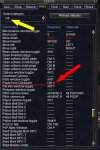
8. Scroll down until you find Paste From Clipboard - red Arrow in image above
Remember the command or Assign this shortcut command something you will remember.
You will need it to cut and paste a very long authorization code
9. Load the plugin
This will create the mq2gmail.ini file inside your MQ2 Release folder
10. Edit your mq2gmail.ini file in your favorite text editor
11. Create a hot key called mq2gmail. The message needs to be in quotes ""
12. Press the hot key
This will open the Mq2Gmail Auth code box in EverQuest and it will open a new window in your web browser
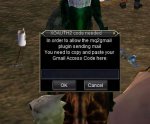
13. Goto the new widow in your browser and Click the Allow button
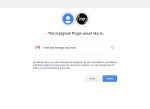
13. Copy the long ass code from the page
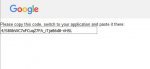
15. Go back to everquest and Paste the code into the Auth box and hit ok
16. Hit your gmail hot key again and it should send the message
-------------------------------------------------------------------------------------------------------------------------------------------------------------------------------
MQ2GMail
Gmail usage:
/gmail <FromEmailAddress> <ToEmailAddress> "<Subject>" "<Message>"
Example:
THE GMAIL ADDRESS ALWAYS HAS TO BE THE ONE YOU AUTHORIZED
Do not use colons : or semi colons ; in your messages. They will cause a blank email due to being reserved email punctuation.
the /gmail command works backwards from the default info in the ini file.
It is has 1 parameter it will send it as the MESSAGE and pick the rest from the ini file
It is has 2 parameters it will send it as the SUBJECT and MESSAGE and pick the rest from the ini file
It is has 3 parameters it will send it as the TO ADDRESS, SUBJECT and MESSAGE and pick the rest from the ini file
It is has 4 parameters it will send it as the GMAIL ADDRESS, TO ADDRESS, SUBJECT and MESSAGE and pick the rest from the ini file
--------------------------------------------------------------------------------------------------------------------------------------------------------------------------------
Here is a list of the major mobile phone companies that allow email to text - Thanks William12
Use these in the ToEmailAddress= if you want to text yourself instead of email
AT&T - [email protected]
Sprint - [email protected]
T-Mobile - [email protected]
Verizon - [email protected]
All Tell - [email protected]
Boost - [email protected]
Cellular South - [email protected]
Centennial Wireless - [email protected]
Cincinnati Bell - [email protected]
Cricket Wireless - [email protected]
Metro PCS - [email protected]
Powertel - [email protected]
Qwest - [email protected]
Rogers - [email protected]
Suncom - [email protected]
Telus - [email protected]
U.S. Cellular - [email protected]
Virgin Mobile USA - [email protected]
Google Fi - [email protected] - thanks Panda
These instructions will be expanded on
Chill though because this is So Cool.
Send yourself Emails and Texts from Everquest.
Redguides always bringing you something new.
Redguides always bringing you what you want.
After months of development we proudly present MQ2Gmail.
All you need is a Gmail account and you can tell MQ2 to Email or text you using the NEW /gmail command
DEAD and want a text?
Rich (BB code):
/if (${Me.Hovering}) /gmail "I died. Get back over here and rez me"
Rich (BB code):
/if (${Me.Level}==95) /gmail "Hey everything is green and I Need XP"
Rich (BB code):
/if (${SpawnCount[GM]}>=1) /gmail "Hey dummy you are about to be banned"MQ2Gmail uses all the latest encrypted email protocols to make your messaging safe.
Quick setup instructions.
1. Open your favorite Web Browser
2. Create a Gmail account
3. Login into your Gmail account
4. Open Everquest with MQ2 loaded
5. Open options - Ctrl O
6. Select the Keys tab
7. Select All in the Select Category drop-down menu - Yellow arrow in image
8. Scroll down until you find Paste From Clipboard - red Arrow in image above
Remember the command or Assign this shortcut command something you will remember.
You will need it to cut and paste a very long authorization code
9. Load the plugin
Rich (BB code):
/plugin mq2gmailThis will create the mq2gmail.ini file inside your MQ2 Release folder
Rich (BB code):
[Default]
    FromEmail=
    ToEmail=
    Subject=
10. Edit your mq2gmail.ini file in your favorite text editor
Rich (BB code):
[Default]
    [email protected]
    [email protected]
    Subject=Message from Norrath
11. Create a hot key called mq2gmail. The message needs to be in quotes ""
Rich (BB code):
/gmail "Test from EverQuest"12. Press the hot key
This will open the Mq2Gmail Auth code box in EverQuest and it will open a new window in your web browser
13. Goto the new widow in your browser and Click the Allow button
13. Copy the long ass code from the page
15. Go back to everquest and Paste the code into the Auth box and hit ok
16. Hit your gmail hot key again and it should send the message
-------------------------------------------------------------------------------------------------------------------------------------------------------------------------------
MQ2GMail
Gmail usage:
/gmail <FromEmailAddress> <ToEmailAddress> "<Subject>" "<Message>"
Example:
Rich (BB code):
/gmail [email protected] [email protected] "Hi There" "This is a message"THE GMAIL ADDRESS ALWAYS HAS TO BE THE ONE YOU AUTHORIZED
Do not use colons : or semi colons ; in your messages. They will cause a blank email due to being reserved email punctuation.
the /gmail command works backwards from the default info in the ini file.
It is has 1 parameter it will send it as the MESSAGE and pick the rest from the ini file
Rich (BB code):
/gmail "<Message>"
Rich (BB code):
/gmail "<Subject>" "<Message>"
Rich (BB code):
/gmail <ToEmailAddress> "<Subject>" "<Message>"
Rich (BB code):
/gmail <FromEmailAddress> <ToEmailAddress> "<Subject>" "<Message>"--------------------------------------------------------------------------------------------------------------------------------------------------------------------------------
Here is a list of the major mobile phone companies that allow email to text - Thanks William12
Use these in the ToEmailAddress= if you want to text yourself instead of email
AT&T - [email protected]
Sprint - [email protected]
T-Mobile - [email protected]
Verizon - [email protected]
All Tell - [email protected]
Boost - [email protected]
Cellular South - [email protected]
Centennial Wireless - [email protected]
Cincinnati Bell - [email protected]
Cricket Wireless - [email protected]
Metro PCS - [email protected]
Powertel - [email protected]
Qwest - [email protected]
Rogers - [email protected]
Suncom - [email protected]
Telus - [email protected]
U.S. Cellular - [email protected]
Virgin Mobile USA - [email protected]
Google Fi - [email protected] - thanks Panda
These instructions will be expanded on
Last edited by a moderator:


